Quik Unbind
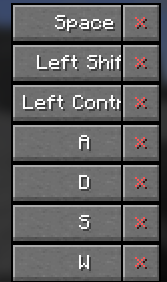
Adds a simple "×" button to the controls menu to instantly unbind keys. No more clicking and pressing Escape—just one click to clear any keybinding.
截图
介绍
❌ Quick Unbind
Quick Unbind is a lightweight, client-side utility mod that adds a dedicated “Unbind” button to the Minecraft controls menu.
Tired of having to click a keybind, press Escape, or manually hunt through config files just to clear a shortcut? This mod simplifies the process by adding a small, intuitive “×” button next to every keybinding in your options menu.
✨ Features
One-Click Unbind: Clear any keybinding instantly with a single click on the red “×”.
Seamless Integration: The button fits perfectly into the vanilla Minecraft UI, located right next to the “Reset” button.
Vanilla Friendly: Uses standard Minecraft logic to ensure your options are saved correctly and instantly updated.
Lightweight: Minimal impact on performance, written with clean Mixins for maximum compatibility.
🛠 How to use
Go to Options > Controls > Key Binds.
Look for the red “×” button next to the Reset button of any entry.
Click it to set the keybind to NONE (Unknown).
常见问题
Quik Unbind 支持哪些 Minecraft 版本?
Quik Unbind 支持 Minecraft Java 版 1.21.11,可用的加载器:Fabric。下载时注意选择和你游戏版本一致的文件。
Quik Unbind 怎么安装?
先用 PCL2 或 HMCL 启动器安装对应版本的 Fabric,再把下载的 .jar 文件放进游戏目录的 mods 文件夹,重新启动游戏即可。开启了版本隔离的,mods 文件夹在 versions/版本名 下面。运行环境:仅客户端。
crqzycat 的其他作品
查看全部 →
No Damage Tilt
Removes the camera shaking effect when taking damage.

Smart Pearl
"Throw Ender Pearls with a single hotkey directly from your inventory or hotbar—featuring intelligent anti-cheat protection and a smart auto-refill system."

Totem & Shield Swapper (Offhand Toggle)
„A smart client-side utility to instantly toggle between your Totem of Undying and your best Shield with one keypress, featuring durability checks and anti-rollback logic.“

Smart Elytra
Smart Elytra lets you swap between flight and armor with a single keypress (G). Featuring a server-safe 3-tick sync method (switch > equip > return), it ensures reliable performance and bypasses anti-cheat issues on multiplayer servers.
评论
登录后评论和评分