
截图


介绍
Redstone Frequencies
Introduction
Tired of messy Redstone dust and limitations on signal transmission? Redstone Frequencies is a powerful, intuitive, and server-friendly solution for all your wireless Redstone needs. Designed to feel like a natural extension of the vanilla game, this mod allows you to transmit Redstone signals wirelessly over any distance, making your contraptions cleaner, more compact, and more capable than ever before. Whether you’re a technical Redstone engineer or just want to open a door from far away, this mod is for you!
Features
- Wireless Redstone: Transmit signals instantly with the Redstone Transmitter and Redstone Receiver. No more complicated wiring!
- Full Analog Signal Strength: This mod transmits the full Redstone signal strength from 0 to 15. It’s not just on/off, allowing for complex analog contraptions to work wirelessly.
- Frequency Channels: Set a numerical frequency on your blocks to create independent channels. Run multiple wireless networks in the same area without any interference.
- User-Friendly GUI: Right-click a block with an empty hand to open a clean and simple interface. Type in the exact frequency you want, no more tedious clicking!
- Private Frequencies (Server-Friendly!): Protect your creations on a multiplayer server! With a simple toggle in the GUI, you can set your frequency to “Private.” Only blocks placed by you will be able to communicate on that channel.
- Admin Override: Server operators with permission level 2 or higher can access and modify any block, regardless of its private status, making server management a breeze.
- Owner Display: The GUI clearly shows the name of the player who placed the block, providing full transparency on servers.
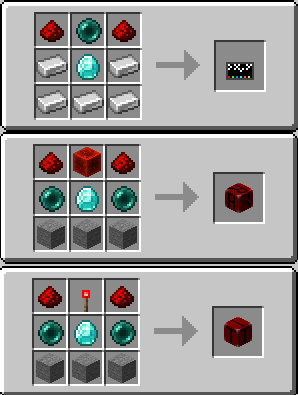
- The Linking Tool: Craft the Redstone Linking Tool to instantly copy and paste a block’s full configuration (Frequency and Private Status) from one block to another. Perfect for setting up large networks quickly and without errors.
- Tool Reset: Clear the settings stored on your Linking Tool by simply Shift + Right-Clicking in the air.
- Visual & Audio Feedback: Blocks change their texture to a glowing “on” state when active. Additionally, helpful sound effects provide satisfying feedback for every interaction.
- REI Compatible: Compatible with REI to see crafting recipes. Recipes can be found in the gallery.
Pictures
(Textures are WIP I think.. I’m not good in creating textures. They will be replaced in a future version)
Spoiler


Usage, Issues and Modpacks
You can use this Mod in all your Modpacks. Found any problems, issues or just have a good idea? Contact me or post your issue on GitHub. 🙂
常见问题
Redstone Frequencies 支持哪些 Minecraft 版本?
Redstone Frequencies 支持 Minecraft Java 版 1.21.8–1.21.9,共 2 个版本,可用的加载器:Fabric。下载时注意选择和你游戏版本一致的文件。
Redstone Frequencies 怎么安装?
先用 PCL2 或 HMCL 启动器安装对应版本的 Fabric,再把下载的 .jar 文件放进游戏目录的 mods 文件夹,重新启动游戏即可。开启了版本隔离的,mods 文件夹在 versions/版本名 下面。运行环境:客户端和服务端都要装。

评论
登录后评论和评分