
EasyLAN
作者:XiaoXianHW
A custom Single Player World (LAN) server with an independent GUI Minecraft Mod, supporting 1.7.2-1.21.x versions
截图


介绍
中文介绍正在准备中,下面暂时显示原文。
EasyLAN
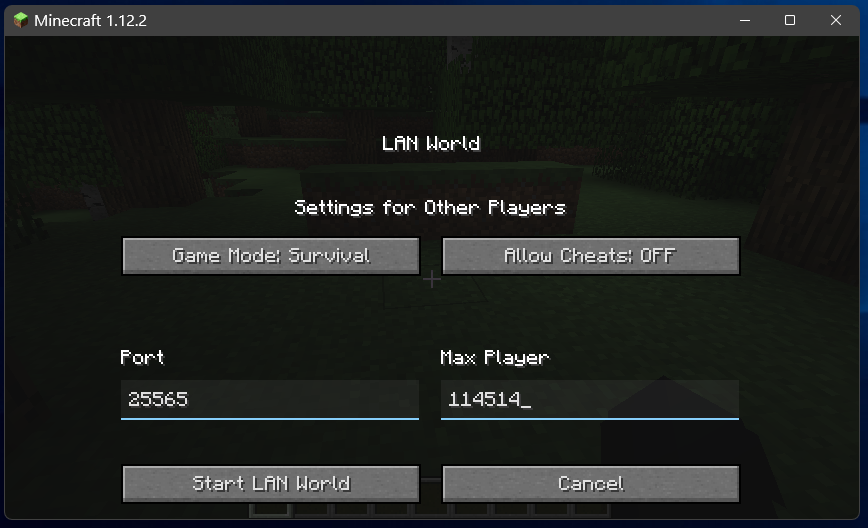
A Minecraft Forge Mod for Custom LAN Servers Related settings for customizing the LAN server (built-in server)
Configurable List
Custom
- Custom Port(100-65535)
- Custom Max Player(2-500000)
- Custom Motd(100 Word Count)
Server Basic Setting
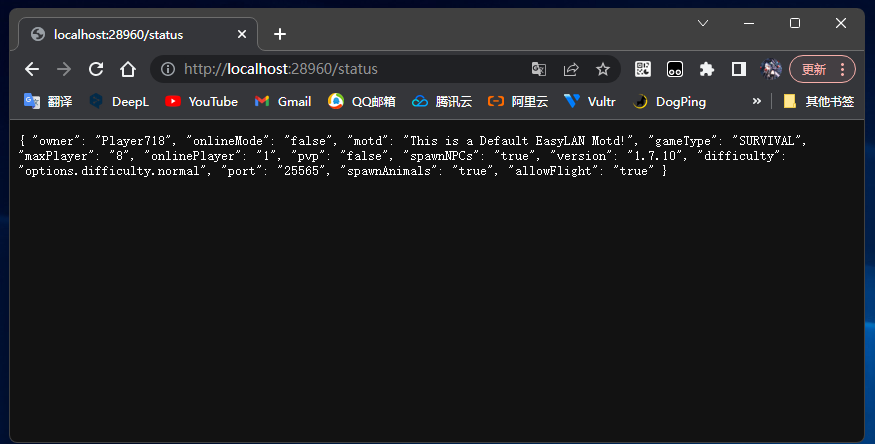
- Allow PVP(True/False)
- Online Mode(True/False)
- Spawn Animals(True/False)
- Spawn NPCs(True/False)
- Allow Flight(True/False)
Server Command Support
- WhiteList(/whitelist [on/off/add/remove/…])
- Banned(/ban|/ban-ip | /pardon|/pardon-ip)
- Operator(/op | /deop)
- SaveAll(/save-all | /save-off | /save-on)
Extensions
Extensions have not been tested for compatibility, please try to disable them if you have problems with the game crashing.
- HttpAPI Info(HTTPApi Support | port: 28960 | address: 127.0.0.1)
- LAN output(Game Chat Output LAN Server Info)
You can also configure this plugin through .minecraft\config\easylan.cfg (similar to server.properties)
Support Version
- Forge 1.7.2 – 1.21.11
1.7.2 Untested, usability is not yet certain - NeoForge 1.20.1 – 1.21.11
- Fabric 1.14.4 – 1.21.11
- Please delete the
.minecraft\config\easylan.cfgfile when updating from an old version of EasyLAN to a new version, otherwise the game may crash (see the update log for details)
常见问题
EasyLAN 支持哪些 Minecraft 版本?
EasyLAN 支持 Minecraft Java 版 1.7.2–1.21.11,共 23 个版本,可用的加载器:Fabric / Forge / NeoForge。下载时注意选择和你游戏版本一致的文件。
EasyLAN 怎么安装?
先用 PCL2 或 HMCL 启动器安装对应版本的 Fabric / Forge / NeoForge,再把下载的 .jar 文件放进游戏目录的 mods 文件夹,重新启动游戏即可。开启了版本隔离的,mods 文件夹在 versions/版本名 下面。运行环境:仅客户端。
评论
登录后评论和评分