
Create: Refilling Boxes
作者:Poly12gon
Adds boxes that can automatically put in or take out items to keep a certain amount of items in your inventory.
截图
介绍
中文介绍正在准备中,下面暂时显示原文。
For non-Create version, check Refilling Boxes!
Create: Refilling Boxes
Adds boxes that can automatically put in or take out items to keep a certain amount of items in your inventory.
Items
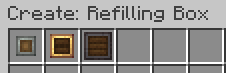
- Andesite Refilling Box: 9 slots, transfers 5 items per second
- Brass Refilling Box: 27 slots, transfers 10 items per second
- Netherite Refilling Box: 54 slots, transfers 20 items per second
How to Use
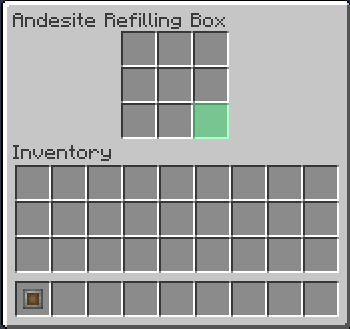
- Open the Box’s GUI by right-clicking.
- Put an item into the green slot at bottom-right of the Box’s GUI as a target item.
- If you have less than 32 of the target items, the Box will put them into your inventory.
- If you have more than 32 of the target items, the Box will take them from your inventory.
Refilling Boxes are useful when…
- You use a potato cannon or a bow (set arrows/vegetables as a target)
- You go mining (set cobblestones or minerals as a target)
- etc…
常见问题
Create: Refilling Boxes 支持哪些 Minecraft 版本?
Create: Refilling Boxes 支持 Minecraft Java 版 1.18.2–1.20.1,共 3 个版本,可用的加载器:Forge。下载时注意选择和你游戏版本一致的文件。
Create: Refilling Boxes 怎么安装?
先用 PCL2 或 HMCL 启动器安装对应版本的 Forge,再把下载的 .jar 文件放进游戏目录的 mods 文件夹,重新启动游戏即可。开启了版本隔离的,mods 文件夹在 versions/版本名 下面。运行环境:客户端和服务端都要装。
Poly12gon 的其他作品
查看全部 →
Create: Cataclysm
by Poly12gon
Empower your "Create" factory by beating "Cataclysm" bosses
5万
1 年前
CurseForge

Create: Cataclysm
by Poly12gon
Empower your "Create" factory by beating "Cataclysm" bosses
5,478
1 年前
Modrinth

NeoCreate: Cataclysm
by Poly12gon, BonyLord
Empower your "Create" factory by beating "Cataclysm" bosses
2,208
4 个月前
Modrinth

Create: Poly12gon’s Easy Guns
by Poly12gon
Datapack for Create and MrCrayfish's Gun Mod. You can make guns of 3 tiers(andesite alloy, brass, netherite).
1,352
2 年前
Modrinth · CurseForge
评论
登录后评论和评分