
Sqrilizz Headcam
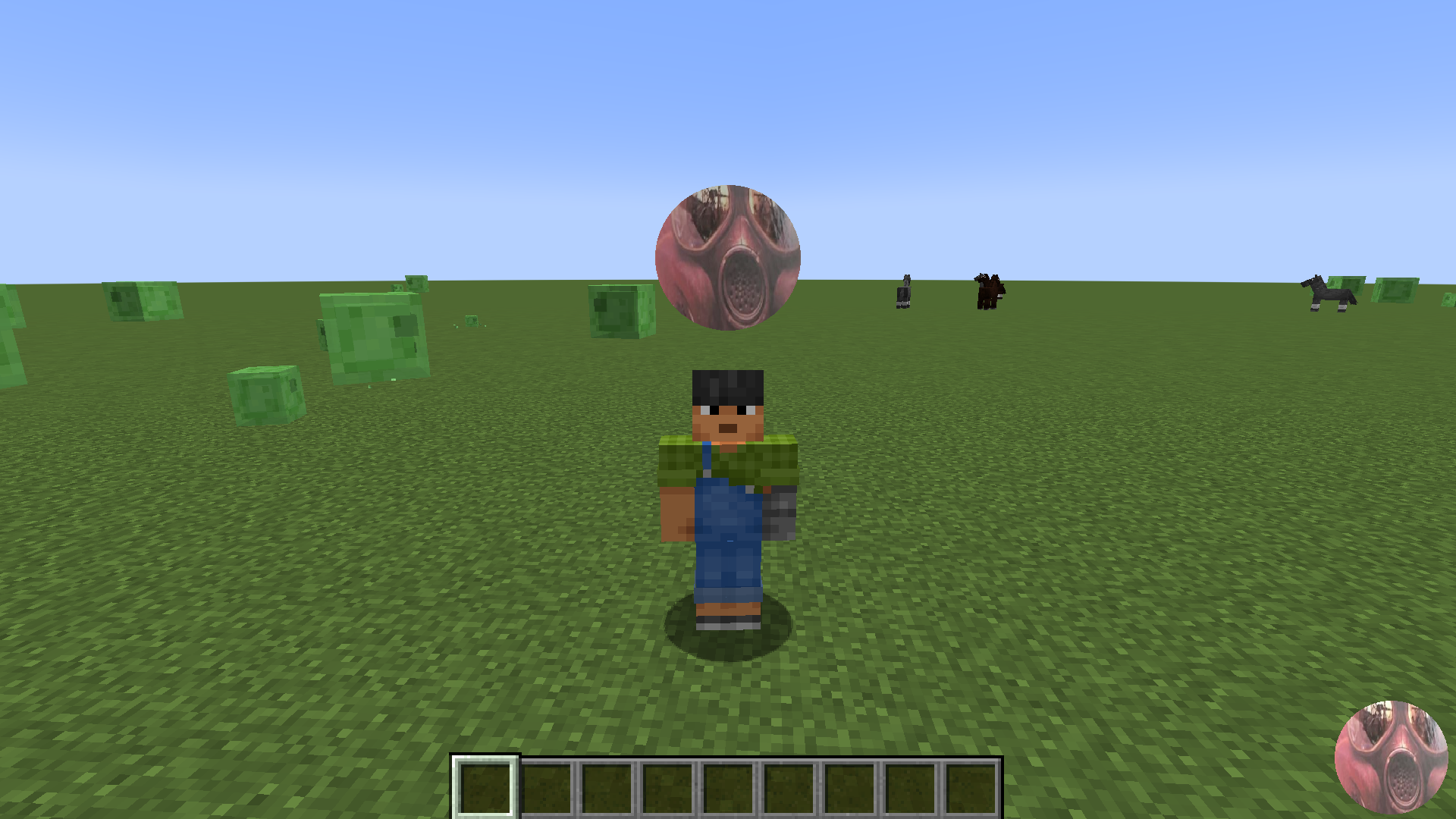
[1.21.1-1.21.8] Revolutionary Minecraft mod that allows you to stream your webcam directly into the game! Show your face to other players in real-time, creating a unique social experience. Perfect for streamers, content creators, and social servers.
截图


介绍
🎥 sqrilizz HeadCam
Revolutionary Minecraft mod that allows you to stream your webcam directly into the game!




Right now follow me on telegram for news and if you have issues
✨ Key Features
🎮 Core Functionality
- 📹 Real-time Webcam Streaming – Broadcast your webcam directly into Minecraft
- 🌍 In-Game Display – See webcam feeds floating above players’ heads
- ⚡ High Performance – Optimized for smooth 60 FPS streaming
- 🔧 Easy Configuration – Modern settings menu with intuitive controls
🎨 Customization Options
- 📐 Adjustable Position – Move webcam display anywhere around your head
- 🎯 Camera Indicators – Visual indicators for other players’ cameras
- 🔇 Mute System – Easily mute/unmute other players’ webcams
- ⚙️ Display Modes – Choose between different rendering modes
- 📏 Scale Control – Adjust the size of webcam displays
🌐 Multiplayer Support
- 👥 Server Integration – Works seamlessly with Spigot/Paper servers
- 🔄 Real-time Sync – Webcam data syncs instantly between players
- 🎪 Social Experience – Perfect for streaming and content creation
🎯 Perfect For
- 📺 Streamers – Show your face while streaming Minecraft
- 🎬 Content Creators – Create unique YouTube videos
- 👥 Social Servers – Build communities with face-to-face interaction
- 🎮 Entertainment – Add a new dimension to your server
- 🏗️ Unique Experiences – Stand out from other servers
Performance
- ⚡ Lightweight – Minimal impact on game performance
- 🎯 Optimized – Efficient network usage
- 🔄 Smooth – 60 FPS webcam streaming
- 💾 Low Memory – Efficient resource usage
🎮 How to Use
Basic Controls
. PERIOD– Open settings menu, COMMA– Open mute menu- Mouse – Adjust webcam position and scale
Settings Menu
- 📹 Webcam Selection – Choose your webcam device
- 🎯 Camera Indicators – Show/hide camera indicators
- 🖼️ Display Mode – Choose rendering mode
- 📐 Position – Adjust X, Y, Z coordinates
- 📏 Scale – Change display size
🌟 Screenshots
🔧 Configuration
Client-Side Settings
{
  "webcamEnabled": true,
  "selectedWebcam": "HD WebCam",
  "cameraIndicator": "CIRCLE",
  "displayMode": "FULL_FRAME",
  "offsetX": 0.0,
  "offsetY": 100.0,
  "offsetZ": 0.0,
  "worldScale": 1.0
}
Server Requirements
- Spigot/Paper server with sqrilizz.headcam plugin
- Network bandwidth for webcam data
- Player permissions for webcam usage
🤝 Community
Support
- 📧 Issues: Report bugs on GitHub
- 💬 Discord: Join our community (soon)
Contributing
We welcome contributions! Whether it’s bug reports, feature suggestions, or code contributions, every bit helps make this mod better.
📄 License
This project is licensed under the MIT License. Feel free to use, modify, and distribute as needed.
🎥 Created with ❤️ by sqrilizz
Experience Minecraft like never before with real-time webcam streaming!
常见问题
Sqrilizz Headcam 支持哪些 Minecraft 版本?
Sqrilizz Headcam 支持 Minecraft Java 版 1.21–1.21.8,共 9 个版本,可用的加载器:Bukkit / Fabric / Paper / Spigot。下载时注意选择和你游戏版本一致的文件。
Sqrilizz Headcam 怎么安装?
先用 PCL2 或 HMCL 启动器安装对应版本的 Bukkit / Fabric / Paper / Spigot,再把下载的 .jar 文件放进游戏目录的 mods 文件夹,重新启动游戏即可。开启了版本隔离的,mods 文件夹在 versions/版本名 下面。运行环境:客户端 / 服务端。

评论
登录后评论和评分