
Viscord
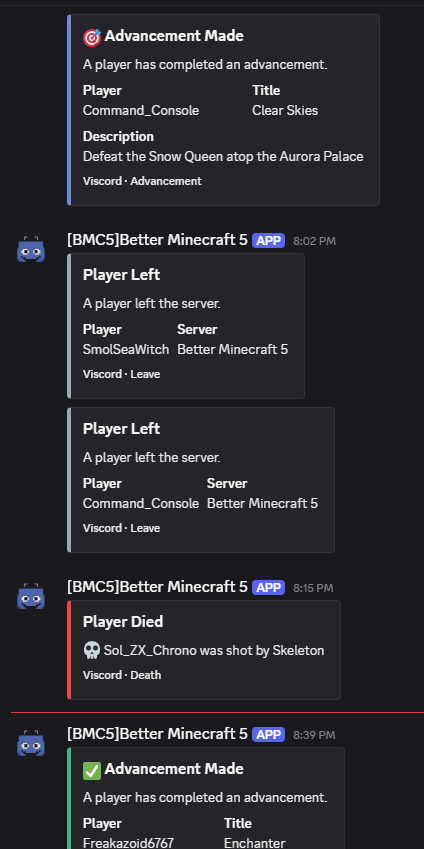
Discord Integration mod for Multi Server setups and webhook message loop prevention.
截图
介绍

🤖 Viscord: The Ultimate Minecraft-Discord Bridge
Developed by Vonix-Network, Viscord creates a seamless, powerful, and real-time connection between your Minecraft server and your Discord community. Keep your players engaged and your staff connected, no matter where they are!
🚀 Key Features & Functionality
- Two-Way Chat Sync: Instantly syncs messages from your Minecraft server chat to a dedicated Discord channel, and relays Discord messages back into the game.
- Customizable Events: Personalize the messages displayed for player joins, leaves, and server status changes.
- Full Command Integration:
- In-Game Commands (e.g.,
/discord): Used to get the discord link (more to come) - Discord Slash Commands (e.g.
/list): List the players of one server - Discord ! Commands (e.g.
!list): List the players in all servers in channel
🛠️ Command Reference
Note: Always check the official documentation or the /viscord help command for the most current and specific command usage and required permissions.
🔗 Get Started
Viscord is stable, actively maintained, and designed to foster a strong, unified community for your server.
Download Viscord today and connect your worlds!
Dependencies
_Kotlin for Forge is required for OkHttp for webhooks!_
常见问题
Viscord 支持哪些 Minecraft 版本?
Viscord 支持 Minecraft Java 版 1.20.1–1.21.1,共 2 个版本,可用的加载器:Forge / NeoForge。下载时注意选择和你游戏版本一致的文件。
Viscord 怎么安装?
先用 PCL2 或 HMCL 启动器安装对应版本的 Forge / NeoForge,再把下载的 .jar 文件放进游戏目录的 mods 文件夹,重新启动游戏即可。开启了版本隔离的,mods 文件夹在 versions/版本名 下面。运行环境:仅服务端。
评论
登录后评论和评分