
截图
介绍
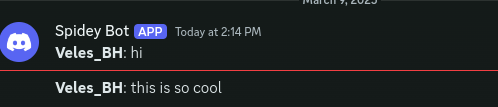
Discord Chat Logger
Relays your Minecraft server chat into a Discord channel using a webhook. No bot
account, no token, no gateway connection – just a webhook URL.
One-way by design: Minecraft chat shows up in Discord, Discord messages do not show
up in Minecraft.
Setting it up
- In Discord: Server Settings -> Integrations -> Webhooks -> New Webhook, pick a channel, and press Copy Webhook URL.
- Put the jar in
plugins/(Bukkit and proxies) ormods/(Fabric and NeoForge) and start the server once so the config file is written. - Paste your webhook URL into
webhook-urlin the config. - Run
/discordchatlogger reload, or restart the server.
Keep the webhook URL secret – anyone who has it can post to your channel.
Supported platforms
| Platform | Versions |
| — | — |
| Spigot / Paper / Purpur / Folia | 1.8.8 through 26.2, from one single jar |
| Velocity | 3.x and 4.x |
| BungeeCord / Waterfall | current |
| Fabric | 1.20.1 to 1.21.11 (one jar per version) |
| NeoForge | 1.20.4 to 26.2 (one jar per version) |
Fabric on Minecraft 26.x is not available yet: Minecraft 26 ships unobfuscated and
Fabric’s build tooling still requires a mapping set. Use the NeoForge build there.
Why it is small
There are no third-party dependencies. Requests use the HTTP client built into Java
and the small amount of JSON needed is written by hand, so the Bukkit jar is about
30 KB and cannot clash with libraries that other plugins bundle.
Things it gets right
- Chat can never ping
@everyone, a role, or a user, whatever a player types - Markdown typed in chat is escaped, so the log cannot be reshaped
- Messages are batched to stay inside Discord’s rate limit, and a rate limit pauses and retries rather than dropping messages
- Messages cancelled by other plugins (muted players, word filters) are not relayed
- Commands are never relayed on proxies, so a mistyped
/logincannot leak - Nothing touches the main thread, and the webhook URL is never written to the log
Configuration
Player name and skin as the Discord author, custom message format, an optional
per-server label, colour-code stripping, and optional join/leave and death messages.
Source, issues and full documentation: https://github.com/SawyerTheNerd/Discord-Chat-Logger
常见问题
Discord Chat Logger 支持哪些 Minecraft 版本?
Discord Chat Logger 支持 Minecraft Java 版 1.8–26.2,共 74 个版本,可用的加载器:Bukkit / Fabric / Folia / NeoForge / Paper / Purpur / Spigot / Velocity。下载时注意选择和你游戏版本一致的文件。
Discord Chat Logger 怎么安装?
先用 PCL2 或 HMCL 启动器安装对应版本的 Bukkit / Fabric / Folia / NeoForge / Paper / Purpur / Spigot / Velocity,再把下载的 .jar 文件放进游戏目录的 mods 文件夹,重新启动游戏即可。开启了版本隔离的,mods 文件夹在 versions/版本名 下面。
Enzonic Studios 的其他作品
查看全部 →
Create: Atmospherics
为机械动力添加海浪、帆船、季节、天气和农业!

Shoppers (Lightmans currency addon)
Lightman 货币的附加模组,添加了村民,他们会从你的商店购买、在你的赌场赌博,并在你的拍卖中出价。

ANTI ADMIN ABUSE
此插件记录所有玩家命令并将其发送到Discord webhook进行监控。管理员可以使用/setwebhook 更新webhook(需要antiadminabuse.setwebhook权限)。🚀
Mechanically
the first season of mechanical smp modpack. The server no longer exists.
评论
登录后评论和评分