
截图

介绍
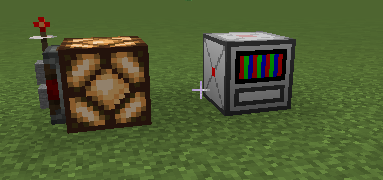
A create automation with using own programming language, naming “Metal”.
Place a computer, right click, enter code, press save, shift+right click for toggle run.
Coding:
Declare 2 Systems (System is just like function), “INIT” and “TICK” like that:
SYSTEM(INIT): START;
init code here
END_SYSTEM;
SYSTEM(TICK): START;
tick (loop) code here
END_SYSTEM;
API:
There is some functions to work with Metal.
built-in functions:
MAKE_VAR(VAR_TYPE,$name,start_value); – making a global variable (global variable MUST start with ‘$’, ONLY in INIT)
MAKE_ITEM_VAR($name,item_id); – making a INT variable by minecraft item number id (ONLY in INIT)
SET($name,value); – set new value for variable
ADD/SUB/MUL/DIV($name,value); – operations with variables
WAIT(ms); – delaying script (ONLY in TICK)
CONTINUE(); – return to the current System begin (ONLY in TICK)
RERUN(); – return to the main System of current script (ONLY in TICK), REMOVED since 0.0.7
EXIT_STACK(); – exit entire stack of System calls and returns to the point of stack start. REMOVED since 0.0.7
RETURN(); – exit 1 System of stack of System calls, since 0.0.7 can actually return values to SYSTEM call
ABORT(); – forcibly terminate current script (Doesn’t turn off computer)
CALL_SYSTEM(name, args…); – call System (max stack size is 16), cannot call Systems-EntryPoints (INIT, TICK), args is ONLY in in 0.0.3+ mod version, since 0.0.7, can return values
IF(condition): START; – Base IF operator (closing – “END_IF;”)
ELSE(): START; – Base ELSE operator (between IF and END_IF), since 0.0.7 can be called without “()”
BIND_ARGS_TO_SYSTEM(name, args…); ONLY in INIT, args must be like “#var:INT”, setting arguments to system call (CALL_SYSTEM), ONLY in 0.0.3+ mod version
MAKE_LOCAL_VAR(VAR_TYPE,#name,start_value); – making a local variable (local variable MUST start with ‘#’) ONLY in 0.0.3+ mod version
ACCEPT_INVOKES(); – allow invoke non-reserved systems by integrations ONLY in INIT, for 0.0.4+ mod version
PRINT(args…); – INFO Output (white) ONLY in 0.0.6+ mod version
WARN(args…); – WARN Output (yellow) ONLY in 0.0.6+ mod version
ERROR(args…); – ERROR Output (red) ONLY in 0.0.6+ mod version
EVALUATE(str); – calculates the expression, added since 0.0.7
EVAL(code); – executes the code like a new SYSTEM, added since 0.0.7
FUNC((args),{ body }); – Creates a MetalFunction, can be called with .invoke(args), added since 0.0.7
CAUSE_HARD_ERROR(message); – Stops the script, log stack and info to console. added since 0.0.7
WHILE(condition, { body }); Runs while condition is true, added since 0.0.7
FOR(#i,start,end, { body });
Runs from #i = start to end – 1, added since 0.0.7
LIST(TYPE); – Creates a MetalList, elements limit is 1024, added since 0.0.7
SET_CATCH_MODE(); ONLY in INIT, now, some of errors won’t stop the script, just log with “Error catched!”, added since 0.0.7.
SENDER($name,”item1″, “item2”); – ONLY in INIT, makes RedstoneLinker (MetalObject) with sending mode, better than old functional method (CONNECT_LINK_SENDER) added since 0.0.7.
RECEIVER($name,”item1″, “item2”); – ONLY in INIT, makes RedstoneLinker (MetalObject) with receiving mode, better than old functional method (CONNECT_LINK_RECEIVER) added since 0.0.7.
MAKE_PROCESS(SYSTEM_NAME); – makes second ticking entrypoint, can be called once. ONLY in INIT. added since 0.0.7.
end of built-in functions
Java Functions (registered outside of a Metal):
CONNECT_LINK_SENDER(id,item1,item2); – making a transmitter connection (for two last arguments recommends use MAKE_ITEM_VAR, id is any value, doesn’t used before), ONLY in INIT. NOTE: since 0.0.7 use SENDER($sender,item1name,item2name) instead.
CONNECT_LINK_RECEIVER(id,item1,item2); – making a receiver connection (use MAKE_ITEM_VAR variables for two last arguments) ONLY in INIT. NOTE: since 0.0.7 use RECEIVER($receiver,item1name,item2name) instead.
SEND_LINK(id,power); – send power to Create Redstone Link (use with id, used in CONNECT_LINK_SENDER). NOTE: since 0.0.7 use $sender.send(power) instead.
RECEIVE_LINK(id); – receive power from Create Redstone Link (use with id, used in CONNECT_LINK_RECEIVER). NOTE: since 0.0.7 use $receiver.receive() instead.
RANDOM(min,max); – returns random INT between min and max
RAND(); – returns random DOUBLE between 0.0 – 1.0
SIN(value); – returns sin of the value (use radians)
COS(value); – returns cos of the value (use radians)
TAN(value); – returns tan of the value (use radians)
SQRT(value); – returns sqrt of the value
DTR(value); – degrees to radians
RTD(value); – radians to degrees
GET_PI(); – returns PI
MIN(args…); – returns MIN of all arguments
MAX(args…); – returns MAX of all arguments
CLAMP(value,min,max); – returns limited value in range
ABS(value); – returns module of value
POW(value,pow); – returns exponentiation of the value
GET_OPS(); – returns completed operations of this script – 0.0.5+
end of Java Functions;
Tips:
ADD,SUB, etc using ONLY in modification of value
for example:
ADD($x,1); = x += 1;
In brackets:
IF($x + 1 > $y): START;
code
END_IF;
And, “: START” is not necessarily, but recommended, you also can use
SYSTEM(INIT);
…
IF(condition);
…
etc.
Current variable types: INT, DOUBLE, POWER, BOOL. Since 0.0.7 – STRING, OBJECT.
TICK EntryPoint (System) running in the other thread 1000 times per second.
INTEGRATION:
Since 0.0.4 you can call non-reserved systems from Computer Craft mod, its looks like:
Metal:
SYSTEM(INIT): START;
ACCEPT_INVOKES();
BIND_ARGS_TO_SYSTEM(SUM,#first:DOUBLE,#second:DOUBLE);
END_SYSTEM;
SYSTEM(SUM): START;
RETURN(#first + #second);
END_SYSTEM;
SYSTEM(TICK): START;
END_SYSTEM;
CC Lua:
local metal = peripheral.find(“metal”);
if metal then
print(metal.callSystem(“SUM”,5,10)); — output: 15
else
print(“Cannot find Metal Computer”);
end
Since 0.0.5 you can use
SYSTEM(NAME,args…): START; instead of BIND_ARGS_TO_SYSTEM
example:
SYSTEM(SET_POWER,#f:POWER,#s:POWER): START;
SEND_LINK(1,#f);
SEND_LINK(2,#s);
END_SYSTEM;
“**” instead of “POW(val,pow);”
“%” operator
Since 0.0.6, in output functions you can use literals, just like that:
PRINT(~Hello World);
> Hello World
or, with variable:
MAKE_VAR(INT,$test,150);
PRINT(~counter: ,$test);
> counter: 150
OBJECTS:
MetalList:
$list.add(value);
$list.get(index);
$list.getFirst();
$list.getLast();
$list.remove(index);
$list.removeFirst();
$list.removeLast();
$list.clear();
$list.size();
$list.maxSize();
$list.hasIndex(index);
$list.forEach(MetalFunction);
MetalFunction:
$func.invoke(args);
$func.getTypes();
RedstoneLinker:
SENDER:
$sender.send(power);
$sender.toggle(active);
RECEIVER:
$receiver.receive();
$receiver.isActive();
since 0.0.8 variables can be assigned like that:
TYPE $global_var = …;
TYPE #local_var = …;
changing:
var++; (increment)
var–; (decrement)
var+=…; (add)
var-=…; (sub)
var%=…; (mod)
var*=…; (mul)
var/=…; (div)
var**=…; (pow)
var=…; (set)
常见问题
Create: Logic 支持哪些 Minecraft 版本?
Create: Logic 支持 Minecraft Java 版 1.21.1,可用的加载器:NeoForge。下载时注意选择和你游戏版本一致的文件。
Create: Logic 怎么安装?
先用 PCL2 或 HMCL 启动器安装对应版本的 NeoForge,再把下载的 .jar 文件放进游戏目录的 mods 文件夹,重新启动游戏即可。开启了版本隔离的,mods 文件夹在 versions/版本名 下面。运行环境:客户端和服务端都要装。
评论
登录后评论和评分