
Toss To Trash
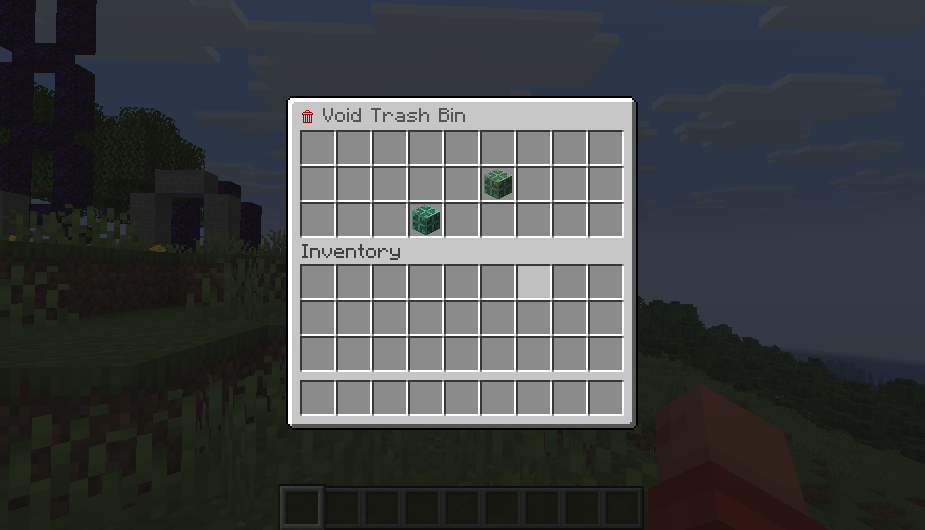
TossToTrash is a server-side Fabric mod that eliminates entity lag by replacing dropped items with a virtual disposal bin. Players simply use the /trash command to open a UI where items are permanently deleted upon closing.
截图
介绍
Toss To Trash
Toss To Trash is a lightweight, server-side Fabric mod that gives every player a personal void trash bin. Instead of throwing unwanted items on the ground, where they become entities that cost server performance, players run a single command and delete items through a familiar chest interface.
Because the mod is server-side only, vanilla clients can join and use it immediately. There are no client mods, no resource packs, and no configuration.
What the mod does
- Adds a
/trashcommand that opens a private 27-slot (single chest) disposal interface for the player who ran it. - Items stay in the bin while the interface is open, so players can drag, drop, and double-check before committing.
- The moment the interface is closed, every item inside is permanently deleted. Nothing is dropped into the world and no item entities are ever spawned.
- The bin is fully virtual and per-session. Each opening creates a fresh, isolated inventory that is cleared and released as soon as the screen closes.
- The command is registered with the server command dispatcher, so it appears in chat auto-suggestions like any vanilla command.
Commands
| Command | Access | Description |
|—|—|—|
| /trash | Every player, no operator level required | Opens your personal Void Trash Bin. Close the interface to permanently delete everything inside. |
There are no arguments, no subcommands, and no permission setup. If a player can run chat commands, they can use /trash.
Configuration
Toss To Trash has no configuration file and needs no setup. Behavior is fixed and identical on every server:
| Setting | Value |
|—|—|
| Bin size | 27 slots (9×3 chest layout) |
| Deletion timing | When the interface is closed |
| Item drops | Never spawned |
| Client requirements | None, vanilla clients supported |
| Dependencies | Fabric Loader only, no Fabric API |
Installation
- Install Fabric Loader for your Minecraft version on the server.
- Download the Toss To Trash file that matches your Minecraft version (see the compatibility table below).
- Place the
.jarfile into the servermodsfolder. - Start or restart the server. Players can use
/trashright away.
Compatibility
| Mod file | Minecraft versions | Java | Fabric Loader |
|—|—|—|—|
| Toss To Trash 1.1.0 for 1.21.x | 1.21 through 1.21.11 | 21 or newer | 0.19.2 or newer |
| Toss To Trash 1.1.0 for 26.1.x | 26.1, 26.1.1, 26.1.2 | 25 or newer | 0.19.2 or newer |
| Toss To Trash 1.1.0 for 26.2.x | 26.2 | 25 or newer | 0.19.2 or newer |
| Toss To Trash 1.1.0 for 26.3.x | 26.3 | 25 or newer | 0.19.2 or newer |
The mod is server-side only. Install it on the server; clients never need it.
Performance notes
- Zero item entities. Deleted items never touch the world, so mob grinders, spawn areas, and community farms stay clean.
- Near-zero memory footprint. The bin inventory exists only while the screen is open and is released on close.
- No ticking logic, no background tasks, no world interaction.
License
All Rights Reserved. Copyright (c) 2026 TOPG-V. Redistribution or modification without explicit prior permission from the copyright holder is not permitted.
常见问题
Toss To Trash 支持哪些 Minecraft 版本?
Toss To Trash 支持 Minecraft Java 版 1.21–26.3,共 17 个版本,可用的加载器:Fabric。下载时注意选择和你游戏版本一致的文件。
Toss To Trash 怎么安装?
先用 PCL2 或 HMCL 启动器安装对应版本的 Fabric,再把下载的 .jar 文件放进游戏目录的 mods 文件夹,重新启动游戏即可。开启了版本隔离的,mods 文件夹在 versions/版本名 下面。运行环境:仅服务端。
Fabric Server Essentials 的其他作品
查看全部 →
Vein Miner
Viper Vein Miner 是一款轻量级的服务端连锁采集模组。挖掘一块矿石或一根原木,即可一次性采完整条相连矿脉。

Viper AntiXray
ViperAntiXray 是一款性能极高、完全在 Fabric 服务端运行的实用工具,可彻底屏蔽客户端 X 光雷达,保护服务器经济系统。

Custom Dimensions
服务端 Fabric 模组,支持持久化自定义维度和双向传送门。
Custom Dimensions
Server-side Fabric mod for persistent custom dimensions and two-way portals.
评论
登录后评论和评分