
截图
介绍
CervLogger
Block logging, lookup, rollback and restore for NeoForge 1.21.1 servers.
CervLogger records player activity in a local database and lets staff inspect
block history, search the logs and roll back grief in seconds — with **no
client-side installation required**. Vanilla and modded clients can join freely.
✨ Features
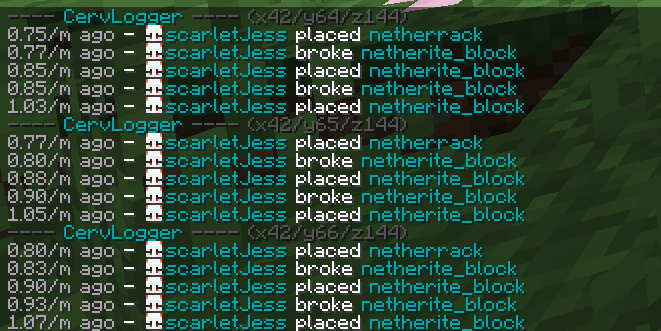
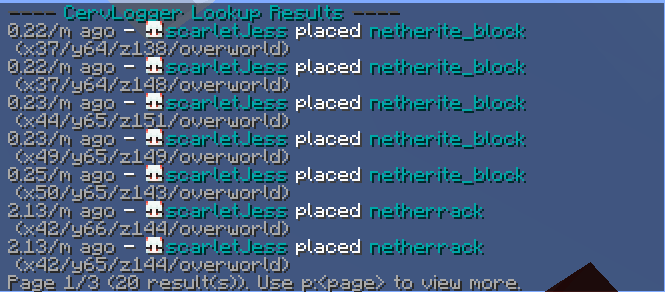
- 📝 Comprehensive logging — block place/break, explosions, fire, container transactions, signs, buckets, interactions (doors, levers, buttons…), entity kills, chat, commands and login/logout sessions
- 🔍 Inspector mode (
/cl i) — click any block to instantly see who placed, broke or changed it and when - ⏪ Rollback & restore — undo grief filtered by player, time, radius, action and block types (
/cl rollback u:Player t:2h r:20) - 🗄️ Flexible storage — SQLite works out of the box with zero setup; MySQL supported for larger servers (both drivers bundled)
- 🖥️ Server-side only — nothing to install on clients
📋 Commands
| Command | Description | Permission |
| — | — | — |
| /cl inspect (/cl i) | Toggle the inspector | everyone |
| /cl lookup <params> | Search the logs | op |
| /cl rollback <params> | Roll back changes | op |
| /cl restore <params> | Re-apply rolled back changes | op |
| /cl near [radius] | Lookup around you | op |
| /cl structures | List loaded Create/Sable structures | op |
| /cl purge t:<time> | Delete old log data | op |
Parameters: u:<player> t:<time> r:<radius|#global> a:<action>
b:<blocks> e:<exclude> w:<world> p:<page>
Example: /cl rollback u:Notch t:2h r:20 a:-block
⚙️ Configuration
Everything is created on first run at config/cervlogger/config.properties:
per-category logging toggles, radius limits, page size, extra interact block
IDs, and MySQL credentials if you set storage-type=mysql.
🤝 Compatibility
Rollbacks run on the main server thread — safe alongside c2me, Lithium and
other optimization mods. Blocks moving inside Create contraptions or Sable
sub-levels bypass standard block events and are not logged while in motion.
常见问题
CervLogger 支持哪些 Minecraft 版本?
CervLogger 支持 Minecraft Java 版 1.21.1,可用的加载器:NeoForge。下载时注意选择和你游戏版本一致的文件。
CervLogger 怎么安装?
先用 PCL2 或 HMCL 启动器安装对应版本的 NeoForge,再把下载的 .jar 文件放进游戏目录的 mods 文件夹,重新启动游戏即可。开启了版本隔离的,mods 文件夹在 versions/版本名 下面。运行环境:仅服务端。

评论
登录后评论和评分