
Item Collector (by iPao)
🧲 Automatic item collection for Chests & Barrels — no Hoppers required! 📦
截图
介绍
📦 Item Collector
🧲 Automatically collect dropped items into your Chest, Trapped Chest, or Barrel — without using Hoppers!
Item Collector is a lightweight Minecraft Java datapack that turns a normal storage container into an automatic item collector.
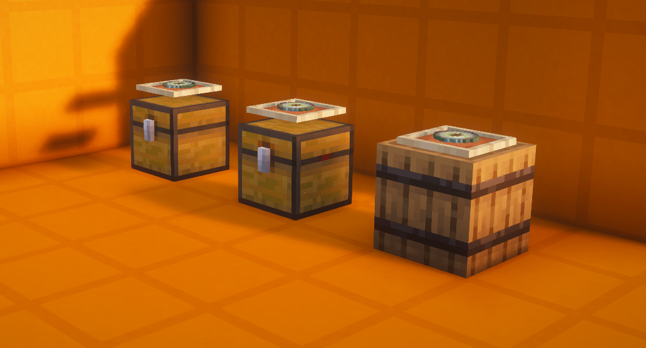
Simply place an Item Frame or Glow Item Frame directly above your container and put an Eye of Ender inside the frame. The collector will automatically detect nearby dropped items and attempt to move them into the container.
✨ Features
🧲 Automatic Item Collection
- Automatically collects dropped items from the surrounding area.
- Items are moved directly into the storage container.
📦 Supported Containers
- 🧰 Chest
- 🔴 Trapped Chest
- 🛢️ Barrel
👁️ Easy Activation
- 🖼️ Item Frame + Eye of Ender
- 💡 Glow Item Frame + Eye of Ender
- No special block or custom item required.
🚫 No Hopper Required
- Completely eliminates the need for Hopper-based collection systems.
- Great for farms and compact storage setups.
⚙️ Configurable Collection Range
- ↔️ Horizontal range can be configured.
- ↕️ Vertical range can be configured.
- Adjust the collection area to fit your setup.
✨ Optional Particles
- Enable or disable collection particles.
- Useful for visual feedback or cleaner builds.
🧱 Safe Deactivation
- Removing the Eye of Ender disables the collector.
- Breaking the Item Frame disables the collector.
- Breaking the container stops the collector.
- Normal Minecraft item drops are preserved.
📚 Vanilla Datapack
- No custom mod is required for the datapack itself.
- Designed for Minecraft Java Edition.
🛠️ How to Build a Collector
Build the following structure:
🖼️ Item Frame / Glow Item Frame
👁️
Eye of Ender
↓
📦 Chest / Barrel
✅ Requirements
- Place a Chest, Trapped Chest, or Barrel.
- Place an Item Frame or Glow Item Frame directly above it.
- Put an Eye of Ender inside the frame.
- The collector will become active.
🎯 Once activated, nearby dropped items will be detected automatically.
📐 Default Settings
| Setting | Default |
|—|—:|
| ↔️ Horizontal Range | 16 blocks |
| ↕️ Vertical Range | ±8 blocks |
| ✨ Collection Particles | ON |
The collection area is centered around the collector container.
🎮 Commands
All commands use Minecraft datapack functions.
↔️ Horizontal: 24 blocks
↕️ Vertical: 12 blocks📊 Show Status
/function item_collector:status常见问题
Item Collector (by iPao) 支持哪些 Minecraft 版本?
Item Collector (by iPao) 支持 Minecraft Java 版 26.1–26.3,共 5 个版本。下载时注意选择和你游戏版本一致的文件。
Item Collector (by iPao) 怎么安装?
新建世界时在「数据包」里把下载的 .zip 拖进去;已有的存档,把文件放进存档目录下的 datapacks 文件夹,进游戏输入 /reload 即可生效。服务器同样放在世界目录的 datapacks 里。

评论
登录后评论和评分