
MCAI Assistant
AI assistant mod for Minecraft server and client - connects to OpenAI-compatible API.
截图

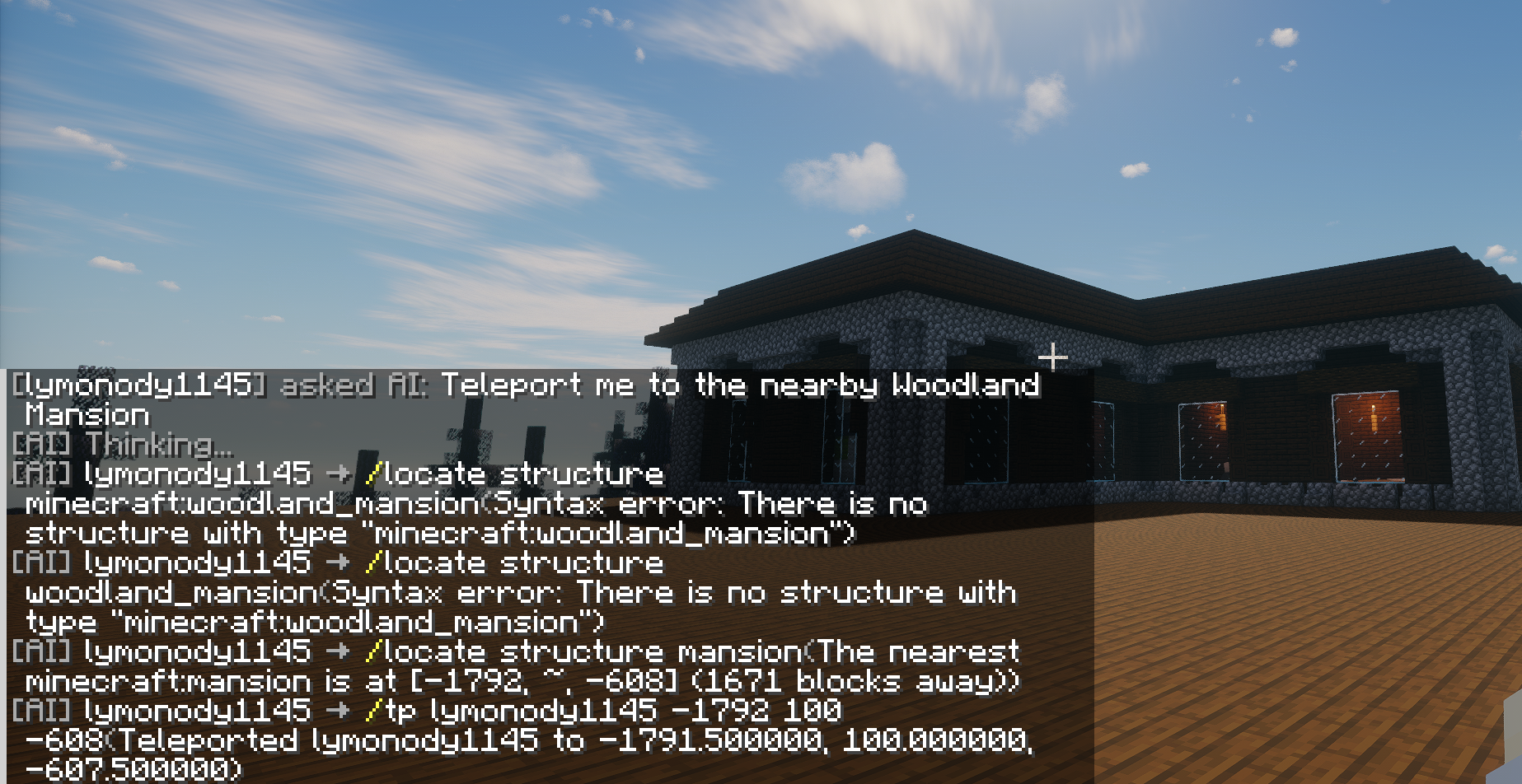
介绍
MCAI – Minecraft AI Assistant


MCAI is a Fabric mod that lets AI manage your Minecraft server. This entire project is AI-developed.
TL;DR: Players type /ai how do I enchant a diamond sword?, AI answers. Someone swears? AI warns or kicks. Dangerous ops need admin approval.
Quick Start
| What | How |
|——|—–|
| Chat with AI | /ai <question> or !ai <question> |
| AI executes commands | /ai give me a diamond sword (admin approval) |
| AI batch commands | /ai build a redstone circuit (command chain, one approval) |
| Check behavior score | /aiscore |
| Search wiki | /aikb enchantment (online Wiki available) |
| Admin approve | /aiaccept <id> approve / /aireject <id> reject |
| Cancel pending | /aicancel cancel latest / /aicancel all cancel all |
Features
AI Chat
- Players use
!aior/aito chat with AI - AI has full server context (chat logs, weather, time, players)
- Multi-turn conversation with history
- Persona mode: switch AI persona with
/aipersona— built-in villager, piglin, ender dragon, creeper themes, bilingual (ZH/EN), admins can add custom personas inconfig/mcai/personas/
Auto Behavior Review
- AI analyzes chat every 30 minutes
- Three-tier penalty: score deduction -> yellow card -> red card (kick)
- Admin messages are trusted; admins can declare server rules
Admin Approval
- Dangerous commands (op, ban, kick) require manual admin approval
- 3-minute timeout auto-cancels pending approvals
- Strict mode: only whitelisted safe commands skip approval
- AI text starting with
/is blocked; all commands must go through the Tool system and the unified approval flow - Command Chain: AI can batch multiple commands into a single approval unit (
execute_command_chain), admin approves once to execute all, with configurable intervals between commands - Player Cancel: Players can use
/aicancelto cancel their own pending commands; AI receives cancellation notice and won’t retry the same command
Game Knowledge Base
- AI searches minecraft.wiki / zh.minecraft.wiki online for up-to-date game knowledge (language via
wikiLanguage) - Supports Chinese and English search, returns summaries and full page links
Installation
Requirements
- Minecraft Fabric server 26.x
- Java 25
- A DeepSeek API Key (or any OpenAI-compatible API)
Steps
- Download the latest JAR
- Place it in
mods/folder - Start the server to auto-generate config
- Edit
config/mcai/config.json, fill in your API Key - Config auto-reloads; or run
/aireloadmanually
Single-Player Usage
The mod works in single-player too (no dedicated server required):
- Install Fabric client (same version 26.x)
- Place the JAR in
.minecraft/mods/folder - Launch the game and enter a single-player world
- Config and commands are identical to the server setup
- You are the world owner with full admin permissions by default
- (Optional) Install Mod Menu for in-game config editing
Tip: The behavior review system is auto-disabled in single-player (no need to review yourself).
Commands
Player Commands
| Command | Description |
|———|————-|
| !ai <msg> /ai <msg> | Chat with AI |
| /aiscore | Check behavior score |
| /aicancel [id/all] | Cancel your own pending commands |
Admin Commands
| Command | Description |
|———|————-|
| /aiaccept <id> | Approve pending action |
| /aireject <id> | Reject pending action |
| /aiquery | List pending approvals (shows unique ids) |
| /aiclear | Clear AI chat history |
| /aireload | Manually reload config (auto-reloads on file change) |
| /airesetprompts | Reset prompt files to current built-in defaults |
| /aikb <keyword> | Search Wiki knowledge base |
| /aicontrol [chat/review] [on/off] | Toggle AI chat/review |
| /aikill | Destroy all AI threads |
| /aidebug start/stop/show/list/clear | Debug logging |
| /aipersona [list/set/current/view/reload] | Switch/view/reload AI persona |
Review Management
| Command | Description |
|———|————-|
| /aireview start | Trigger manual review |
| /aireview approve <id> | Approve kick |
| /aireview reject <id> | Reject kick |
| /aireview last | View last review result |
| /aireview last reasoning | View AI reasoning |
Test Commands (OP only)
| Command | Description |
|———|————-|
| /aitest score <player> | Check player behavior score |
| /aitest set <player> <score> | Set player behavior score |
| /aitest penalty <player> <points> | Simulate penalty |
| /aitest reset <player> | Reset player behavior score |
| /aitest review | Trigger manual review |
| /aitest chatlog | View chat log |
Configuration
File: config/mcai/config.json. Auto-reloads on change (or use /aireload).
| Key | Default | Description |
|—–|———|————-|
| apiEndpoint | https://api.deepseek.com | API endpoint (without /chat/completions, format varies by provider) |
| apiKey | "" | API key |
| model | deepseek-v4-flash | Model name |
| triggerPrefix | !ai | Chat trigger prefix |
| maxTokens | 2048 | Max response tokens |
| temperature | 0.75 | Response randomness (0-1) |
| thinkingLevel | 1 | Thinking level 0-3 |
| strictMode | true | Strict mode |
| aiCooldownSeconds | 60 | Non-admin AI cooldown (seconds) |
| aiMaxConcurrent | 3 | Max concurrent non-admin AI calls |
| compatibilityMode | false | Compatibility mode: send only basic fields for local APIs like LM Studio |
| enableStream | false | Streaming output (SSE), some APIs only support streaming mode |
| reviewIntervalMinutes | 30 | Review interval (min) |
| yellowCardThreshold | -30 | Yellow card threshold |
| redCardThreshold | -60 | Red card threshold |
| scoreRecoveryPerInterval | 5 | Score recovery per cycle |
| approvalTimeoutMinutes | 10 | Approval timeout (min) |
| wikiLanguage | "zh_cn" | AI online search language: zh_cn Chinese, en_us English (online search enabled by default) |
| apiConnectTimeoutSeconds | 10 | API connect timeout (seconds) |
| apiRequestTimeoutSeconds | 60 | API per-request timeout (seconds) |
| apiLoopTimeoutSeconds | 300 | Tool-call loop total timeout (seconds) |
| commandExecTimeoutSeconds | 30 | Per-command execution timeout (seconds) |
| wikiConnectTimeoutSeconds | 5 | Wiki search connect timeout (seconds) |
| wikiRequestTimeoutSeconds | 8 | Wiki search request timeout (seconds) |
| maxChainCommands | 10 | Max commands per chain |
| contextMaxChars | 20000 | Max context chars for AI (auto-truncated) |
| maxToolCalls | 15 | Max tool calls per conversation turn |
| activePersona | "default" | Current persona ID |
| personaLanguage | "" | Persona language override, empty=follow client language |
| promptLanguage | "zh_cn" | Built-in prompt language |
| enableChatInterception | true | Intercept chat and forward to AI |
| enableCommandExecution | true | Allow AI to execute commands |
| enableAutoReview | true | Enable auto behavior review |
| maxReviewCycles | 4 | Max review analysis cycles |
| systemPromptPath | "" | System prompt file (under config/mcai/) |
| reviewPromptPath | "" | Review prompt file |
| reviewApiEndpoint | "" | Review system API endpoint, empty=follow chat config |
| reviewApiKey | "" | Review system API key, empty=follow chat config |
| reviewModel | "" | Review system model, empty=follow chat config |
Prompt files system_prompt.txt / review_prompt.txt are auto-created on first start. Run /airesetprompts to force-sync them to the current built-in versions.
Knowledge Base
AI knowledge search is done via online Wiki — no manual data import needed.
Links
License
MIT License
常见问题
MCAI Assistant 支持哪些 Minecraft 版本?
MCAI Assistant 支持 Minecraft Java 版 26.1–26.3,共 5 个版本,可用的加载器:Fabric。下载时注意选择和你游戏版本一致的文件。
MCAI Assistant 怎么安装?
先用 PCL2 或 HMCL 启动器安装对应版本的 Fabric,再把下载的 .jar 文件放进游戏目录的 mods 文件夹,重新启动游戏即可。开启了版本隔离的,mods 文件夹在 versions/版本名 下面。运行环境:客户端 / 服务端。
评论
登录后评论和评分