
截图
介绍
Realistic Death Visuals
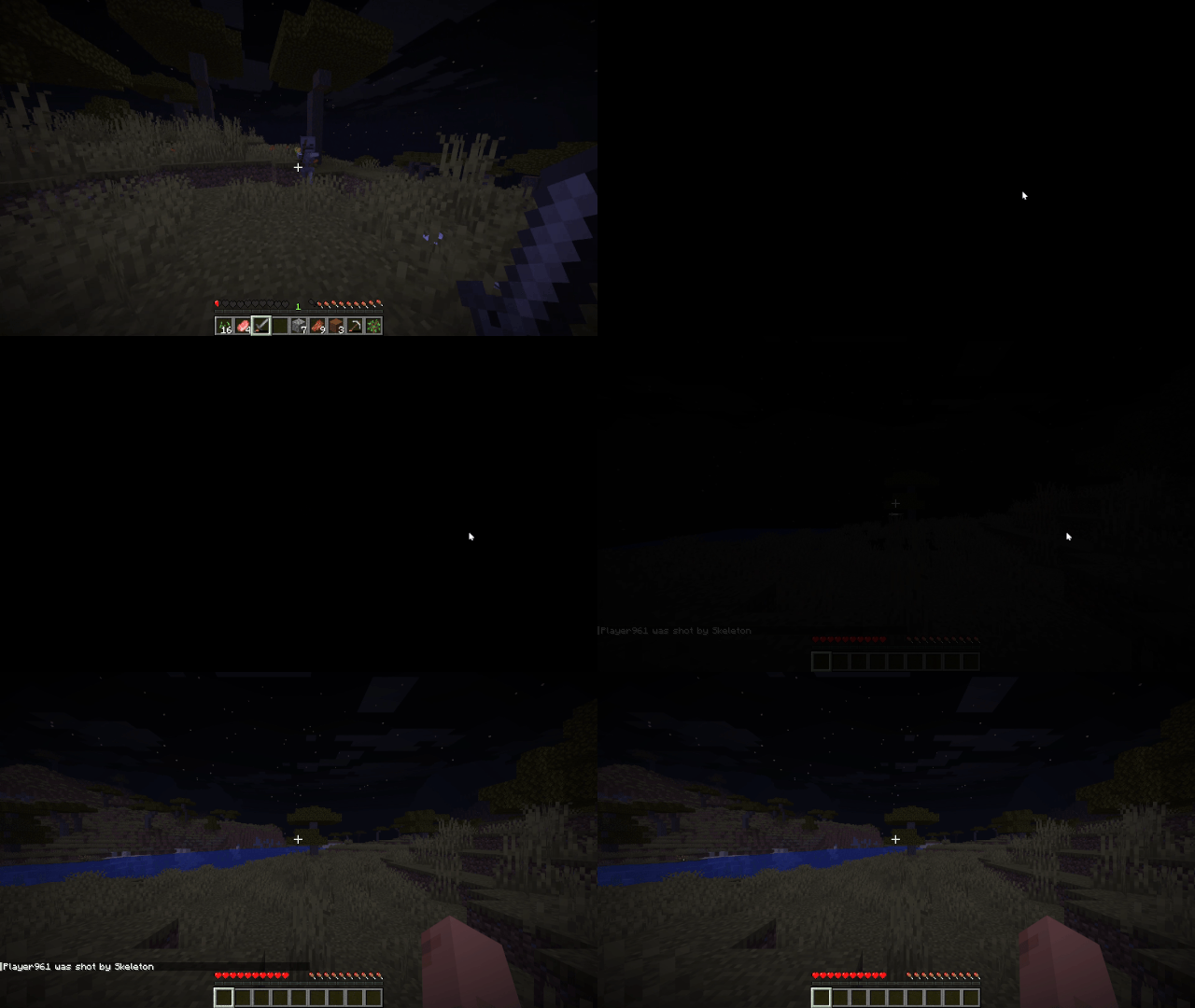
Realistic Death Visuals replaces Minecraft’s default death screen with a more realistic and dramatic death screen that actually feels like you died, instead of just “died”.
Instead of the usual “You Died” screen with the death message, score, and buttons immediately taking over your screen, the moment of death is changed into a short visual transition. You get a quick flash of white, followed by a black screen that feels closer to what it would look like if your character actually lost consciousness or died.
On top of that, the normal death options are removed entirely. The “Respawn” and “Return to Title Screen” buttons are disabled so you don’t get pulled into a menu at all. Instead, the game automatically respawns you, keeping the experience continuous and removing the interruption of the vanilla death screen UI.
The goal of this mod is not to change gameplay, difficulty, or mechanics at all, but to completely change how death feels in the moment. Vanilla Minecraft death screens are very UI-heavy and break immersion instantly, so this replaces that with something more atmospheric and less game-like.
Built for Fabric 1.21.11, and designed to stay lightweight and compatible with most other mods, since it only touches the visual side of the death screen and the flow after death, without changing core gameplay logic.
If you’re looking for a more immersive experience where death feels less like a menu and more like an event, this mod is made for that.
常见问题
Realistic Death Visuals 支持哪些 Minecraft 版本?
Realistic Death Visuals 支持 Minecraft Java 版 1.21.11,可用的加载器:Fabric。下载时注意选择和你游戏版本一致的文件。
Realistic Death Visuals 怎么安装?
先用 PCL2 或 HMCL 启动器安装对应版本的 Fabric,再把下载的 .jar 文件放进游戏目录的 mods 文件夹,重新启动游戏即可。开启了版本隔离的,mods 文件夹在 versions/版本名 下面。运行环境:仅客户端。
d3v_c 的其他作品
查看全部 →
Realistic Tree Behaviour
Realistic Tree Behaviour makes trees fall with physics + sounds, clearing foliage they hit, and bouncing slightly before settling back into blocks. It keeps the tree intact during the fall for a more natural, realistic yet vanilla feel.

d3v_c’s Terrain Overhaul
Fabric worldgen overhaul for 1.21.11: taller mountains, deeper terrain, rebalanced biome climate zones, more natural caves, and improved underwater shaping for realistic Overworld landscapes.

Better Redstone
Mine Redstone Ore to collect glittering shards and craft them into redstone dust for a fresh twist on resource gathering.
Improved Snowfall
A lightweight snowfall overhaul that replaces vanilla snow streaks with drifting snowflakes, surface settling, and smooth fade-out behavior.
评论
登录后评论和评分