
截图
介绍
中文介绍正在准备中,下面暂时显示原文。
This Mod adds a recipe for the Crying Osidian with 3 steps see them below or in gallery (works on forge 1.16.5 , 1.17.1 , 1.18.2 and 1.19.2) 1.20.4 in future plans.
Step 1
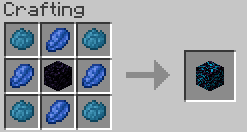
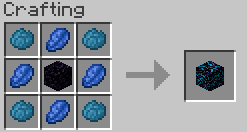
Add in the middle of the crafting table obsidian block , and in all sides lapis lazuli , and in all corners cyan dye. like in the picture below.
Spoiler
Step 2
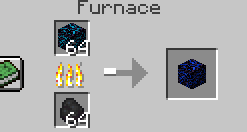
Smelt the lapised Obsidian. like in the picture below.
Spoiler
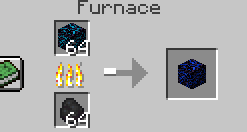
Step 3
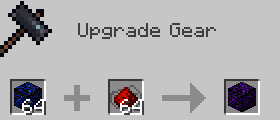
Add Redstone to the smelted lapised obsidian in the smithing table. like in the picture below
Spoiler
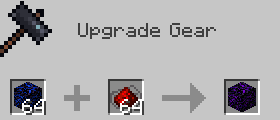
常见问题
Craft a Crying Obsidian 支持哪些 Minecraft 版本?
Craft a Crying Obsidian 支持 Minecraft Java 版 1.16.5–1.19.2,共 4 个版本,可用的加载器:Forge。下载时注意选择和你游戏版本一致的文件。
Craft a Crying Obsidian 怎么安装?
先用 PCL2 或 HMCL 启动器安装对应版本的 Forge,再把下载的 .jar 文件放进游戏目录的 mods 文件夹,重新启动游戏即可。开启了版本隔离的,mods 文件夹在 versions/版本名 下面。运行环境:客户端和服务端都要装。
评论
登录后评论和评分