
截图

介绍
Caxton
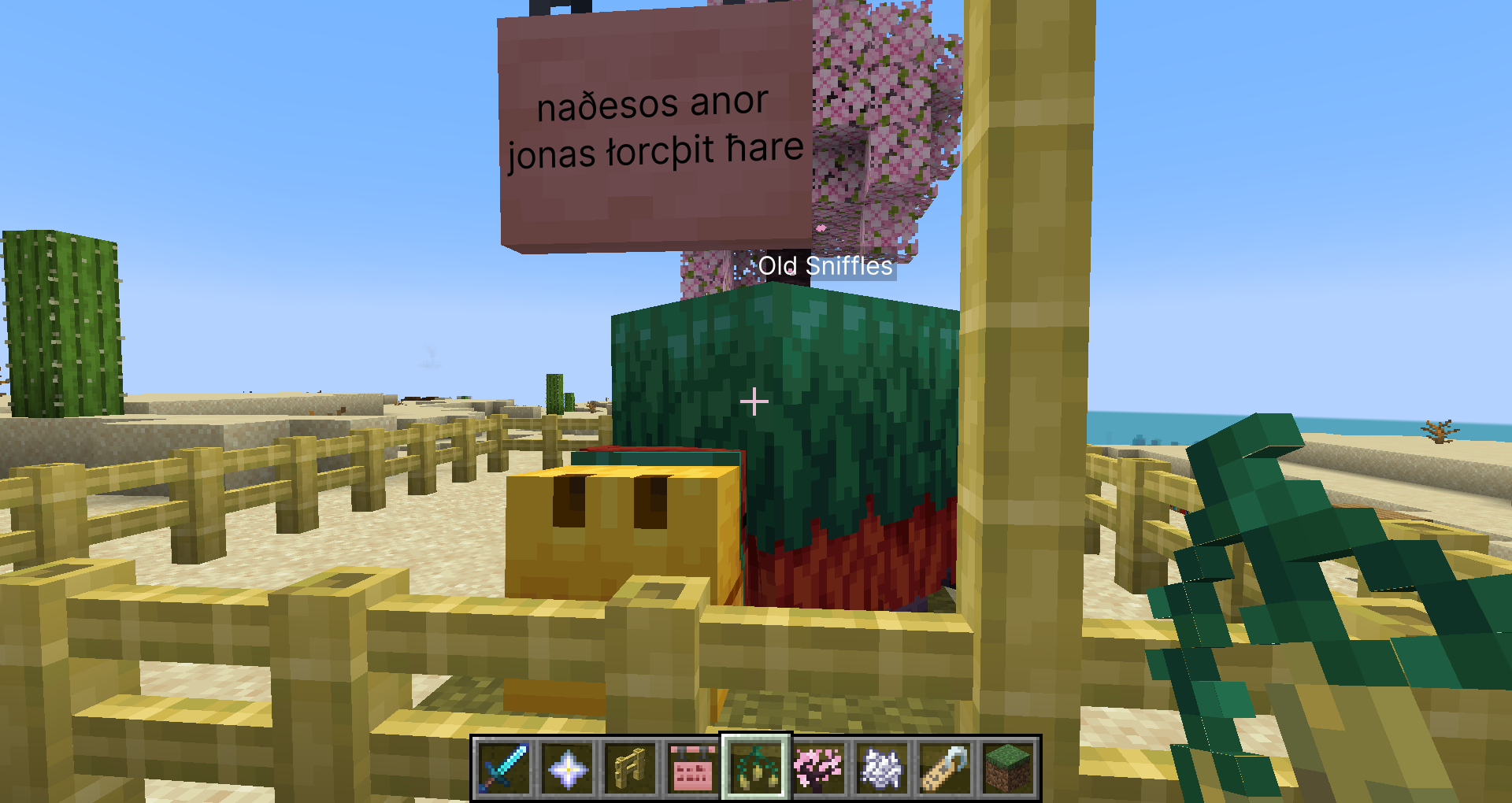
Caxton以 [William Caxton] 命名,是一款为 Minecraft 添加 TrueType 和 OpenType 字体支持的模组。
可在 Modrinth
和 CurseForge 获取!
功能
- 借助 [MSDF] 技术,任何字号都能呈现清晰文字
- 真正的粗体和斜体字体
- 复杂文本渲染
- 不使用 AWT
当前限制
- 目前不支持旧版字体的阿拉伯文塑形。要在支持样式和正确处理双向文本的同时实现这一功能比较复杂,因为我们无法为此使用 ICU4J 的 API。如果希望阿拉伯文正确显示,则需要在 Caxton 中使用支持阿拉伯文的字体。
- 从字体生成 MTSDF 的开销较大。因此,Caxton 会并行处理此过程,并在首次生成后缓存结果。
- Minecraft 和各类模组中的许多 UI 元素都对文本渲染作出了错误假设。让它们支持双向文本——更不用说连字等情况——将是一项艰巨的工作,欢迎为此提供补丁。
- GUI 元素已打上补丁以处理此问题,但无论文本的基方向如何,显示的文本都会左对齐。
- 字体微调功能可能永远不会得到支持。
模组和资源包兼容性
兼容,但有一些注意事项
| 模组 | 版本 | 备注 |
|——————-|—————————————–|———————————————————————————————————————————————————————————————————————————————————————|
| [钠] | 除 Caxton <0.6.0 与 Sodium 0.5.5 的组合外,均兼容 | 在 Sodium 0.5.5 和低于 0.6.0 的 Caxton 版本中,描边文本显示异常 |
| [ImmediatelyFast] | ≥1.2.0 | 禁用 Caxton 的 sortTextRenderLayers 选项(Caxton <0.6.0 时还需禁用 reuseTextRendererDrawer)(会自动完成)。请确保已禁用 ImmediatelyFast 的 experimental_sign_text_buffering 选项。 |
| [Exordium] | 任意 | 禁用 Exordium 的告示牌缓冲 |
不兼容
| 模组 | 版本 | 备注 |
|———————–|—————————————-|——————————————————————————————————————————————————————————————-|
| [Iris Shaders] | 任意 | 自定义核心着色器不受 Iris 支持;游戏内使用 MSDF 字体的文本无法渲染 |
| [Emojiful] | 任意 | 完全替换 Minecraft 默认文本渲染器 |
| [MemoryLeakFix] | ≤1.1.1 | |
| [VanillaIcecreamFix] | ≤1.2.1-beta+1.20.4 | 启动时与 Caxton 的 Fabric ASM 前置库冲突 – 已在 1.2.2-beta+1.21 中修复 |
| [Porting Lib] | \<1.2.1451-beta+1.18.2/2.1.1453+1.19.2 | 与 Fabric API 的核心着色器注册 API 冲突 |
| [Advent of Ascension] | 1.20.4-3.7.7 | 不会导致崩溃,但 AoA 的描边文本不使用 MSDF 字体,且 AoA 的可滚动面板组件无法裁剪 MSDF 字体中的文本(计划推出兼容附属模组) |
布局处理不正确
已知以下模组无法正确处理文本布局。它们不应导致游戏崩溃,但这些模组的 GUI 元素
可能会出现异常行为,并可能在日志中显示有关不支持的文本处理方法的警告。
| 模组 | 版本 | 备注 |
|————————|———|——————————————————————————————————————————————–|
| [IBE Editor] | 任意 | 使用自定义文本字段控件,该控件克隆了 Minecraft 原版的大部分渲染代码 |
| [Roughly Enough Items] | 任意 | 在部分控件中使用了不受支持的方法 |
带有自定义文本相关核心着色器的资源包
修改文本相关核心着色器的资源包(例如 [Vanilla Tweaks] 的 “Dark UI” 和 “Transparent UI” 资源包)
需要修改后才能与 Caxton 字体兼容。
操作系统支持
Caxton 使用原生库辅助文本整形和 MSDF 生成。预编译版模组内置了适用于 x86_64 Windows 和 Linux 平台的
该库版本。如果你使用的是其他平台,则需要自行构建模组。
如果模组仍无法识别你的平台,请将 config/caxton.json 中的 rustTarget 设置更改为与你的平台对应的Rust 平台名称,
然后在此处报告问题。
请注意,我家里连一台 Mac 都没有,因此由于许可问题,我无法构建 macOS 二进制文件。
如何使用 Caxton
Caxton 目前内置了两个字体资源包。第一个是 [Inter],第二个
是 [Open Sans]。
如果这两种字体都不符合你的需求,你可以使用资源包来添加自己的字体。**在分发包含字体文件的资源
包之前,请先阅读该字体的许可证,确认你有权分发该字体。**
通过资源包添加字体
Caxton 添加了一种类型为 caxton 的字体提供程序,支持 regular、bold、italic 和 bold_italic 这些键。
每个键都可以设置为一个标识符,其中 <namespace>:<path> 会解析为
字体文件 assets/<namespace>/textures/font/<path>。如需指定其他选项,请使用对象,并通过
键 file 指定路径:
{
  // The only required element.
  "file": "<namespace>:<path>",
  // The factor by which to scale the font from the default size.
  // If this is 1.0, then the font is scaled so that the ascent is scaled to 7
  // pixels of the default bitmap font.
  // Added in Caxton 0.3.0.
  "scale_factor": 1.0,
  // The shadow offset, as a multiple of the memefont pixel size.
  "shadow_offset": 1.0,
  // The amount to shift the rendered text by in the X and Y axes, in memefont pixels.
  // Added in Caxton 0.4.4.
  "shift": [
    0.0,
    0.0
  ],
  // A 32-bit integer whose bits are interpreted as a 32-bit floating-point number
  // describing the slant to apply to the characters.
  // This can be used to emulate italics in fonts that do not have an italic variant,
  // but it is always preferable to use a dedicated italic variant if one is
  // available.
  // Added in Caxton 0.5.6.
  // Not supported in Caxton 0.7.0.
  "the_font_designer_couldnt_be_assed_to_make_an_italic_variant_so_slant_the_text": 0,
  // A list of OpenType feature tags. See below for the syntax:
  // https://docs.rs/rustybuzz/0.6.0/rustybuzz/struct.Feature.html#method.from_str
  "features": [],
  // Only has an effect on raster tech. Interpolation is always enabled for
  // MSDF fonts.
  // If true, texels in the glyph bitmap will be interpolated.
  // Added in Caxton 0.4.0. Replaced by font metadata setting in Caxton 0.7.0.
  "blur": false
}
如果字体 JSON 文件中存在键 caxton_providers 对应的对象,并且已安装 Caxton,则会使用该对象替代 providers。
这样可以在加载 Caxton 字体的同时,为未安装 Caxton 的情况提供回退方案。
如果未指定 caxton_providers,则会改用 providers。
你还可以添加文件 assets/<namespace>/textures/font/<path>.json,其中包含字体
栅格化设置:
{
  // 指定字体文件的实际路径,与 Caxton 字体提供器中显示的路径一致。
  // 通常可以省略此项,但使用可变字体时可能会用到。
  "path": "<path of font file>",
  // 以下选项均为可选项;未指定时将使用提供的默认值。
  // 纹理图集中每个像素对应的字体单位数。
  // 使用 "msdf" 字体渲染技术时,可以将此值设得较高。
  // 使用 "raster" 时,应将此值设得较低。
  "shrinkage": 32.0,
  // 字形边界框四周各留出的像素数。
  // 此值应大于 `range`;留空时将默认为 `range`。
  "margin": 4,
  // 字形周围最小与最大可表示有符号距离之间的范围宽度。必须为不大于 255 的正整数。
  // 此值也决定发光标牌文字描边的宽度。
  "range": 4,
  // 是否反转有符号距离场(true 或 false)。
  // 如果此项为 null,Caxton 会尝试自动判断;若判断有误,你可以在此覆盖。
  "invert": null,
  // 此选项用于设置可变字体的变化轴坐标。
  // 每个元素的格式如下:
  // { "axis": <axis type>, "value": <axis value> }
  "variations": [],
  // 字体集合中要使用的字体面索引。
  // 如果不确定,请保留为 0。
  // Caxton 0.3.0 版本新增。
  "face_index": 0,
  // 指定使用基于 MSDF 的渲染方式("msdf"),还是使用字形位图("raster" – 实验性)。
  // 大多数字体推荐使用 "msdf",但像素字体更适合使用 "raster"。
  // 此外,只有 "raster" 与 Iris Shaders 完全兼容——加载光影时,MSDF 字体的文字不会显示在世界中。
  // Caxton 0.4.0 版本新增。
  "tech": "msdf",
  // 最大 mipmap 级别(0 – 4)。
  // 使用 MSDF 渲染技术时,设置此项没有作用。
  // 但使用 raster 渲染技术时,非像素字体可能会用到此项。
  // Caxton 0.4.0 版本新增。
  "max_mipmap": 0,
  // 仅对 raster 技术有效。MSDF 字体始终启用插值。
  // 如果为 true,将对字形位图中的纹素进行插值。
  // Caxton 0.7.0 版本中取代了字体提供器设置。
  "blur": false
}请务必包含字体文件的扩展名。例如,如果字体位于
assets/example/textures/font/example.otf,那么你的 JSON 文件应位于
assets/example/textures/font/example.otf.json(而不是 example.json)。
全局配置
config/caxton.json 中提供了以下选项:
{
  // One of the Rust platform names (https://doc.rust-lang.org/nightly/rustc/platform-support.html)
  // corresponding to your platform.
  // If this is null, then Caxton will determine the correct value for your
  // platform, so it is recommended to change this only when necessary.
  // Added in Caxton 0.2.1.
  "rustTarget": null,
  // Use a different method of drawing the level text on the experience bar:
  // For Caxton fonts, this draws the text with an outline shader, instead of
  // drawing four offset copies in the outline color followed by the main text
  // in the fill color.
  // This option primarily serves to make the experience level text look better
  // in outline fonts. It used to act as a workaround for a misrendering issue
  // with ImmediatelyFast but posed issues on some later versions of that mod.
  // Starting from Caxton 0.5.0, Caxton will detect if ImmediatelyFast 1.2.0 or
  // later is present and use its API to mitigate issues with this setting
  // turned on.
  // See:
  // * https://gitlab.com/Kyarei/caxton/-/issues/31
  // * https://github.com/RaphiMC/ImmediatelyFast/issues/49
  // Non-Caxton fonts are not affected.
  // Added in Caxton 0.4.0.
  "tweakExpText": true,
  // Sort primitives on Caxton’s text render layers from back to front.
  // Disabling this setting may theoretically result in misrendering of text;
  // however, ImmediatelyFast expects this setting to be disabled, and
  // the developer of ImmediatelyFast has not received any reports of rendering
  // issues when this functionality is disabled.
  // If you experience rendering issues where some text seems to be drawn in
  // the wrong z-order, then try enabling this option (and disabling HUD batching
  // in ImmediatelyFast).
  // See: https://github.com/RaphiMC/ImmediatelyFast/issues/49
  // Added in Caxton 0.4.0.
  "sortTextRenderLayers": false,
  // Before 0.6.0, Caxton reused the vanilla `TextRenderer.Drawer` class
  // but forcibly set its `x` and `y` fields instead of creating a new
  // instance for every operation.
  // This caused an incompatibility with one of ImmediatelyFast’s mixins,
  // so this option was introduced to work around this problem.
  // As of 0.6.0-alpha.4, this is no longer needed as Caxton no longer
  // uses `TextRenderer.Drawer`.
  // See: https://gitlab.com/Kyarei/caxton/-/issues/50
  // Added in Caxton 0.4.7.
  // Removed in Caxton 0.6.0.
  "reuseTextRendererDrawer": true,
  // Some text handling methods are inherently broken and unsupported by Caxton.
  // Caxton will log a warning whenever these methods are called. If this option
  // is set to true, then Caxton will throw an exception instead.
  // This option is primarily useful for debugging. If in doubt, set this to false.
  // Added in Caxton 0.2.1.
  "fatalOnBrokenMethodCall": false,
  // Track information about when a Caxton font object has a reference added or
  // removed for debugging purposes.
  // If in doubt, set this to false.
  // Added in Caxton 0.3.0.
  "debugRefcountChanges": false,
  // Disable splash text easter eggs on certain dates.
  // Added in Caxton 0.5.6.
  "disableEasterEggs": false
}
从源代码构建
如果你想从源代码构建 Caxton,除了
Gradle,还需要安装 [Rust toolchain] 和 [Clang]。
默认情况下,原生库只会针对主机平台构建。若要为其他平台构建,请在
xyz.flirora.caxton.additionalTargets 属性中指定其他目标平台的 [target triples](以逗号分隔)。例如,如果你想为 x86_64 Windows 构建该库,可以运行以下命令:
gradle build -Dxyz.flirora.caxton.additionalTargets=x86_64-pc-windows-gnu如果你遇到关于未知目标的错误,请修改
caxton-impl/build.gradle 中的 cargoCrossBuildTasks 变量。
与其他模组的比较
BetterFonts / TrueType 字体替换
最初由 [thvortex] 创建,支持到 1.4.4,之后由 bechill 更新到 1.4.7,再由 [The_MiningCrafter] 更新到 1.5.2,然后
由 [secretdataz] 更新到 1.6.x 和 1.7.x,再由 [cubex2] 从 1.8.9 更新到 1.12.2。之后又由 secretdataz 更新到 1.13。
此模组使用 Java AWT 的文本布局功能来排列文本。在渲染字形时,它会将字形栅格化为位图。分辨率相当有限。然而,与下面列出的许多其他模组不同,它正确地实现了粗体和斜体样式,以及复杂文字。
Smooth Font
由 [bre2el] 创建,适用于 1.7 到 1.12 的版本。此模组还改进了不同缩放比例下的文本渲染,并实现了一些文本渲染优化。
至于它的工作原理,谁知道 RenderType 呢?此模组为 ARR。
ThaiFixes
由 [lion328] 创建,适用于 Forge 上最高到 1.12.2 的版本,以及 Rift 上的 1.13,并由 secretdataz 在 Fabric 上更新到 1.18.2。
此模组专门为泰语实现了自己的字形整形例程。因此,它对于其他需要复杂渲染的语言没有用处。
Modern UI
由 [BloCamLimb] 创建,适用于 Forge 上 1.15 到 1.19 的版本。
从截图来看,此模组似乎支持复杂文本渲染以及真正的粗体和斜体样式。它还修复了原版文本布局的许多问题,例如 [MC-117311]。
从代码来看,Modern UI 拥有令人惊讶地复杂的布局算法。不过我没有太多时间去看它。
然而,此模组无法渲染边缘清晰的文本。它还使用 AWT 来执行文本布局。
Minecraft 1.13 及更高版本
自 1.13 起,Minecraft 支持 TrueType 和 OpenType 字体。然而,这一实现与位图字体的实现并没有本质区别——游戏会将字形转换为位图,并以朴素的方式排列文本。此外,它错误地处理了字形度量,导致 TTF 文本看起来歪斜。
致谢
如果没有以下项目,Caxton 将不可能实现:
- [Fabric] for Minecraft
- [Architectury Loom]
- [Rust] 编程语言
- [Gradle Cargo Wrapper] (Arc-blroth, Apache-2.0)
- [HarfRust] (MIT)
- 0.8 之前的版本使用了 [RustyBuzz] (RazrFalcon, MIT)
- [Skrifa] (MIT/Apache-2.0)
- 0.8 之前的版本使用了 [ttf-parser] (RazrFalcon, MIT/Apache-2.0)
- [fdsm] (我, MIT)
- 0.5 之前的版本使用了 [msdfgen] (Chlumsky, MIT) 和 [msdfgen-rs] 绑定 (Kayo Phoenix, MIT),这两者随后在 fdsm 的开发中都发挥了不可估量的作用。
- 0.2.3 及更早版本则使用了 [msdf-rs] 绑定 (Penple, MIT)。
- [ab-glyph-rasterizer] (alexheretic, Apache-2.0)
- [Rust 的 JNI 绑定] (MIT/Apache-2.0)
- [flate2] (MIT/Apache-2.0)
- [Rayon] (MIT/Apache-2.0)
- [Cross] (MIT/Apache-2.0)
- [Fabric-ASM] (Chocohead, MPL-2.0)
- [MixinExtras] (LlamaLad7, MIT)
- [Caffeine] (Ben Manes, Apache-2.0)
- [Inter] (Rasmus Andersson, OFL-1.1)
- [Open Sans] (OFL-1.1)
以下人员也因翻译而受到致谢:
- IcedDog 提供中文翻译
- JustFoxxo 提供波兰语翻译
常见问题
Caxton 支持哪些 Minecraft 版本?
Caxton 支持 Minecraft Java 版 1.18.2–26.3,共 27 个版本,可用的加载器:Fabric / Forge / NeoForge。下载时注意选择和你游戏版本一致的文件。
Caxton 怎么安装?
先用 PCL2 或 HMCL 启动器安装对应版本的 Fabric / Forge / NeoForge,再把下载的 .jar 文件放进游戏目录的 mods 文件夹,重新启动游戏即可。开启了版本隔离的,mods 文件夹在 versions/版本名 下面。运行环境:仅客户端。
flirora 的其他作品
查看全部 →
Caxton
A mod that adds improved TrueType/OpenType font support
X-Bar Theory
Adds growable battle towers to Minecraft!

Etaerio Eaterie
Adds some food items to the game
Camelliate
Adds the Caxton 0.3.0 April Fool’s prank to Minecraft.
评论
登录后评论和评分