
Smart Compass & Clock
Show coordinates with compass and time with clock. supports minecraft version 1.21x
截图
介绍
🧭 Coordinate & Clock Display – Never Get Lost Again!
A simple, lightweight, and elegant datapack that displays your coordinates and in-game time directly above your hotbar. No more cluttered F3 screen—just hold a compass or clock!
✨ Key Features
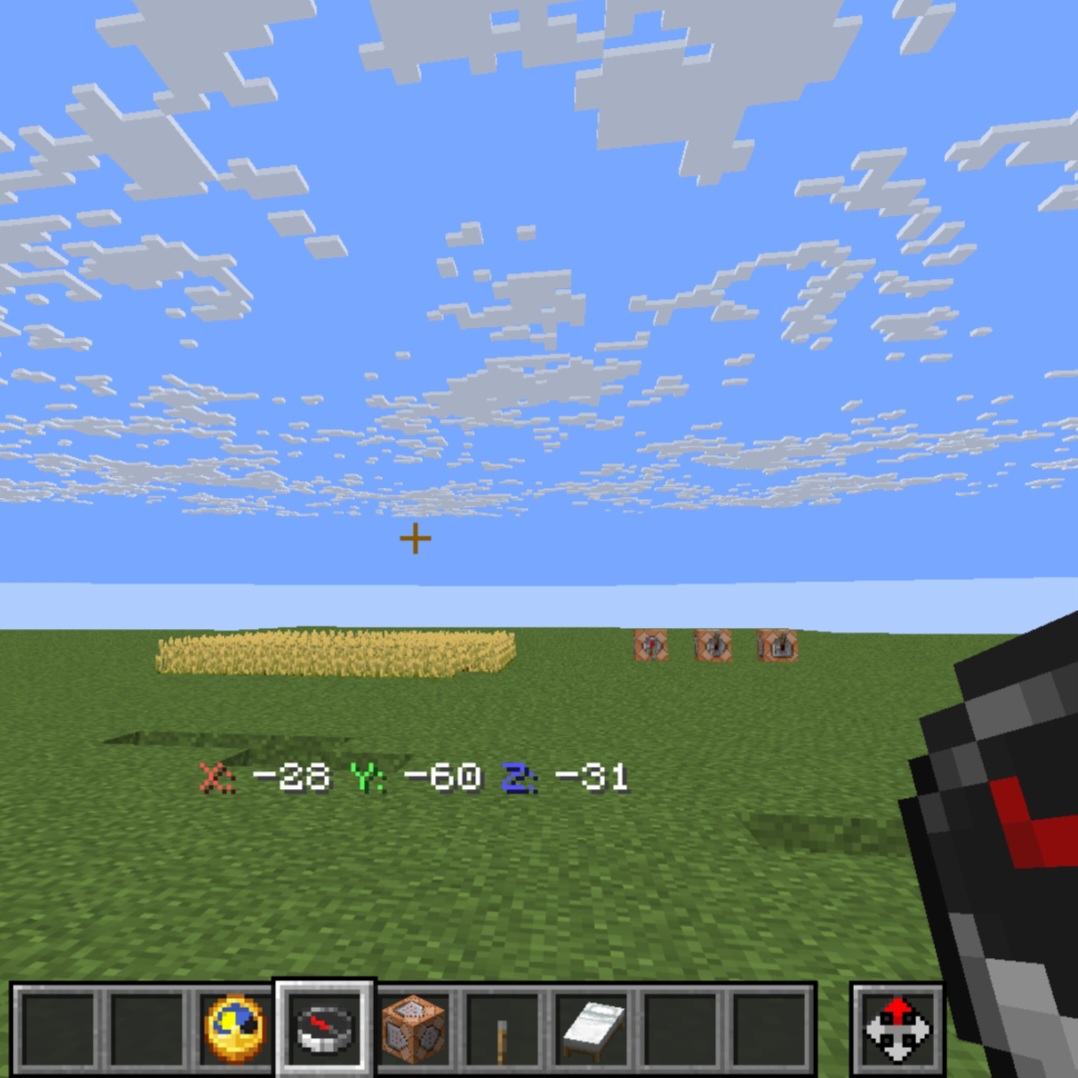
🗺️ Coordinate Display
- Hold a Compass to see your X, Y, Z coordinates
- Color-coded for easy reading (X=Red, Y=Green, Z=Blue)
- Perfect for navigation and building projects
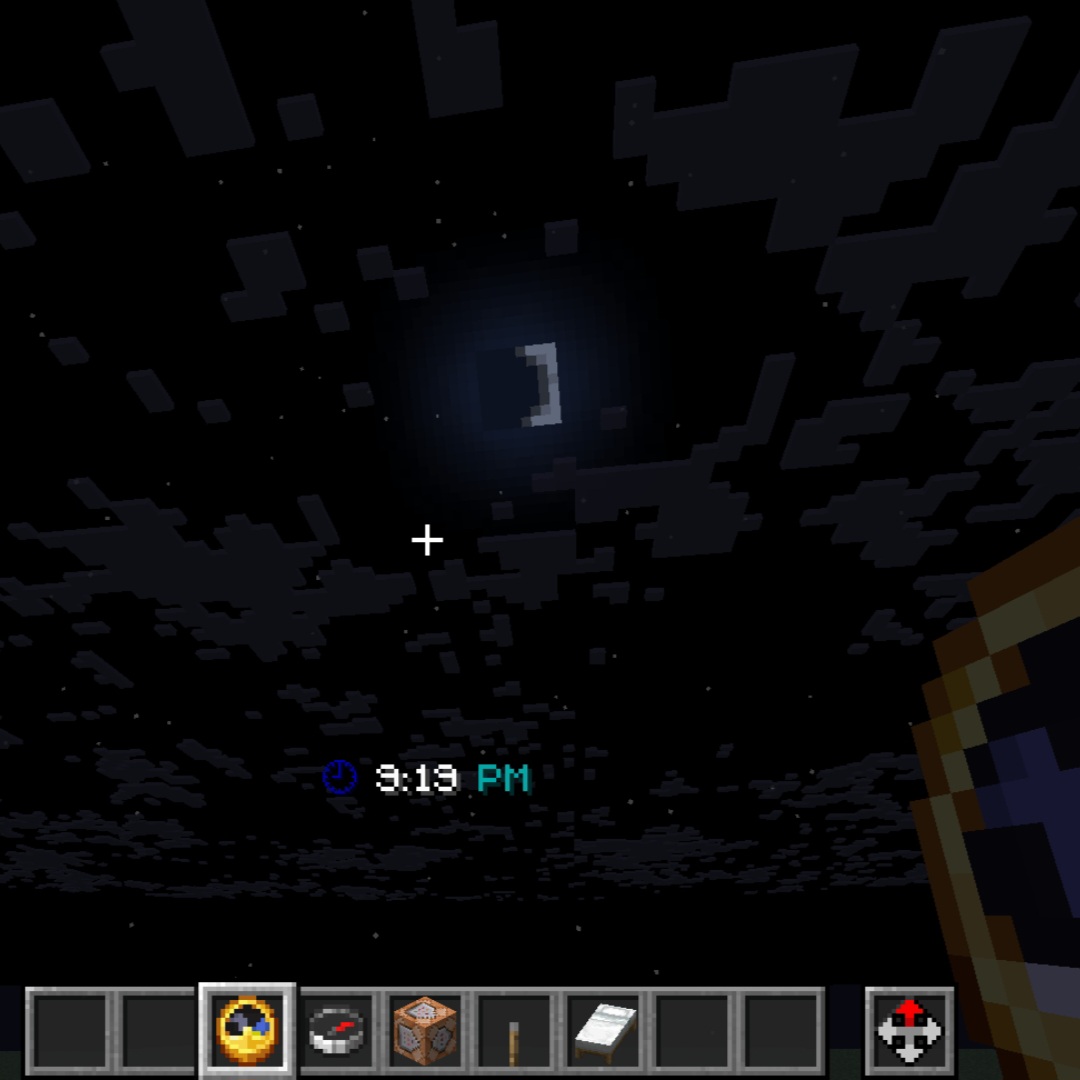
🕐 Time Display
- Hold a Clock to see the current in-game time
- Shows time in readable 12-hour format (e.g., 6:40 AM, 8:30 PM)
- Includes clock emoji and AM/PM indicators
- Color-coded by time of day (day/night/morning/evening)
🎨 Beautiful UI
- Clean, minimal design
- Displays in action bar (above hotbar)
- No screen clutter
- Smooth, real-time updates
⚡ Smart & Efficient
- Works with items in main hand OR offhand
- Zero performance impact
- No configuration needed
- Instant activation
📸 Screenshots Galary
Coordinates Display:
X: 250 Y: 64 Z: -120Time Display:
🕕 6:40 AM(Colors change based on time of day!)
🎮 How to Use
- Install the datapack in your world’s
datapacksfolder - Run
/reloadin-game - Hold a Compass → See your coordinates
- Hold a Clock → See the time
- That’s it! No setup required.
🌟 Why Choose This Datapack?
- ✅ Vanilla-Friendly – No mods required, pure datapack
- ✅ Multiplayer Compatible – Works perfectly on servers
- ✅ Lightweight – Absolutely no lag
- ✅ Both Hands – Works in main hand or offhand
- ✅ Always Accurate – Real-time coordinate and time tracking
- ✅ Easy Uninstall – Includes uninstall function for clean removal
🔧 Technical Information
- Minecraft Version: 1.21+
- Pack Format: 48
- Type: Datapack (No mods needed)
- Server-Side: Yes
- Client-Side: Not required
- Performance Impact: None
📥 Installation
Singleplayer:
- Download the datapack
- Navigate to
.minecraft/saves/[WorldName]/datapacks/ - Extract the datapack folder here
- Run
/reloadin-game or restart the world
Multiplayer (Server):
- Download the datapack
- Place in your server’s
world/datapacks/folder - Run
/reloadfrom console or in-game - All players will automatically have access
🗑️ Uninstallation
Super easy! Just run:
/function coord_display:uninstallThen remove the datapack folder and run /reload.
🎯 Perfect For:
- 🏗️ Builders – Track coordinates while building
- 🗺️ Explorers – Navigate without F3 clutter
- ⚔️ Survival Players – Quick coordinate checks
- 🎮 Multiplayer Servers – Great for community worlds
- 📚 Content Creators – Clean HUD for videos/streams
💡 Pro Tips
- Hold compass in offhand and clock in main hand to quickly switch between displays
- Great companion for mapping tools and waypoint mods
- Coordinates are rounded to whole numbers for cleaner display
- Time display includes fun clock emojis that change throughout the day!
🐛 Bug Reports & Suggestions
Found a bug? Have an idea? Let me know in the comments or issues section!
📋 Changelog
v1.0.0 – Initial Release
- Coordinate display with compass
- Time display with clock (12-hour format)
- Color-coded UI elements
- Both hands support
- Clean uninstall function
🤝 Compatibility
✅ Works with vanilla Minecraft
✅ Compatible with Fabric, Forge, and vanilla servers
✅ No conflicts with other datapacks
✅ Compatible with OptiFine, Sodium, and performance mods
📜 License
Free to use, modify, and redistribute. No attribution required but always appreciated!
⭐ Support the Project
If you love this datapack:
- ⭐ Leave a review
- 📢 Share with friends
- 💬 Suggest improvements
- 🎉 Use it in your videos/streams (credit appreciated!)
Download now and never get lost in Minecraft again! 🧭✨
My other Datapacks ❤️Profile❤️
Made with ❤️ for the Minecraft community
常见问题
Smart Compass & Clock 支持哪些 Minecraft 版本?
Smart Compass & Clock 支持 Minecraft Java 版 1.21–1.21.11,共 12 个版本。下载时注意选择和你游戏版本一致的文件。
Smart Compass & Clock 怎么安装?
新建世界时在「数据包」里把下载的 .zip 拖进去;已有的存档,把文件放进存档目录下的 datapacks 文件夹,进游戏输入 /reload 即可生效。服务器同样放在世界目录的 datapacks 里。
OPSIBA007 的其他作品
查看全部 →
Multi Miner
An Enchantment that mines 3x3x3 at once. Supports 1.21x

Minimal Day Counter
Simple Day counter for remember every day. Minecraft version 1.21x. More Updates Soon.

XP-Book
Store your experience in a written book for Minecraft version 1.21.11

Recipes Rebalanced
A utility expansion for Minecraft 1.21x. New update v1.2 adds 40 recipes in game.
评论
登录后评论和评分