
截图


介绍
Welcome to Fresh Flesh(FF)
You’ve built a zombie farm to gather XP, but now you’re left with tons of useless rotten flesh. So, you install a mod to turn flesh into leather, but eventually, you realize you don’t need it anymore. Not wanting to waste the resource, you add a mod to convert flesh into food, but then you build a golden carrot farm, making that mod obsolete too. Next, you think, “What if I compost the flesh?” but Minecraft doesn’t support that feature, and every mod you find either lacks it or comes with a bunch of unnecessary extras.
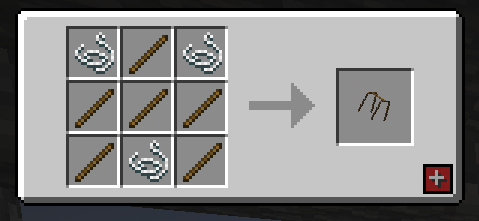
Autorack(1.0.4.0 + ):
Well, guess what? We’ve got you covered! Fresh Flesh (FF) introduces a brand-new block: the Flesh Rack. Simply place your rotten flesh on this sleek block, then right-click it with your axe—just like stripping bark. This removes all that zombie gunk and leaves you with a clean, usable piece of flesh.
To remove the freshly cleaned flesh from the rack, simply right-click it with an empty hand. Once you’ve collected your clean flesh, you’re ready to start crafting your
To remove the freshly cleaned flesh from the rack, simply right-click it with an empty hand. Once you’ve collected your clean flesh, you’re ready to start crafting your items!
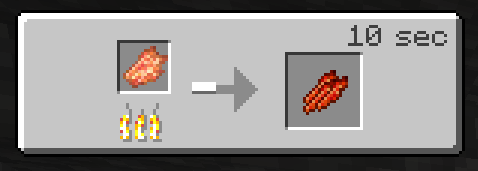
Jerky
Cooked on a Campfire
Bone Meal
Crafting Table
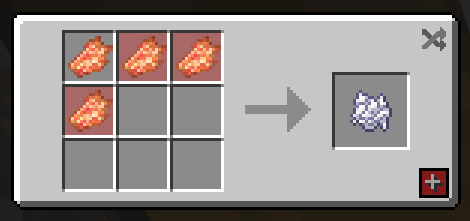
- Composter, Clean Flesh 30% chance to add a stage.
- Composter, Rotten Fless 15% chance to add a stage.
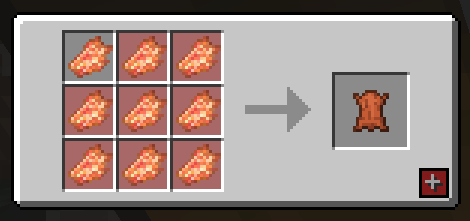
Leather
Crafting Table
As a little bonus I also included 2 paintings a 1 block and 4 block versions
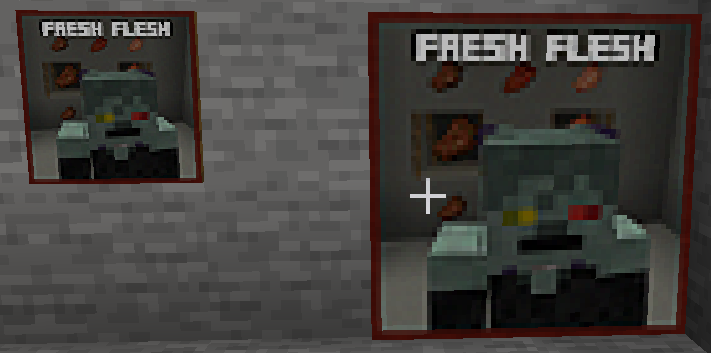 )
Features of the Fresh Flesh Mod (FF)
-Flesh Rack Block
A new block where you can hang and clean your rotten flesh. Perfect for converting zombie drops into usable resources.
-Rotten Flesh Cleaning Mechanic
- Place rotten flesh on the Flesh Rack.
- Right-click with an axe (similar to stripping bark) to remove the zombie gunk, leaving you with clean flesh.
-Easy Item Retrieval
- Right-click the Flesh Rack with an empty hand to remove the cleaned flesh.
- Right-click the Flesh Rack with you axe to also remove your clean flesh(1.0.3.0).
- If you need that Rotten Flesh back you can also just Right-click it with a empty hand and it will return the Rotten Flesh(1.0.3.0).
-Crafting with Clean Flesh
Once you’ve collected the clean flesh, you can use it to craft various useful items:
- Rotten Flesh to Leather
- Rotten Flesh to Bone Meal
- Rotten Flesh to Jerky (Food)
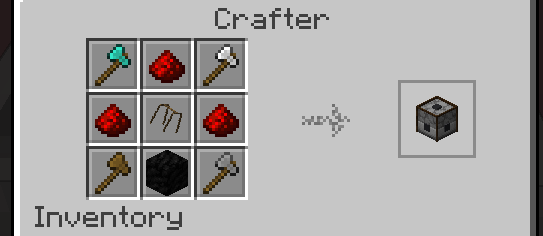
-Autorack(1.0.4.0 + )
- _Image below is a 1.21.1 example_
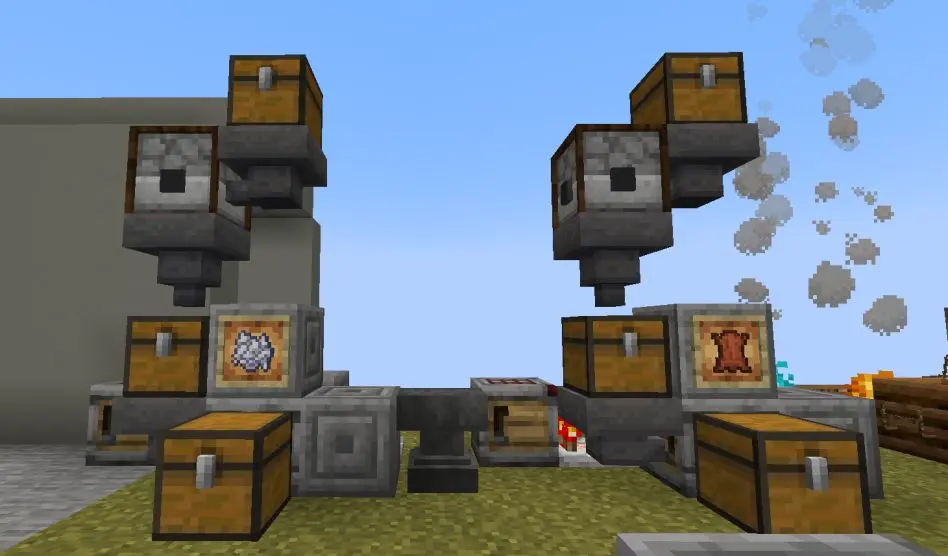
Using Autorack:
- Right click on the Autorack to open it’s gui add your rotten flech and in 2 seconds you will have your clean flesh
- hoppers and chests to do this on a large scale, you can also do as the image above where you can create a farm linked to the autorack and then a crafter meaning you can make lether, bonemeal or food.
Social Media
Supporting The Mods?

Would you like to support us? consider our patreon, to help keep our lights on and our tummies full. https://www.patreon.com/TSMUK thanks guys, if you make videos and love our mods, consider making a review video, can’t do these two things? then simple, Follow us on twitter, and comment on this page to tell us what you like and dislike about our work.
Most importantly ENJOY yourself.
常见问题
Fresh Flesh(FF) 支持哪些 Minecraft 版本?
Fresh Flesh(FF) 支持 Minecraft Java 版 1.21.1–1.21.8,共 3 个版本,可用的加载器:NeoForge。下载时注意选择和你游戏版本一致的文件。
Fresh Flesh(FF) 怎么安装?
先用 PCL2 或 HMCL 启动器安装对应版本的 NeoForge,再把下载的 .jar 文件放进游戏目录的 mods 文件夹,重新启动游戏即可。开启了版本隔离的,mods 文件夹在 versions/版本名 下面。运行环境:客户端和服务端都要装。
Regressia 的其他作品
查看全部 →
NappyCraft
回归疗法与无障碍模组,适合使用尿布的玩家。帮助你接纳自己的疾病,或以婴儿、儿童的状态回归。包含尿布、年龄回归等内容。

Plushy+
将我们定制的毛绒玩具收藏添加到Minecraft中。

PaciCraft
PaciCraft 是一款倒退主题的模组,也是 NappyCraft 的配套模组,可帮助实现倒退玩法,还添加了更多内容,例如木材和食物。

How We Sleep
让你的睡觉地点更有装饰感。
评论
登录后评论和评分