
World Color TAB
Dynamically change the color of the nickname in the tab depending on the measurement
截图
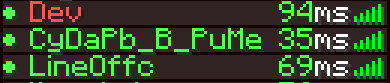
介绍
WorldColor Teams
Overview
WorldColor Teams is a lightweight and vanilla-friendly datapack that automatically changes a player’s name color based on the dimension they are currently in. Perfect for RPG servers, SMPs, or just adding a touch of immersion to your world!
Features
Automatic Synchronization: Your name color updates instantly as you pass through portals.
Unique Colors for Each Dimension:
Overworld: Vibrant Green
The Nether: Fiery Red
The End: Mystical Purple
No Commands Needed: Once installed, everything works automatically in the background.
Vanilla System: Uses the native Minecraft /team system, ensuring compatibility with the Tab list and nameplates above heads.
How it Works
The datapack creates three teams (overworld, nether, and end) and continuously checks the player’s location. As soon as you switch dimensions, the pack seamlessly moves you to the corresponding team.
Installation
Download the datapack.
Place the .zip file (or folder) into your world’s datapacks folder.
Use /reload in-game or restart your server.
Enjoy your new dynamic identity!
常见问题
World Color TAB 支持哪些 Minecraft 版本?
World Color TAB 支持 Minecraft Java 版 1.16–1.21.11,共 35 个版本。下载时注意选择和你游戏版本一致的文件。
World Color TAB 怎么安装?
新建世界时在「数据包」里把下载的 .zip 拖进去;已有的存档,把文件放进存档目录下的 datapacks 文件夹,进游戏输入 /reload 即可生效。服务器同样放在世界目录的 datapacks 里。

评论
登录后评论和评分