
Visual Blueprint Materials
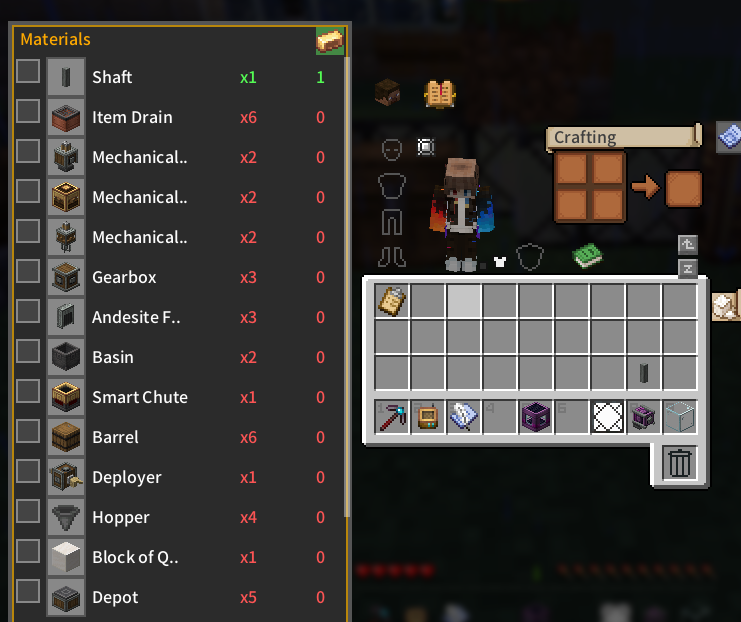
Displays a visual material list and inventory tracking for Create blueprints directly on container and inventory screens.
介绍
Mod Introduction
This project includes code developed with AI assistance and manually reviewed by the author.
Visual Blueprint Materials is a Create add-on that parses blueprint clipboard NBT data to display a visual material list and current inventory counts on inventory, chest, AE2, and RS terminal screens. The side panel intelligently positions itself to avoid overlapping with item slots or JEI, allowing players to track requirements, toggle collected or ignored items directly into the clipboard NBT, and lock the panel to auto-open with containers. It supports JEI recipe lookups via R/U keys and requires Minecraft 1.20.1, Forge 47.x, and Create 0.5.x or 6.x.
Authored by AlkSur under the MIT License, this project is free for personal and non-profit server use, while any commercial application, including paid modpacks or monetized servers, requires explicit written authorization.
Screenshots
常见问题
Visual Blueprint Materials 支持哪些 Minecraft 版本?
Visual Blueprint Materials 支持 Minecraft Java 版 1.20.1–1.21.1,共 2 个版本,可用的加载器:Forge / NeoForge。下载时注意选择和你游戏版本一致的文件。
Visual Blueprint Materials 怎么安装?
先用 PCL2 或 HMCL 启动器安装对应版本的 Forge / NeoForge,再把下载的 .jar 文件放进游戏目录的 mods 文件夹,重新启动游戏即可。开启了版本隔离的,mods 文件夹在 versions/版本名 下面。运行环境:仅客户端。

评论
登录后评论和评分