
Vecs Speak 512k AI
作者:Tagesbw
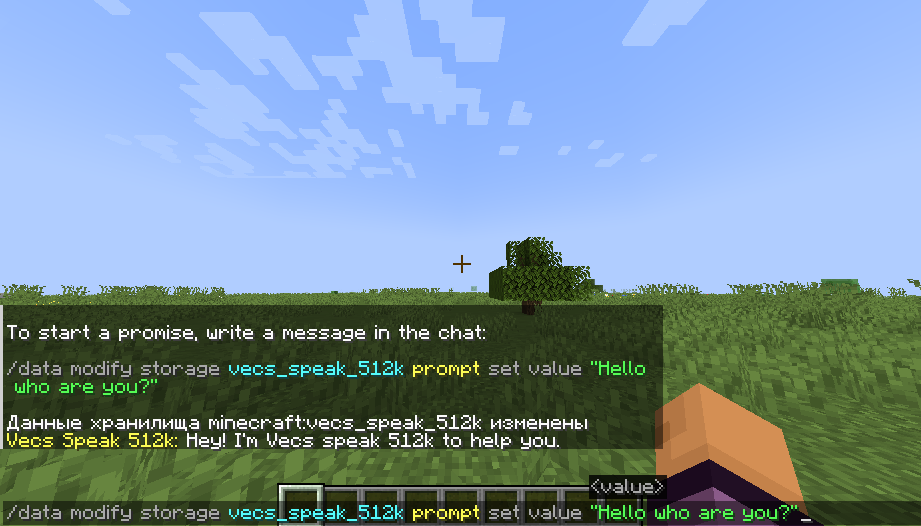
Vecs_Speak_512k is a simple artificial intelligence for Minecraft, implemented as a datapack.
截图
介绍
中文介绍正在准备中,下面暂时显示原文。
Vecs_Speak_512k is a simple artificial intelligence for Minecraft, implemented as a datapack.
It allows you to ask text questions directly in the game and receive answers related to Minecraft.
Works without mods and without an internet connection.
Features and limitations:
- Answers questions related to Minecraft (mechanics, history, basic guides).
- Fast response time, around 2 seconds on average.
- Fully offline operation.
- All functionality is contained within a single datapack.
- May make mistakes if there are typos in the query.
- Does not work well with questions unrelated to Minecraft.
CPU compatibility:
- Will struggle on: old Intel i3 CPUs and mobile U-series processors.
- Minimum required: AMD Ryzen 3 / Intel i3 10th generation.
- Recommended: AMD Ryzen 5 / Intel i5 and above.
Installation:
- Copy the datapack “[DataPack] Vecs_Speak_512k.zip” into the datapacks folder of your world.
- Enter the world or reload it using the /reload command.
- After the datapack is loaded, the AI is ready to use.

常见问题
Vecs Speak 512k AI 支持哪些 Minecraft 版本?
Vecs Speak 512k AI 支持 Minecraft Java 版 1.21–1.21.11,共 12 个版本。下载时注意选择和你游戏版本一致的文件。
Vecs Speak 512k AI 怎么安装?
新建世界时在「数据包」里把下载的 .zip 拖进去;已有的存档,把文件放进存档目录下的 datapacks 文件夹,进游戏输入 /reload 即可生效。服务器同样放在世界目录的 datapacks 里。
Tagesbw 的其他作品
查看全部 →
bodycam_RP
by Tagesbw
这个资源包能让游戏更加真实,营造出警察胸前摄像机的拍摄效果。
4,640
9 个月前
Modrinth

Bloom-Entity
by Tagesbw
此资源包为某些实体添加了泛光高亮效果。
1,344
9 个月前
Modrinth

Screamerpack RP
by Tagesbw
这个资源包将帮助你在原版 Minecraft 中恶作剧和吓唬你的朋友。
1,165
9 个月前
Modrinth

AutoBlink – by Tagesbw
by Tagesbw
This resource-pack/shader creates a natural blinking effect on players without the need for OptiFine or Sodium.
834
1 年前
Modrinth
评论
登录后评论和评分