
Ultra Hardcore Gamemode
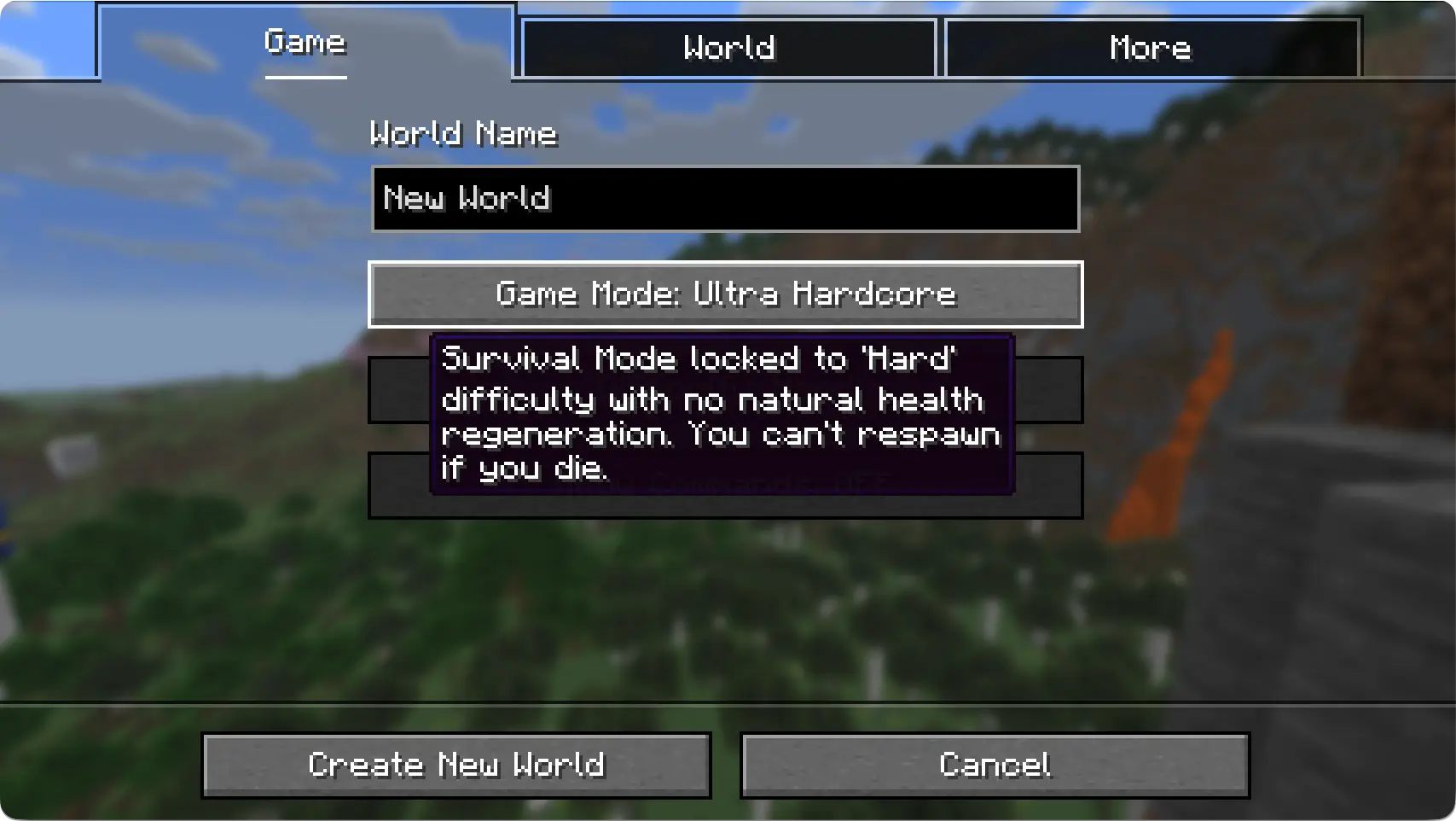
Adds an easy-to-use 'Ultra Hardcore' gamemode button. For the tryharders.
截图

介绍
Ultra Hardcore Gamemode (UHC)


Ever wished the game had a ‘Ultra Hardcore’ gamemode button ?
Well now it does.
_What the new UI looks like:_
FAQ
_Can I remove the mod after the world is generated?_
Yes you can, adding/removing the mod has absolutely no effect on existing worlds.
The mod works by automatically setting the naturalRegeneration gamerule to false. No need to feedle with settings. It’s just a QoL mod.
_The button doesn’t translate to my locale_
Currently only a few languages are supported. If you want to add your language to the mix, you can either ping me to make it available to everyone, or just make a resource pack with a selectWorld.gameMode.ultra_hardcore language key.
常见问题
Ultra Hardcore Gamemode 支持哪些 Minecraft 版本?
Ultra Hardcore Gamemode 支持 Minecraft Java 版 1.20–1.21.8,共 16 个版本,可用的加载器:Fabric。下载时注意选择和你游戏版本一致的文件。
Ultra Hardcore Gamemode 怎么安装?
先用 PCL2 或 HMCL 启动器安装对应版本的 Fabric,再把下载的 .jar 文件放进游戏目录的 mods 文件夹,重新启动游戏即可。开启了版本隔离的,mods 文件夹在 versions/版本名 下面。运行环境:客户端和服务端都要装。
ferdinandkeller 的其他作品
查看全部 →
Fix Jungle Saplings
Fixes Jungle Saplings drop rates to match other trees.
Hotbar Totems
Makes Totems of Undying work even when in hotbar!

Glow Glow Berries
Now Glow Berries give you a glowing effect!

Bane of Shulkers
Squash Shulkers like bugs! Now BoA works on Shulkers.
评论
登录后评论和评分