
Hit Timer
A mod that shows you the immunity frames left on a player so you can better time your hits
截图
介绍
Hit Timer
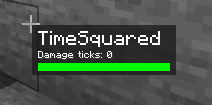
Hit timer is a must-have mod for Minecraft players who want to improve on their sword pvp, or crystal pvp skills. It visualizes the immunity frames (i-frames) the enemy has left before becoming vulnerable, making it easier to time your hits properly.
Features
- The mod comes with a nice-looking target HUD that shows the i-frames your target has using a progress bar
- You can customize the colors to anything you’d like, from white to black, and even from green to blue.
- The position is also freely customizable, allowing you to put it anywhere you want on your screen.
Requirements for installation
You need to install Tulip 1.2.1 for this mod to work properly, as it is the config manager that handles the custom configurations of the mod.
Configuration settings
Hit Timer offers a range of configuration settings that allow you to customize the mod to suit your preferences. You can change the colors of the progress bar, as well as its position on your screen. This makes it easy to position the display in an area with less clutter or center it on your screen for better visibility.
常见问题
Hit Timer 支持哪些 Minecraft 版本?
Hit Timer 支持 Minecraft Java 版 1.19.4,可用的加载器:Fabric。下载时注意选择和你游戏版本一致的文件。
Hit Timer 怎么安装?
先用 PCL2 或 HMCL 启动器安装对应版本的 Fabric,再把下载的 .jar 文件放进游戏目录的 mods 文件夹,重新启动游戏即可。开启了版本隔离的,mods 文件夹在 versions/版本名 下面。运行环境:仅客户端。
TimeSquared 的其他作品
查看全部 →
Totem NoRender
Stops the annoying totem pop animation from rendering

Tulip
A config library for Minecraft that makes it easy to handle saving and loading config data to and from config files
Totem Overlays
Shows a red customizable overlay on your screen when you aren't holding a totem in your main/offhand.
Confetti
This mod turns totem particles into confetti with random colors! You can change the color to your own custom color too! This mod supports 1.18.2, with many more versions coming in the future!
评论
登录后评论和评分