
Remote Access
Switch between nearby workstations instantly without closing your current crafting interface.
截图
介绍


Remote Access
Stop reopening workstations one by one.
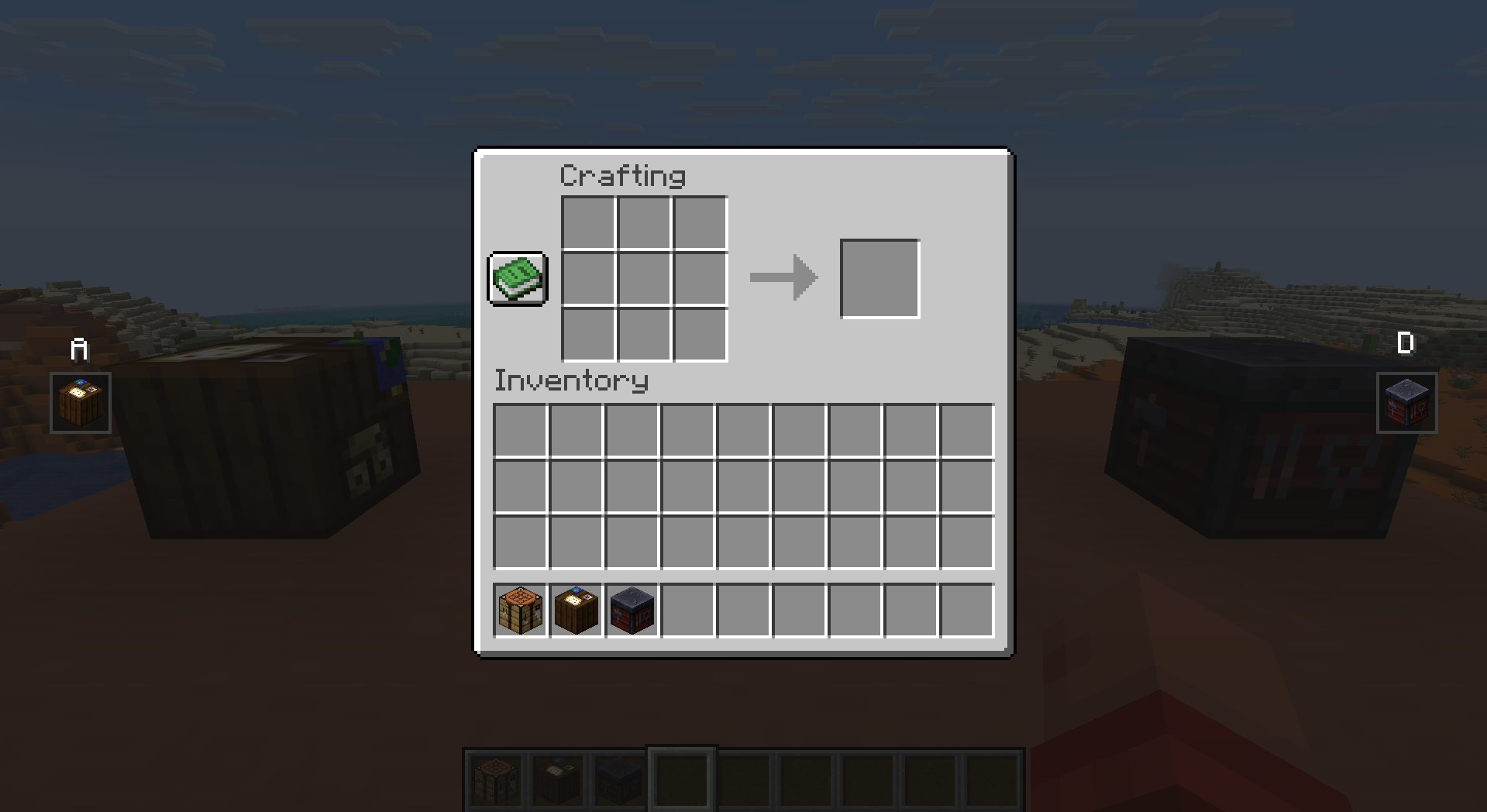
Side Access lets you seamlessly switch between nearby functional blocks directly from inside your current interface. Open a crafting table, then cycle to nearby anvils, enchanting tables, cartography tables, looms, smithing tables, stonecutters, and more without ever closing the screen.
When compatible workstations are detected nearby, small navigation icons appear on the left and right sides of your inventory screen. Press your configured keys to instantly move to the previous or next workstation in range.
Perfect for:
- compact workshop builds
- multiplayer bases
- technical crafting rooms
- builders with dense utility setups
Features
- Seamless workstation switching
- Minimal vanilla-style UI
- Configurable detection radius
- Configurable keybinds
- Supports multiple vanilla functional blocks
- Lightweight and performance-friendly
- Client-side quality of life improvement
Supported Workstations
- Crafting Table
- Anvil variants
- Enchanting Table
- Cartography Table
- Loom
- Stonecutter
- Smithing Table
- Grindstone
- Furnaces
- Blast Furnaces
- Smokers
- Brewing Stands
- More planned
Configuration
The mod includes configurable:
- workstation detection radius
- navigation keybinds
- icon size
- supported block behavior
Default detection radius:
radius = 5Designed to feel like a natural extension of Minecraft’s inventory system rather than a separate modded interface.


常见问题
Remote Access 支持哪些 Minecraft 版本?
Remote Access 支持 Minecraft Java 版 1.21.1–26.2,共 4 个版本,可用的加载器:Fabric / NeoForge。下载时注意选择和你游戏版本一致的文件。
Remote Access 怎么安装?
先用 PCL2 或 HMCL 启动器安装对应版本的 Fabric / NeoForge,再把下载的 .jar 文件放进游戏目录的 mods 文件夹,重新启动游戏即可。开启了版本隔离的,mods 文件夹在 versions/版本名 下面。运行环境:仅客户端。
Icywhenhot 的其他作品
查看全部 →
Icy’s Better Horses
Better Horses transforms vanilla horses into smarter, faster, and upgradeable companions.

Icy’s Better Horses
Better Horses reworks horses into long-term companions through better traversal, progression, and utility systems.

Take a Seat!
20+ sitting animations for an immersive experience!

Wavify
Adds ambient waves to beaches,oceans and rivers!
评论
登录后评论和评分