
Chat Hide X
Chat Hide X is a simple and lightweight Minecraft mod that lets you hide chat for a cleaner screen and better gameplay experience. It is made to be fast, easy to use, and have almost no performance impact.
截图


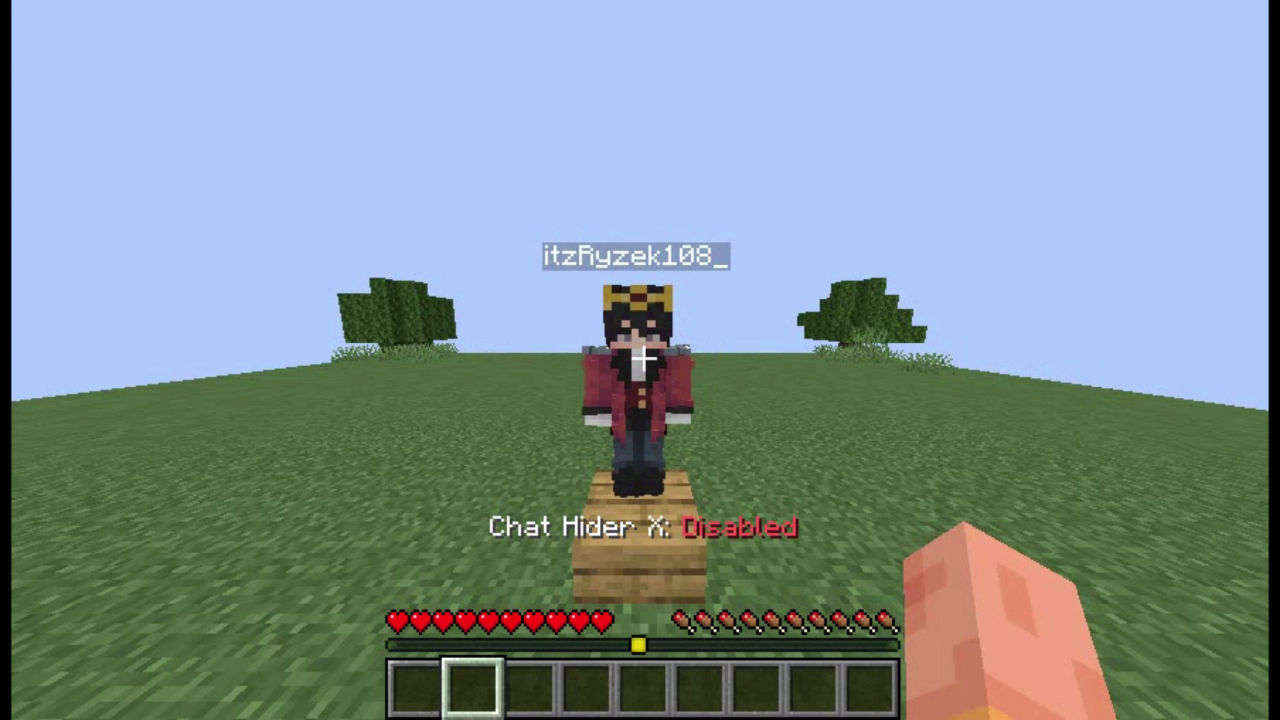

介绍
The status message shows the current chat status, not the mod status. “Chat Hide X: Enabled” means chat is visible and the mod is disabled. “Chat Hide X: Disabled” means chat is hidden and the mod is enabled.
Chat Hide X: Enabled — Chat is visible. The mod is disabled.
Chat Hide X: Disabled — Chat is hidden. The mod is enabled.
Chat Hide X improves your Minecraft experience by giving you an easy way to hide chat whenever you want. It keeps your screen clean, reduces distractions, and stays lightweight so you can enjoy smoother gameplay without extra performance loss.
For Creators
Chat Hide X is perfect for Minecraft creators who record videos, scripted scenes, or cinematic content. It helps remove distracting server chat spam, keeping your screen clean and making your recordings look more professional.
Features
・ Chat Toggle — Hide or show Minecraft chat instantly using the H key (changeable in Controls).
・ Custom Keybind — Choose your own key for toggling chat from the Minecraft keybind menu.
・ Clean Gameplay — Removes chat clutter when you want a clearer view.
・ Lightweight — Client-side mod with minimal performance impact.
常见问题
Chat Hide X 支持哪些 Minecraft 版本?
Chat Hide X 支持 Minecraft Java 版 1.21.10–26.2,共 3 个版本,可用的加载器:Fabric。下载时注意选择和你游戏版本一致的文件。
Chat Hide X 怎么安装?
先用 PCL2 或 HMCL 启动器安装对应版本的 Fabric,再把下载的 .jar 文件放进游戏目录的 mods 文件夹,重新启动游戏即可。开启了版本隔离的,mods 文件夹在 versions/版本名 下面。运行环境:仅客户端。

评论
登录后评论和评分