
截图


介绍

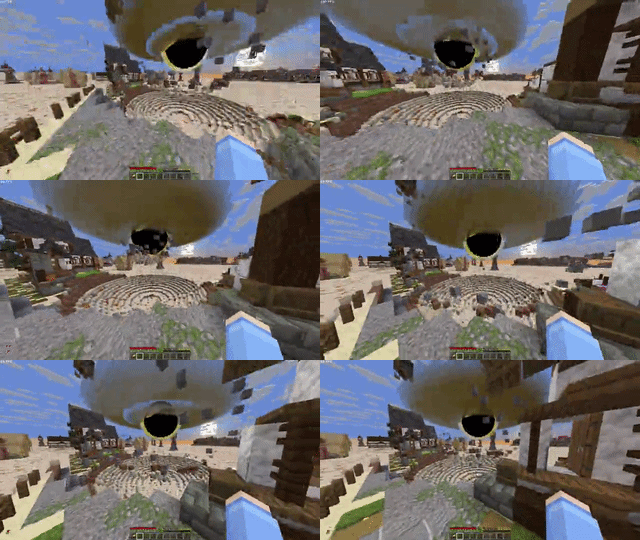
This Datapack adds a destructive Blackhole Launcher that fires a blackhole that will pull in any blocks or entities that come anywhere near it. The Blackhole will continue to grow the more it destroys.

How To Use
Hold right click to charge the blackhold launcher, after it’s done charging it will fire a small blackhole forward and will quickly expand after 2 seconds or once it hits something
How To Get The Item
There is currently no recipe but you can run “/loot give @s loot bhl:blackhole_launcher“
to spawn one in
Installation
Resource Pack
- Go to the versions tab and click the version you want to download and click Download Required Resourcepack.
- Open Minecraft and navigate to your Resorcepacks Menu.
- Drag & drop the resorcepack or click open Resorcepack Folder and drag & drop it there.
Singleplayer (Existing World)
Datapack
- Download the datapack .zip folder.
- Open Minecraft and navigate to your Singleplayer world list.
- Select the world you want to add it to, click Edit, and then click Open World Folder.
- Find and open the datapacks folder.
- Move or paste the downloaded .zip file into this folder (you do not need to unzip it).
Singleplayer (New World)
Datapack
- Download the datapack .zip folder.
- In Minecraft, go to Singleplayer and click Create New World.
- Navigate to the More tab at the top of the screen and click Data Packs.
- Drag and drop the downloaded .zip file directly into the Minecraft window, then click Yes to confirm.
- Hover over the datapack in the “Available” column and click the arrow to move it to the “Selected” column.
- Click Done and finish creating your world.
Multiplayer (Server)
Datapack
- Download the datapack .zip file.
- Access your server files through your server host’s web panel.
- Open your main world folder (usually named world, depending on your server settings).
- Open the datapacks folder.
- Upload the .zip file into the datapacks folder.
- Restart your server, or type /reload to load the datapack.
常见问题
Blackhole Launcher 支持哪些 Minecraft 版本?
Blackhole Launcher 支持 Minecraft Java 版 1.21.8–1.21.11,共 4 个版本。下载时注意选择和你游戏版本一致的文件。
Blackhole Launcher 怎么安装?
新建世界时在「数据包」里把下载的 .zip 拖进去;已有的存档,把文件放进存档目录下的 datapacks 文件夹,进游戏输入 /reload 即可生效。服务器同样放在世界目录的 datapacks 里。
TheDuckInBlue 的其他作品
查看全部 →
Orbital Strike Cannon + More Rods
为你的世界/服务器添加轨道 TNT 炮、箭矢炮和凋灵骷髅炮,以及狼和末影珍珠静滞棒。
Orbital Strike Cannon + More Rods (Datapack)
为你的地图/服务器添加轨道TNT炮、箭矢炮、凋灵骷髅炮,以及狼之法杖和末影珍珠停滞法杖。

SMP PvP Bots
与智能 PvP 机器人对战。

Basic Hacks
为你的 Minecraft 世界/服务器添加基础黑客功能
评论
登录后评论和评分