
截图
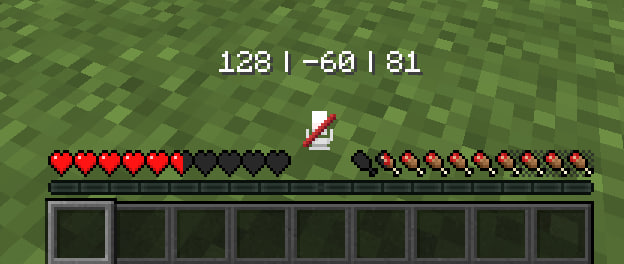
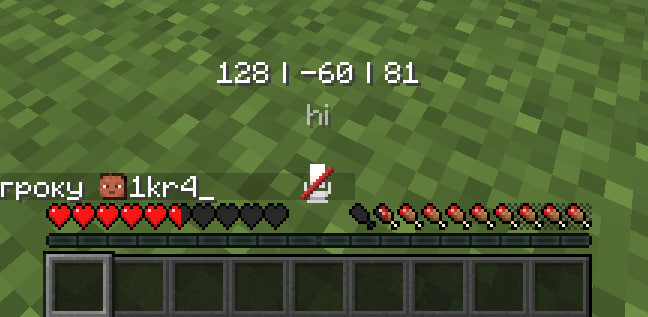
介绍
📍 Coords Action Bar
Minimalistic player coordinates displayed directly in the Action Bar.
✨ _Clean_ • _Simple_ • _No HUD clutter_ ✨
Requires Fabric API
🧭 What this mod does
This mod shows your player coordinates at the bottom of the screen in the Action Bar like this:
X | Y | Z
- Coordinates only
- White text
- Updates in real time
- No extra HUD elements
- Perfect for survival, building, and navigation
🔄 Smart Action Bar behavior
If another message appears in the Action Bar (for example from the game or another mod), Coords Action Bar automatically moves its coordinates slightly above so nothing overlaps.
As soon as the other message disappears, the coordinates return to their normal position.
⚙️ In-game settings & localization
The mod includes a settings screen:
- You have to use Mod Menu to open mod settings by pressing Coords Action Bar icon in the mod list
- Most settings are translated into many languages
- Simple and clean configuration
💡 Why use this?
- No need to open F3
- Keeps your screen clean
- Easy to read and note coordinates
- Fits perfectly into a vanilla-style experience
🔁 Feedback
If you found bugs or crashes you always can DM me on my
discord
常见问题
Coords Action Bar 支持哪些 Minecraft 版本?
Coords Action Bar 支持 Minecraft Java 版 1.19–26.1.2,共 27 个版本,可用的加载器:Fabric。下载时注意选择和你游戏版本一致的文件。
Coords Action Bar 怎么安装?
先用 PCL2 或 HMCL 启动器安装对应版本的 Fabric,再把下载的 .jar 文件放进游戏目录的 mods 文件夹,重新启动游戏即可。开启了版本隔离的,mods 文件夹在 versions/版本名 下面。运行环境:仅客户端。
评论
登录后评论和评分