
截图


介绍
Resource Pack required to correctly view the items in-game!

GearPlus is a group of small Data Packs that focuses on adding tools, weapons or armor to Minecraft to thematically and aesthetically diversify the range of acquirable gear without breaking the balance of the vanilla game experience.
The "Sculk module" adds the Sculk Transmuter, a new Smithing Template which can be used to convert Netherite equipment and the Mace into twisted counterparts made of Sculk!
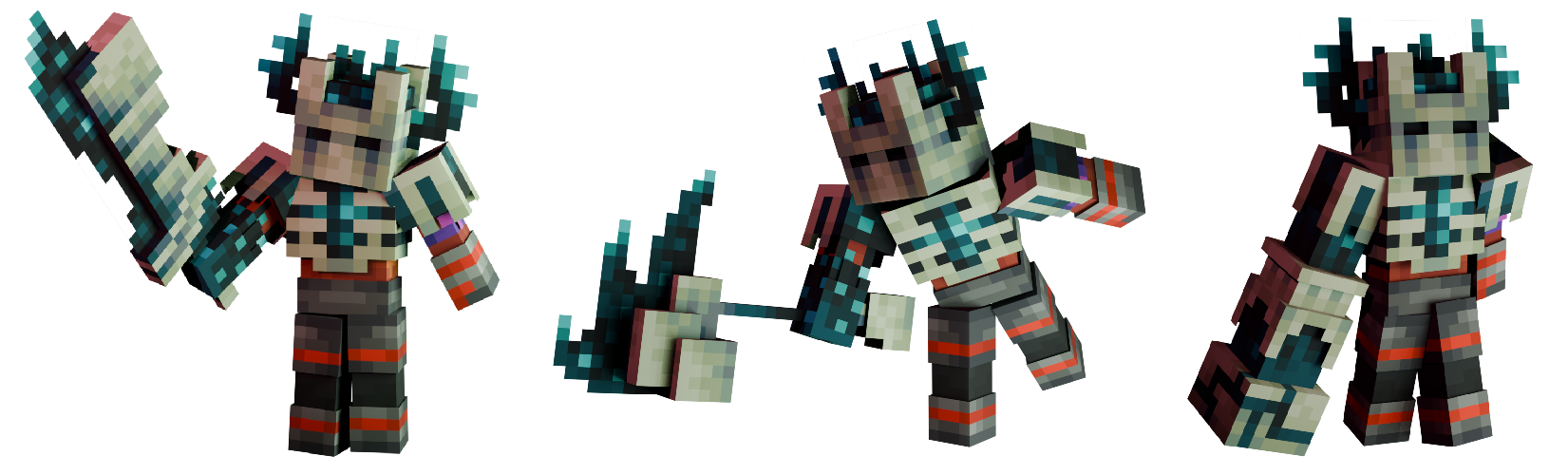
Sculk weapons, tools and armor work a bit differently than their base versions, each one of them granting a small buff whenever the player is near a Sculk Catalyst.
When outside of the range of action of Sculk Catalysts, most of the Sculk set gear has the same stats of their Netherite versions, with the exception of the Mace which has a set of debuffs to balance its huge Catalyst power.
Here is a small list of the Sculk Catalyst powers that the new items get when in the range of 9 blocks around a Catalyst:
- The Sculk Greatsword, transmuted version of the Netherite Sword, gets a small attack speed boost to strike faster!
- The Sculk Greataxe, transmuted version of the Netherite Axe, gets a small attack reach boost to strike farther!
- The Sculk Fungal Hammer, transmuted version of the Netherite Pickaxe, gets an attack damage boost to strike stronger!
- The Sculk Claw, transmuted version of the Netherite Shovel, boosts the player’s block interaction range!
- The Sculk Warped Arm, transmuted version of the Mace, makes the player jump a block higher!
- The Sculk Crown, transmuted version of the Netherite Helmet, grants immunity to the Darkness effect!
- The Sculk Carapace, transmuted version of the Netherite Chestplate, slightly boosts the block breaking speed of all tools!
Installation
To properly view and use the module, both the Data Pack and the Resource Pack must be installed.
To manually install the Data Pack, simply drop the corresponding .zip file in the ‘datapack’ folder inside your world folder.
To manually install the required Resource Pack, drop the corresponding .zip file in the ‘resourcepacks’ folder inside your main MC directory.
The module is extremely lightweight and is compatible with Multiplayer, as long as the Resource Pack is correctly loaded.
Currently supported versions: 1.21.2+
Support
If you like my Data Packs, Resource Packs or textures, consider donating, it would really mean a lot to me. If you are interested in commissioning any content, contact me on any available platform, I’ll try to reach out to you as fast as I can.
Suggestions for future Minecraft content are also well received. Thank you for taking a look at my content. 🙂
常见问题
G+ | Sculk Weapons and Tools 支持哪些 Minecraft 版本?
G+ | Sculk Weapons and Tools 支持 Minecraft Java 版 1.21.2–1.21.8,共 7 个版本。下载时注意选择和你游戏版本一致的文件。
G+ | Sculk Weapons and Tools 怎么安装?
新建世界时在「数据包」里把下载的 .zip 拖进去;已有的存档,把文件放进存档目录下的 datapacks 文件夹,进游戏输入 /reload 即可生效。服务器同样放在世界目录的 datapacks 里。
Napino 的其他作品
查看全部 →
Fancy End | End Aesthetic Overhaul
重新着色末地物品和方块,带来更清新、更紫的视觉体验!

Fancy Gear | Reshaded Equipment
Tools, weapons and armor overhaul, while mantaining the vanilla aesthetic! (Now with copper and spear compatibility!)

Antarchy
Adding 45+ mobs, 8+ bosses, 3 fleshed out dimensions, and more
Fancy Gear | Reshaded Equipment
Tools, weapons and armor overhaul, while mantaining the vanilla aesthetic! (Now with copper and spear compatibility!)
评论
登录后评论和评分