
截图
介绍
中文介绍正在准备中,下面暂时显示原文。
TAB Compass
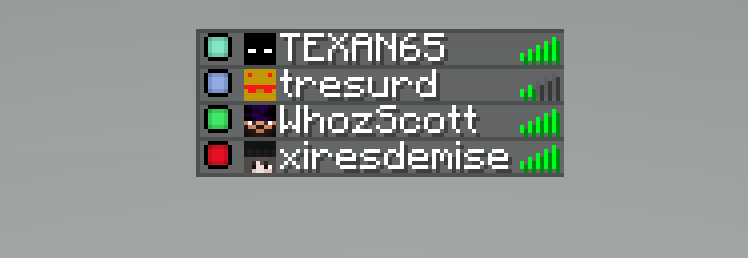
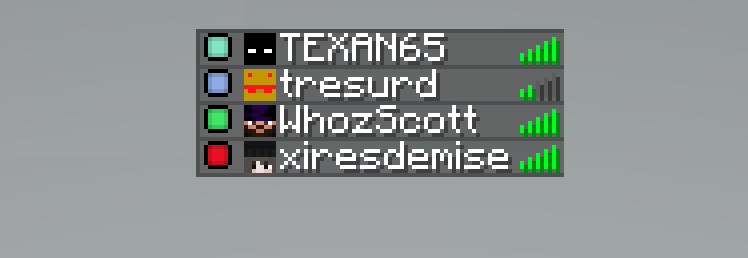
Shows each player’s locator-bar (compass) color as a small dot in the Tab player list.
Features
- Colored locator dots next to each player in Tab
- Matches the same colors as the vanilla locator bar
- Works with or without player heads shown
- Keeps normal username colors
- Keeps vanilla ping bars
- Client-side only
Supported versions
| Minecraft | Loaders |
|———–|———|
| 26.2 | Fabric, NeoForge |
| 26.1.x | Fabric, NeoForge |
| 1.21.11 | Fabric, NeoForge |
| 1.21.9–1.21.10 | Fabric, NeoForge |
| 1.21.6–1.21.8 | Fabric, NeoForge |
Locator-bar colors exist from 1.21.6 onward, so older versions are not supported.
Install
- Install Fabric or NeoForge for your Minecraft version
- (Fabric) Install Fabric API
- Drop the matching TAB Compass jar into your
modsfolder
Notes
- Each player who wants the dots needs the mod installed (client-side)
- Quilt usually works with the Fabric jar
常见问题
TAB Compass 支持哪些 Minecraft 版本?
TAB Compass 支持 Minecraft Java 版 1.21.6–26.2,共 10 个版本,可用的加载器:Fabric / NeoForge。下载时注意选择和你游戏版本一致的文件。
TAB Compass 怎么安装?
先用 PCL2 或 HMCL 启动器安装对应版本的 Fabric / NeoForge,再把下载的 .jar 文件放进游戏目录的 mods 文件夹,重新启动游戏即可。开启了版本隔离的,mods 文件夹在 versions/版本名 下面。运行环境:仅客户端。
评论
登录后评论和评分