截图
介绍
Player Locator Plus
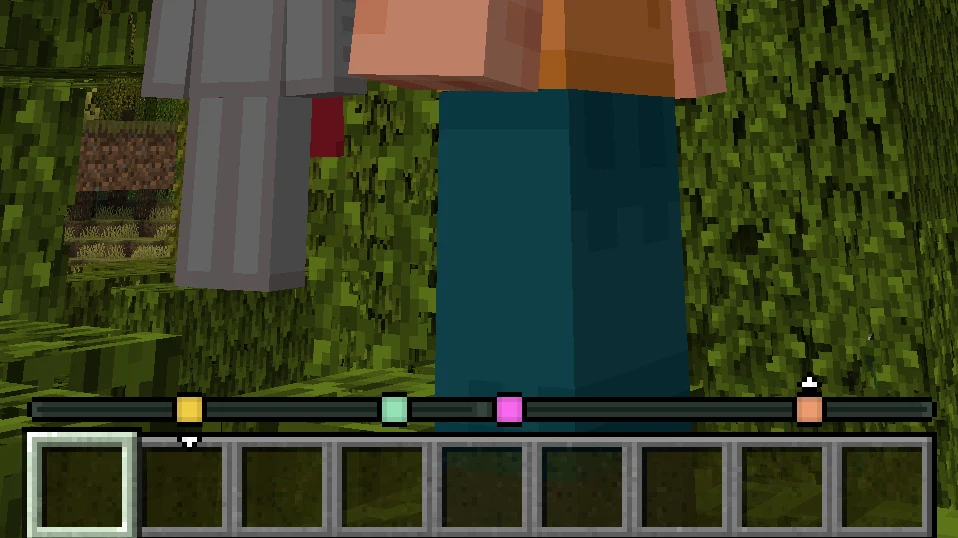
Track other players’ locations on your experience bar like a compass!


NOTE: This is an unofficial port to 26.1.2 and 26.2 by Notenlish. Original project is PlayerLocatorPlus by @sit.
Marker colors
By default, each player’s color is determined randomly by their UUID. There are other options in the config (see below).
Distance fade
When a player is very far away, their marker starts to fade:

Disappearing
There are three ways to hide from the player locator:
- Crouching
- Wearing a carved pumpkin
- Having the invisibility effect

Configuration
The config is available at config/player-locator-plus.toml.
You can also access the configuration screen with Mod Menu.
Server parameters:
enabled: Is the mod enabled server-side at all. Note that the bar will still be visible ifvisibleis true. Default:truesendServerConfig: Whether the server will try to force its config on the client. This will only have effect if the clients haveacceptServerConfigset to true. Default:truesendDistance: Whether to send distance information along with the direction information.
There’s basically no point in settings this to false, as players can still easily
triangulate the exact location of others even without knowing the distance.
However, it is harder with this option on, especially if you consider that other players
move.
Default: true
maxDistance: The maximum distance at which other players are visible on the compass.
Default: 0 (unlimited)
directionPrecision: The amount of segments the direction vector is split into. Decreasing this value significantly will make tracking way more inaccurate but be helpful in preventing triangulation. Default:300ticksBetweenUpdates: How many ticks apart are the compass updates.
The less, the smoother the movements of faraway players are.
Close players (inside the entity render distance) do not depend on this parameter as much.
Default: 5 (four times per second)
sneakingHides: Whether sneaking hides players from the locator. Default:truepumpkinHides: Whether wearing a pumpkin (or any othergaze_disguise_equipment) hides
players from the locator.
Default: true
mobHeadsHide: Whether wearing a mob/player head hides players from the locator. The exact list can be edited with a datapack by changingdata/player-locator-plus/tags/item/hiding_equipment.json(see default here). Default:trueinvisibilityHides: Whether being invisible hides players from the locator. Default:truecolorMode: How to determine the color of the markers. Vanilla waypoints always override this setting. Available modes:UUID(default): Assign a random color based on the UUID of the player.TEAM_COLOR: Use the color of the player’s team (or white)CUSTOM: Allow every player to assign a color with the/plp colorcommandCONSTANT: Everyone has the same color from theconstantColoroptionconstantColor: Color used whencolorModeisCONSTANT. Default:0xFFFFFF(white)allowVanillaLocatorBar: Allow sending waypoint to vanilla players without the mod. Default:true
Client parameters:
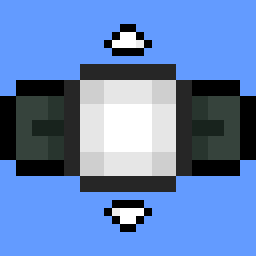
visible: Show the player locator. Default:truevisibleEmpty: Show the player locator even there are no players online and no markers in sight. Default:falseacceptServerConfig: Whether to override the client-side config with the server-side one. The server config will also be able set client parameters. Default:truefadeMarkers: Fade markers of faraway players. Default:truefadeStart: At what distance the markers start to fade. Default:100fadeEnd: At what distance the markers stop fading and settle atfadeEndOpacity. Default:1000fadeEndOpacity: The final opacity when/afterfadeEndis reached. Default:0.3showHeight: Show little arrows above/below a marker if the height difference is significant.
Default: true
alwaysShowHeads: Always show player heads, regardless of whether Tab is pressed. Default:falseshowHeadsOnTab: Show player heads when Tab is pressed. Default:trueshowNamesOnTab: Show player names when Tab is pressed. Default:trueshowVanillaWaypoints: Show custom waypoints created by adding thewaypoint_transmit_rangeattribute. Default:true
Acknowledgements
Originally introduced in Minecraft: Bedrock Edition Preview here, covered by Phoenix SC.
Known issues
- Major versions (1.x.x and 2.x.x) are NOT compatible! At least the major version must match between the server and the client.
License
Player Locator Plus is licensed under the GNU General Public License Version 3 or later.
常见问题
PlayerLocatorPlus 26.1 Port 支持哪些 Minecraft 版本?
PlayerLocatorPlus 26.1 Port 支持 Minecraft Java 版 26.1.2–26.2,共 2 个版本,可用的加载器:Fabric。下载时注意选择和你游戏版本一致的文件。
PlayerLocatorPlus 26.1 Port 怎么安装?
先用 PCL2 或 HMCL 启动器安装对应版本的 Fabric,再把下载的 .jar 文件放进游戏目录的 mods 文件夹,重新启动游戏即可。开启了版本隔离的,mods 文件夹在 versions/版本名 下面。运行环境:客户端 / 服务端。
notenlish 的其他作品
查看全部 →
Static Shader
添加 VHS 效果、柔和阴影、泛光和波浪水面的光影。 试图让画面呈现出用 PSP/初代 iPhone 拍摄的老照片风格。

Endless Elytra
鞘翅无限耐久。天空任你翱翔。

Useful Stacks
Bigger stack sizes to 64 and 16. Makes some non-stackable items stack.

VillagersB
Couple of quality-of-life features for villagers.
评论
登录后评论和评分