
Invisible Minecarts (DataPack Library)
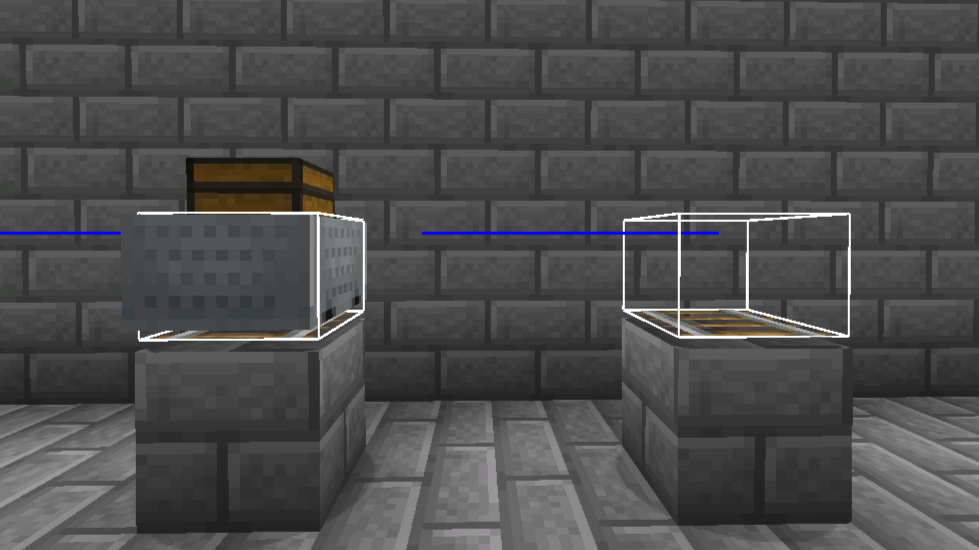
This DataPack Library allow you to summon invisible minecarts without affecting normal ones (they will still be visible).
截图
介绍
This DataPack Library allow you to summon invisible minecarts without affecting normal ones (they will still be visible).
Useful for adding custom UI / Inventories by summoning one of these in front of the player.
USAGE:
To summon a new invisible chest minecart run the next command:
/function im_3:summon_invisible/chest_minecart {pos:"~ ~ ~", noGravity:"true", silent:"true", invulnerable:"true", tags:""}You can change pos, noGravity, silent, invulnerable and add tags to customize your minecarts:
- pos: x y z coordinates (integers and/or ‘~’)
- noGravity, silent and invulnerable: true or false
- tags: custom tags separated with comas
You can also turn a normal minecart into an invisible minecart just by adding the tag “invisible_minecart” and removing, if it has, the “im_set” one.
Rest of minecart types are coming in a future DataPack versión.
Credits to _Misode_.
常见问题
Invisible Minecarts (DataPack Library) 支持哪些 Minecraft 版本?
Invisible Minecarts (DataPack Library) 支持 Minecraft Java 版 1.20.2–1.20.4,共 3 个版本。下载时注意选择和你游戏版本一致的文件。
Invisible Minecarts (DataPack Library) 怎么安装?
新建世界时在「数据包」里把下载的 .zip 拖进去;已有的存档,把文件放进存档目录下的 datapacks 文件夹,进游戏输入 /reload 即可生效。服务器同样放在世界目录的 datapacks 里。
XAVI333 的其他作品
查看全部 →
Chunk Pregenerator
探索时不再卡顿! 提前加载区块,尽情享受探索乐趣。

Way to Grave
死亡后将物品安全保存在墓穴中。

Custom Elytra ResourcePack
Custom Elytra 数据包的官方资源包。

Custom Elytra DataPack
无需披风,也能展示任意鞘翅皮肤。只需在铁砧中重命名即可。 无需 OptiFine!
评论
登录后评论和评分