
Chosen Enchants
作者:Surrender
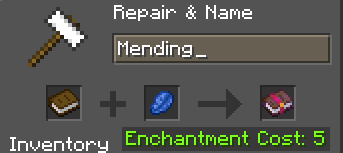
Mod that lets you choose your enchants using an anvil! All you have to do is add a one book, one lapis, have 5 levels, and type in the enchantment you want!
截图
介绍
中文介绍正在准备中,下面暂时显示原文。
Chosen Enchants Mod
The Chosen Enchants mod enhances the enchantment process in Minecraft by allowing players to obtain specific enchanted books directly from an anvil. Instead of relying on chance or randomization, players can now create enchanted books with their desired enchantments simply by renaming a regular book in an anvil.
How It Works
- Renaming the Book: To utilize this feature, players must first acquire a regular book. Using an anvil, they can rename the book to match the name of the desired enchantment. For example, renaming the book to “Sharpness” will result in an enchanted book with the Sharpness enchantment.
- Adding Lapis Lazuli: In addition to the renamed book, players need to include lapis lazuli in the anvil’s input slots, as they would for any regular enchantment process.
- Obtaining the Enchanted Book: Once the renamed book and lapis lazuli are placed in the anvil, the resulting output will be the corresponding enchanted book. The enchantment level of the book will be fixed at level 1.
- Usage: Players can then use the enchanted book as they normally would, applying it to their desired items using an anvil or enchantment table.
常见问题
Chosen Enchants 支持哪些 Minecraft 版本?
Chosen Enchants 支持 Minecraft Java 版 1.20.4,可用的加载器:Fabric。下载时注意选择和你游戏版本一致的文件。
Chosen Enchants 怎么安装?
先用 PCL2 或 HMCL 启动器安装对应版本的 Fabric,再把下载的 .jar 文件放进游戏目录的 mods 文件夹,重新启动游戏即可。开启了版本隔离的,mods 文件夹在 versions/版本名 下面。运行环境:仅服务端。


评论
登录后评论和评分