
截图


介绍

AMS Easy Coordinates gives you quick access to your in-game XYZ coordinates right on the screen. It also allows you to quickly share your coordinates with other players via chat.
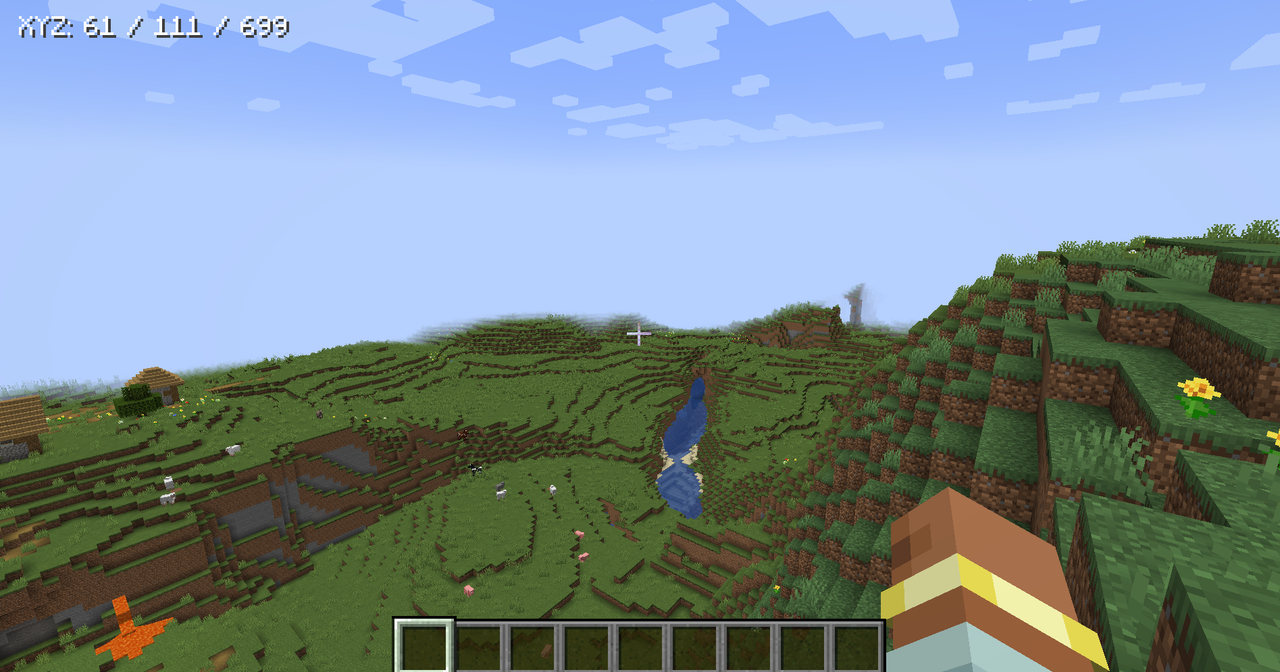
It is intentionally simple: no minimap, no waypoints, no server requirement, and no multiplayer chat spam. Toggle the display on or off, choose where it appears at the top of the screen, and adjust the text size through the generated client config.
Features:
- Client-side coordinates HUD.
- Toggleable display.
- Top-left, top-center, and top-right placement.
- Configurable text size.
- Hidden while the debug/F3 screen is open.
- No server install required.
Note:
Verions below 2.0.0 of AMS Easy Coordinates allowed players to share coordinates through chat. That feature has been removed on 2.0.0+ so this mod can stay focused on a clean client-side HUD. If you want multiplayer location pings, install AMS Pings, which is built for richer player, block, and item pinging.
If you enjoy this mod, consider supporting my work.
常见问题
AMS Easy Coordinates 支持哪些 Minecraft 版本?
AMS Easy Coordinates 支持 Minecraft Java 版 1.20.1–1.21.1,共 7 个版本,可用的加载器:Fabric / Forge / NeoForge。下载时注意选择和你游戏版本一致的文件。
AMS Easy Coordinates 怎么安装?
先用 PCL2 或 HMCL 启动器安装对应版本的 Fabric / Forge / NeoForge,再把下载的 .jar 文件放进游戏目录的 mods 文件夹,重新启动游戏即可。开启了版本隔离的,mods 文件夹在 versions/版本名 下面。运行环境:客户端和服务端都要装。


评论
登录后评论和评分