
截图
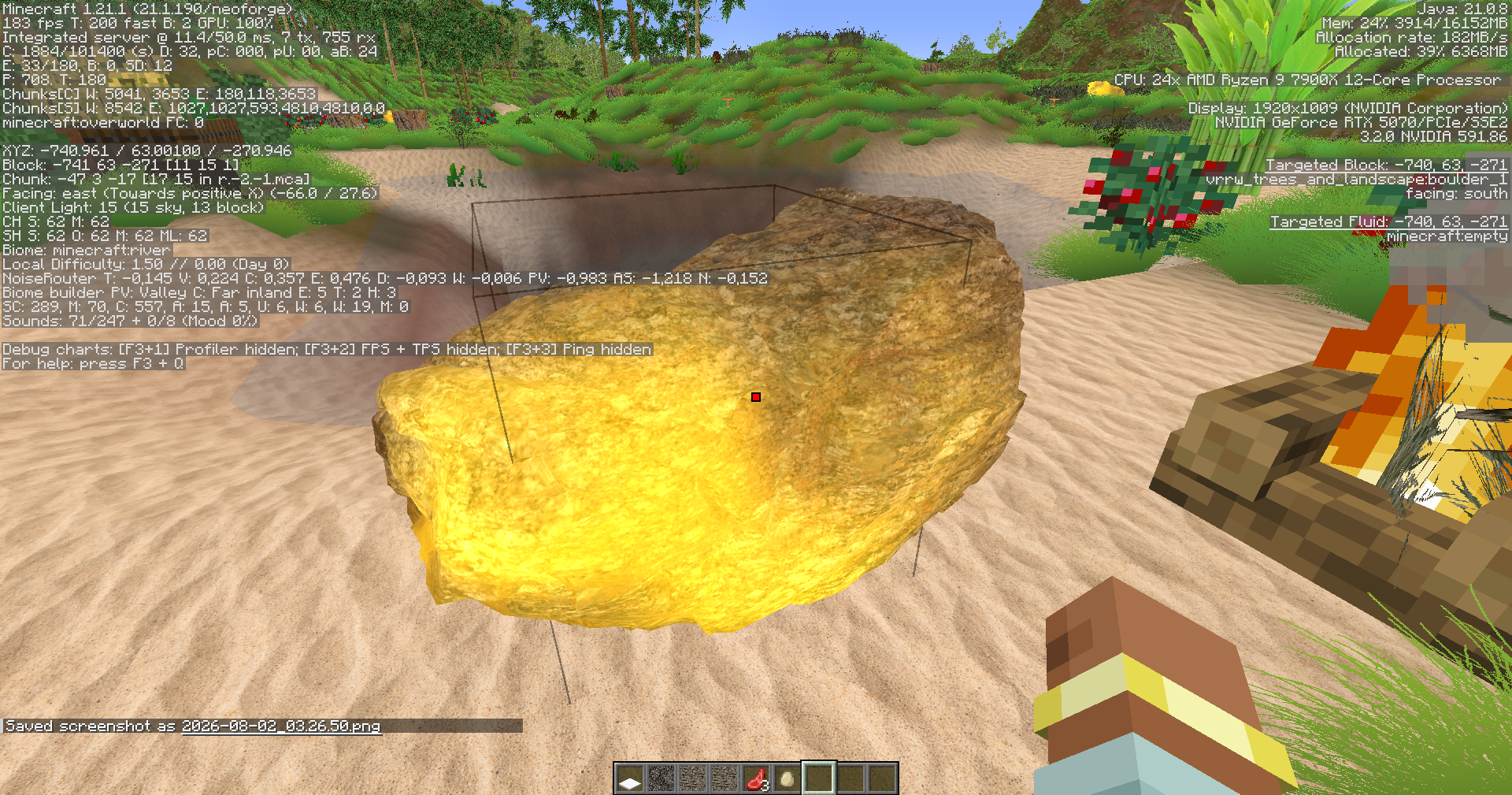
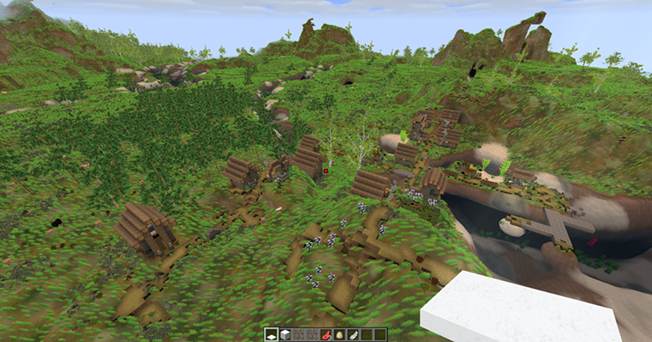
介绍
🌿 VRRW OVERWORLD
🎨 Vote live on the next style and art questions – help decide how VRRW Overworld looks next.
| 🌐 VRRW.online → Free mods, news & guides |
🟣 Twitch → Live dev, polls & giveaways |
💚 Kick → Live dev, polls & giveaways |
▶️ YouTube → Showcases & dev videos |
||||||||
| 🔴 Live Actions → Live events & gifts |
🎁 Offers → Quizzes & challenge programs |
❓ Reddit Q&A → Ask, share & discuss |
💜 Patreon → Support development |
Community-driven VRRW: give feedback, vote in polls during selected livestreams, join feature suggestion rounds and react to new ideas with Blitz Reactions. AI Reborn also has built-in voting, suggestion and bug-report tools.
🌄 A MORE REALISTIC & LIVING MINECRAFT OVERWORLD
Redesigned foliage, trees, vegetation, rocks and natural surface detail combined with VRRW’s own visual and shader systems.
Denser forests. More natural vegetation. Stronger atmosphere. VRRW Overworld is for players who want a richer, more detailed Overworld that still feels like Minecraft – rendered by VRRW’s own shader system instead of a third-party shader pack.
- 🌳 Realistic trees built from trunk and branch parts – and the wood stays harvestable
- 🌿 Dense grass, flowers, bushes and rocks across the Overworld
- 🌤️ VRRW atmosphere: custom clouds, procedural sun, light rays, waterfalls and volumetric fire
- 🥽 VR optional – no headset needed
⚠️ REQUIRED: VRRW Animation – OBJ Anim (free). VRRW Overworld uses the OBJ Anim model, tool and Smooth Terrain / SurfaceNet pipeline. Install both mods and always update them together.
💾 HARDWARE AT A GLANCE
VRRW Overworld + OBJ Anim with SurfaceNet terrain – creator values:
| Your setup | GPU memory (VRAM) |
| — | — |
| 🌄 SurfaceNet terrain with vanilla textures | about 1 GB – but more GPU work than flat vanilla blocks |
| 🐾 + the optional animated Entity Pack (300–400 MB) | about 2–3 GB, depending on texture resolution |
| 🏆 Full look: SurfaceNet + animated entities + Gold-level texture pack | about 3 GB |
| 🏙️ + Nations & Villagers – AI Reborn | only about +200 MB more |
- 🧠 RAM: give Minecraft at least 6 GB – 10–12 GB is better for Gold-level texture packs.
- 🎮 GPU: GTX 1060 class as a minimum, RTX 2050 class or newer as a better target. Smooth SurfaceNet terrain keeps VRAM low, but the GPU works harder than with flat vanilla blocks.
- 🎨 Texture levels: Copper, Silver and Gold – a lower level needs less VRAM.
- Guidance values, not guarantees. The Entity Pack and texture packs are optional – everything is fully playable without them.
🎁 FREE WITH VRRW
- ✅ VRRW Overworld is free – download it right here on Modrinth. OBJ Anim (required) and AI Reborn are free too.
- 🎁 Texture-pack gifts at selected live events – giveaway codes, chat prizes or, when offered, Channel Points rewards on Twitch and Kick. Free giveaways need no channel subscription. Redeem them with a free VRRW account on the VRRW Twitch or Kick page, then download the pack under “Library” in the texture shop. All steps →
- ⭐ VRRW Points – website points, not Channel Points; live prizes can also pay out in points. No plan? Signed-in members can unlock individual texture-pack versions with them. About VRRW Points →
- 🧩 Offers – long-term quizzes and challenge programs on VRRW Offers whenever they run.
Each stream round decides what is offered. Entering is not winning – prizes are reserved after the draw and claimed on the website.
Texture packs are optional extras. You never need one to play VRRW Overworld.
▶️ WATCH VRRW IN ACTION
🎬 More: VRRW Overworld & OBJ Anim showcase · all videos on YouTube
🔥 WHAT VRRW OVERWORLD CHANGES
- 🌳 Trees – redesigned oak, birch, dark oak, spruce, acacia and palm trees built from trunk and branch parts. Wood stays harvestable. Distant trees switch to impostors, so forests stay visible at high render distances.
- 🍃 Wind & seasons – leaves sway in the wind with adjustable strength and speed; seasonal leaf colors can be switched on.
- 🌱 Grass – dense instanced grass with adjustable density and blades per block, colored by biome.
- 🌸 Flowers & plants – new flowers, bushes, ferns, nettles and cacti. Many of them craft into dyes.
- 🪨 Ground detail – rocks, boulders, dry branches, stumps and shells.
- 🍄 Mushroom fields & dripstone – redesigned mushroom-field visuals and new dripstone formations.
- 💧 Water – VRRW waterfalls with foam, plus water waves.
- 🌤️ Sky & atmosphere – custom, weather-aware clouds, a procedural sun and light shafts.
- 🔥 Fire & smoke – volumetric fire, smoke and explosions.
- 🌓 Light & shadow – tree silhouette and mountain shadows, temporal anti-aliasing (TAA), PBR and parallax.
- ✨ Custom shader effects – PBR effects on any block, pattern and depth effects on blocks, JSON and OBJ models – or simply use the presets.
- 🌵 Nature that bites – cacti and nettles hurt players and mobs on contact.
- 🧱 Lots to build with – 10 VRRW creative tabs: Automation, Buildings, Items, Ocean, Props, Village, Furniture, Groundparts, Plants and Trees.
- 👹 A boss – the Giant Club Boss, with its own spawn egg.
🎨 Rounded, organic plant and model shapes – while keeping a Minecraft-inspired texture style.
⚡ PERFORMANCE EXAMPLE
Creator’s test system: RTX 5070 · Ryzen 9 7900X
| Render distance | Observed FPS |
| — | — |
| 32 | ~60–100 |
| 16 | ~200–300 |
| 6–8 | ~400–500 |
⚠️ Example results from one test system, not guaranteed FPS. Your results depend on GPU, CPU, screen resolution, render distance, presets, texture resolution, other mods, drivers and Java memory.
Need more FPS? Press F7 → Graphics → Presets → LOW – Maximum FPS, lower the render distance or use a lower texture-pack resolution.
⚙️ REQUIREMENTS & INSTALLATION
| | |
| — | — |
| Minecraft | Java Edition 1.21.1 |
| Loader | NeoForge 21.1.190 or newer |
| Required mod | VRRW Animation – OBJ Anim – install and update both together |
| Side | Client and server – multiplayer servers need both mods too |
| Download size | about 103 MB |
| VR | Optional – no headset needed |
- Install NeoForge 21.1.190 or newer for Minecraft 1.21.1.
- Put the VRRW Overworld and OBJ Anim
.jarfiles into yourmodsfolder (client – and server for multiplayer). - Give Minecraft at least 6 GB RAM in your launcher’s Java / memory settings.
- Start the game, press
F7→ Graphics → Presets and pick LOW, MEDIUM or HIGH. - Create a new world or explore new chunks to see the new vegetation.
🔌 COMPATIBILITY
- Sodium / Embeddium: not required – VRRW has its own shader system. If either is installed, it takes over terrain rendering and VRRW’s own terrain shaders stay off. For the full VRRW look, play without them.
- Iris shader packs: while a shader pack is active, VRRW switches off its own terrain shaders, waterfall pass, clouds, sky, TAA and horizon shadows so the two systems don’t clash. For the intended look, turn the shader pack off.
- AI Reborn: optional. In single-player, seasonal leaves follow AI Reborn’s seasons when it is installed; otherwise they use a built-in 365-day cycle.
- ⌨️ Shared default keys: the VRRW mods share some default keys – for example
O,P,M,F6andV(AI Reborn / OBJ Anim) andF7,F8(AI Reborn / VRRW Overworld). Rebind them under Options → Controls. OBJ Anim’s climb grip always reacts toV, so move AI Reborn’s push-to-talk to another key. VRRW Options also open from the pause menu. - Back up important worlds before updating.
📚 EXPLORE VRRW OVERWORLD
Open a section for the details.
🎛️ VRRW OPTIONS (F7) – EVERY GRAPHICS TAB
Open VRRW Options with F7 or the VRRW Options button in the pause menu. Graphics has 16 tabs plus Presets (LOW – Maximum FPS, MEDIUM – Balanced, HIGH – Best Quality):
| Tab | What you control |
| — | — |
| Shading | TAA and sharpness, procedural sun (size, intensity) |
| Water / Lava | VRRW waterfalls (flow, foam, mist), water color, clarity, waves, reflections and surface foam; VRRW lava with flow, glow, crust, embers and sparks |
| Lighting | light shafts, sun rays and glare – weather- and biome-aware |
| Shadows | fast shadows, tree silhouettes, terrain and mountain shadows |
| Trees | near trees, impostors, leaf movement, season leaves, distances, tree presets Fast / Balanced / Quality |
| Grass | grass on/off, density, blades per block, biome grass & textures |
| PBR | per-block PBR effects (effect, glitter, height) with block search |
| Depth | depth effects for ordinary blocks or per block, JSON and OBJ |
| Crosshair | crosshair style, color and size |
| Anim. | shortcuts to the OBJ Anim terrain / LOD, collision and editor settings |
| Clouds | quality Low to Ultra, amount, speed, height, scale, opacity, storms |
| Fire / Effects | volumetric fire, smoke and explosions |
| Web | cobweb replacement |
| Pattern | pattern effects assigned to blocks, JSON or OBJ models |
Performance (next to Graphics): instancing, frustum culling, mesh LOD, density culling, instance cap and LOD distances. Changes apply immediately.
🎮 GAMEPLAY INTERACTIONS
- 🪵 Trees – generated trees give harvestable wood.
- 🎨 Dyes – VRRW flowers, cacti and nettles craft into blue, green, lime, magenta, pink, purple, white and yellow dye.
- 🌵 Cacti & nettles – damage players and mobs on contact.
- 💧 Dripstone – generated dripstone formations can provide dripstone blocks.
- 🍄 Mushroom fields – get their own VRRW look instead of the vanilla presentation.
- 🐝 Bees & flowers – new bee and flower generation is in development and may still change.
🌤️ VRRW SHADER & ATMOSPHERE
VRRW Overworld’s look is built around its own rendering pipeline. It is developed together with the VRRW Overworld visuals, so terrain, foliage and atmosphere react as one scene instead of a flat overlay on top of Minecraft.
The pipeline includes or is being developed around:
- depth-aware effects that use scene depth information
- effect masks that apply effects only where they belong – terrain, foliage or selected blocks
- custom clouds that interact with lighting and weather
- procedural sun and sky, volumetric light shafts
- depth-based atmosphere and distance effects
- temporal anti-aliasing and post-processing tied to the rendered world
🌄 VRRW Overworld is not designed around a third-party shader pack. The long-term goal is one connected VRRW visual system built for the project.
⌨️ HOTKEYS & SETTINGS FILES
| Key / place | What it does |
| — | — |
| F7 | opens VRRW Options (Graphics, Performance) |
| Pause menu → VRRW Options | same menu |
| F8 | cycles shader debug views – keep it on OFF for normal play |
| config/vrrw_trees_and_landscape-client.toml | your graphics settings |
Both keys can be changed in Minecraft’s Controls under VRRW Mod.
❓ FAQ
Do I need a shader pack? No. VRRW Overworld brings its own shader system. An active Iris shader pack switches parts of it off.
Do I need texture packs? No. Texture packs are optional extras – the mod is complete without them.
Why is OBJ Anim required? VRRW Overworld uses OBJ Anim’s model, tool and Smooth Terrain / SurfaceNet pipeline. Both mods are developed as one visual setup.
My FPS is low – what helps? F7 → Graphics → Presets → LOW, a lower render distance, a lower texture resolution and enough RAM (at least 6 GB). SurfaceNet terrain costs extra GPU time – you can switch it off for a world (/objanim surfacenet off, or on the Create World screen).
Why does the mod list say “VRRW Overworld 1.5”? That is the in-game name and file version (vrrw_overworld-1.5.jar); Modrinth numbers its versions separately (currently 5.6).
Can I put VRRW Overworld in my modpack? Only with written permission – see the license below.
Where can I ask questions? On Reddit Q&A or live on Twitch and Kick.
🌍 JOIN THE VRRW COMMUNITY
Follow live development on Twitch or Kick and vote on what comes next. The community pages show the stream schedule and channel recommendations – and that’s where you redeem live gifts.
- 🟣 Twitch community & stream schedule →
- 💚 Kick community & stream schedule →
- 🔴 Community Live Actions – current activities & gifts →
- 📰 VRRW News →
- ❓ Questions? r/MinecraftVRRW →
🌐 MORE FROM VRRW
- 🏙️ Nations & Villagers – AI Reborn → – AI citizens, settlements, nations, economy and diplomacy in one connected world.
- ✨ VRRW Animation – OBJ Anim → – the 3D model and animation toolkit: import OBJ models, animate entities and props, edit models in-game and play on smooth SurfaceNet terrain.
- 🌌 VRRW Unlimited – all three mods in one modpack. Coming soon.
🌿 VRRW Overworld = environment and visuals · ✨ OBJ Anim = models and animation · 🏙️ AI Reborn = civilization and connected gameplay
🎨 OPTIONAL: VRRW TEXTURE PACKS
VRRW also makes realistic texture packs in three resolution levels – Copper, Silver and Gold – with the same content; a lower level needs less VRAM. They are offered separately in the VRRW texture shop and are not required for VRRW Overworld. The packs include a VRRW Overworld series.
📜 License: All Rights Reserved © BasteGK. Free for personal, non-commercial gameplay, including private servers for personal use. No re-uploads or redistribution; modpack inclusion only with written permission – ask via vrrw.online.
🖥️ Affiliate link: need a server for VRRW? Kinetic Hosting – code VRRW.
⚖️ Not an official Minecraft product. Not approved by or associated with Mojang or Microsoft.
常见问题
VRRW Overworld / Foliage and Trees 支持哪些 Minecraft 版本?
VRRW Overworld / Foliage and Trees 支持 Minecraft Java 版 1.21.1,可用的加载器:NeoForge。下载时注意选择和你游戏版本一致的文件。
VRRW Overworld / Foliage and Trees 怎么安装?
先用 PCL2 或 HMCL 启动器安装对应版本的 NeoForge,再把下载的 .jar 文件放进游戏目录的 mods 文件夹,重新启动游戏即可。开启了版本隔离的,mods 文件夹在 versions/版本名 下面。运行环境:客户端和服务端都要装。
BasteGK 的其他作品
查看全部 →
VR Realistic Worlds 3D
Realistic Modpack - Improve Physics, game mechanics, Adventures & animations
VRRW Overworld – Foliage and Trees
Graphics mod

Nations & Villagers – AI Reborn
Town building, AI integration and hole inteactive city system.

VR Realistic Worlds 3D Server
Serv ermodpack of VR MRWS
评论
登录后评论和评分