
QuickPOT / PVP Potion / PVP Potion Optimizer
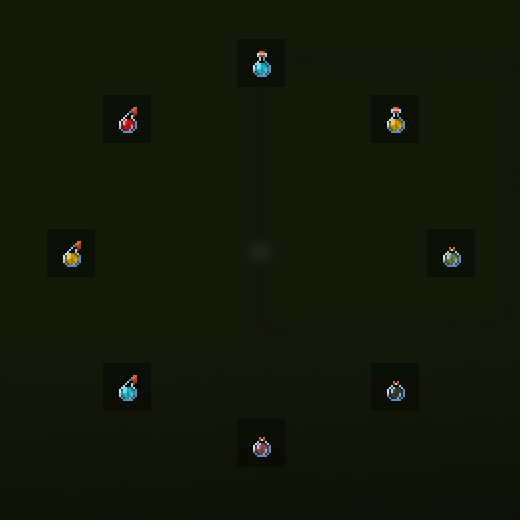
PvP/combat potion switching made easy with a fast radial menu, supporting drinkable, splash, and lingering potions with 8 customizable slots.
截图
介绍
[QUICKPOT] is a PvP-focused potion management mod that lets you instantly
access and use your favorite potions during combat — no more digging
through your inventory mid-fight.
⚠️ Disclaimer
Some servers may consider this mod an unfair advantage or cheating.
Please ask server admins before using it in multiplayer.
Use at your own risk.
⚔️ How It Helps in Combat
–

- Faster reactions — use healing, strength, speed, fire resistance, or any other potion instantly during intense fights.
- No inventory switching — stay focused on combat instead of opening your inventory or scrolling through hotbar slots.
- Quick access — a radial menu lets you select a potion in a split second: hold your keybind, aim, release.
- Supports all potion types — works with drinkable, splash, and lingering potions alike.
- Custom combat setup — keep your most important PvP potions always ready, exactly where you expect them.
🎯 Potion Customization
- Configure up to 8 potion slots in the radial menu (2–8, your choice).
- The wheel fills itself automatically from whatever potions you’re carrying — nothing to set up to get started.
- Hide potions you never want to see. Hover a slot and press X to remove that potion type from the wheel. Press U anytime to restore everything you’ve hidden, in one press.
- Lock your go-to potions in place. Hover a slot and press L to pin that potion type permanently. A locked potion:
- Always keeps its slot, even when you run out mid-fight
- Shows a greyed-out “?” placeholder when you’re empty, so you can see it at a glance without losing your muscle memory for where it sits
- Can’t be misclicked or wasted while empty
- Snaps back to normal the moment you restock, or the moment you unlock it — hover + L again works even on an empty slot
- Locked slots always take priority, so your core PvP loadout never gets bumped by whatever else happens to be in your inventory.
- Every change saves instantly and persists between sessions — set your loadout up once, and it’s there every time you log in.
🔧 Controls
| Action | Key |
|—|—|
| Open radial menu | your configured keybind |
| Hide/show hovered potion | X |
| Lock/unlock hovered potion | L |
| Unhide all potions | U |
常见问题
QuickPOT / PVP Potion / PVP Potion Optimizer 支持哪些 Minecraft 版本?
QuickPOT / PVP Potion / PVP Potion Optimizer 支持 Minecraft Java 版 1.21.1–1.21.10,共 10 个版本,可用的加载器:Fabric / NeoForge。下载时注意选择和你游戏版本一致的文件。
QuickPOT / PVP Potion / PVP Potion Optimizer 怎么安装?
先用 PCL2 或 HMCL 启动器安装对应版本的 Fabric / NeoForge,再把下载的 .jar 文件放进游戏目录的 mods 文件夹,重新启动游戏即可。开启了版本隔离的,mods 文件夹在 versions/版本名 下面。运行环境:仅客户端。
评论
登录后评论和评分