
AFK Manager Plus+
Manage AFK players with AFK Manager, a powerful and fully configurable AFK management mod.
截图



介绍
💤 AFK Manager
Take full control over AFK players on your server with AFK Manager — a powerful, configurable, and clean solution to manage inactivity without ruining the player experience.
⚙️ Features

🚫 Automatic AFK Kick
Players who are AFK for too long will be automatically removed from the server.
Default: 15 minutes
🛠️ Fully Configurable
Customize everything in the anti_afk.json config file:
⏱️ Set AFK kick time
🌍 Disable kicks in specific dimensions
👑 Exempt server owners and high-permission players
{
  "afkTimeoutSeconds": 60,
  "afkKickMinutes": 15,
  "enableAfkKick": true,
  "excludeAfkFromSleep": true,
  "afkSafeZoneRadius": 30.0,
  "kickBlacklist": [],
  "safeZone": {
    "enabled": false,
    "dimension": "",
    "x": 0.0,
    "y": 0.0,
    "z": 0.0
  }
}
**
🗺️ AFK Zones System**
Create safe zones where players won’t be kicked while AFK.
Commands:
/afkzone → Create an AFK zone (30 block radius)
/afkzone clear → Remove all AFK zones
/afk info → Locate active AFK zones
📊 Player Tracking
Stay informed about AFK players in real-time:
/afk list → View:
🧍 Who is AFK
⏳ How long they’ve been AFK
🔁 How many times they’ve gone AFK
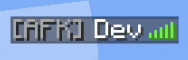
👀 Visual AFK Indicator
Easily see who is AFK directly in-game:
Press TAB to open the player list
💤 AFK players are clearly marked
🔒 Smart Permission System
Server owners are never kicked
Players with high permissions are protected
Perfect for admins, staff, and builders

This mod is created with: intellij
#AD
Disclaimer about product: NOT AN OFFICIAL MINECRAFT PRODUCT. NOT APPROVED BY OR ASSOCIATED WITH MOJANG OR MICROSOFT
常见问题
AFK Manager Plus+ 支持哪些 Minecraft 版本?
AFK Manager Plus+ 支持 Minecraft Java 版 1.19.2–26.2,共 13 个版本,可用的加载器:Fabric / Forge / NeoForge。下载时注意选择和你游戏版本一致的文件。
AFK Manager Plus+ 怎么安装?
先用 PCL2 或 HMCL 启动器安装对应版本的 Fabric / Forge / NeoForge,再把下载的 .jar 文件放进游戏目录的 mods 文件夹,重新启动游戏即可。开启了版本隔离的,mods 文件夹在 versions/版本名 下面。运行环境:客户端和服务端都要装。
SmartStreamLabs 的其他作品
查看全部 →
Create: Structures Arise
这个模组为你的Minecraft世界添加了28个新的机械动力结构。

AnvilCore 🔨 [DISCONTINUED]
AnvilCore 是所有 SmartStreamLabs 模组的前置库,负责处理共享代码和核心功能。

Create: Pillager Arise
游戏内新增10种建筑!(有掠夺者把守)需要机械动力。

Echoes of The End ( Structures)
添加了9个新的末地结构。这就是末地吗?(仅使用原版方块)
评论
登录后评论和评分