
截图
介绍
src=”https://cdn.modrinth.com/data/cached_images/2df5ae65196aa7a4a0aef20e208c0005ff06471f.png”
alt=”Modrinth profile”
style=”image-rendering: pixelated;”
/>
src=”https://cdn.modrinth.com/data/cached_images/14bb5f6380dbf0e9a0bc20179ef4d9728b0f88d9.png”
alt=”GitHub profile”
style=”image-rendering: pixelated;”
/>
BundleUI
A small client-side Fabric mod that fixes the vanilla bundle tooltip preview cap.
Overview
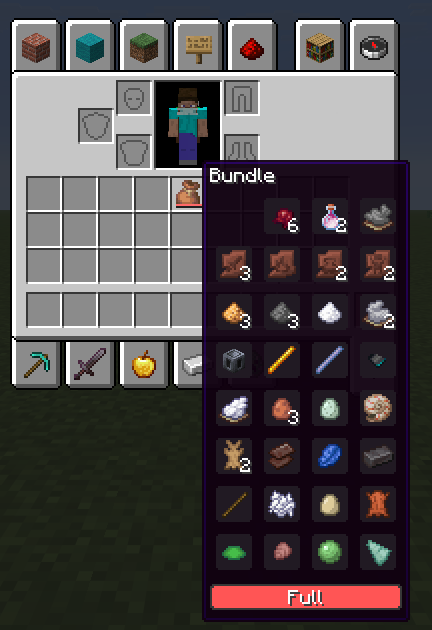
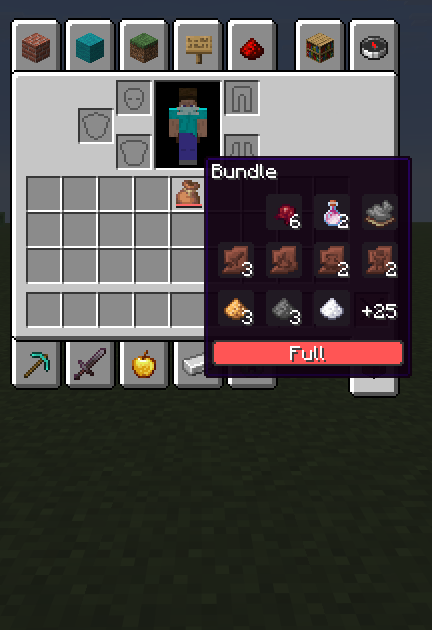
BundleUI improves the vanilla bundle tooltip in Minecraft 1.21.11 by removing the default preview limit.
When hovering a bundle, the tooltip keeps the vanilla slot grid, selection highlight styling, and progress bar, but renders every stored stack instead of cutting the preview short.
Features
- Shows all stored bundle contents in the tooltip
- Keeps the vanilla bundle tooltip style
- Preserves the vanilla slot grid and highlight visuals
- Keeps the vanilla progress bar
- Lightweight and focused on one simple fix
- Client-side only
Design Goals
BundleUI is meant to fix a vanilla UI limitation without changing how bundles work.
It does not touch bundle storage, item behavior, gameplay balance, or server logic. The goal is to keep the vanilla look and behavior intact while making the tooltip actually useful.
Supported Platform
- Fabric
- Yarn mappings
- Minecraft 1.21.11
Notes
- Client-side only
- Does not modify bundle mechanics
- Does not affect servers
- Keeps vanilla behavior intact
- Focused on a single clean quality-of-life improvement
License
MPL-2.0
Summary
BundleUI keeps the vanilla bundle tooltip style, but removes the pointless preview cap so you can actually see everything inside.
常见问题
Bundle Tooltip 支持哪些 Minecraft 版本?
Bundle Tooltip 支持 Minecraft Java 版 1.21.11,可用的加载器:Fabric。下载时注意选择和你游戏版本一致的文件。
Bundle Tooltip 怎么安装?
先用 PCL2 或 HMCL 启动器安装对应版本的 Fabric,再把下载的 .jar 文件放进游戏目录的 mods 文件夹,重新启动游戏即可。开启了版本隔离的,mods 文件夹在 versions/版本名 下面。运行环境:仅客户端。
earlystream 的其他作品
查看全部 →
Mace Indicator+
Notifies you when you’re high enough to guarantee popping someone’s totem.

Don’t Clear Chat History+
A simple one-mixin mod that preserves your sent-message history when you disconnect or relog, so you can still access it with the Up Arrow key.

Pyre
Experimental TNT and explosion optimization focused on smoother heavy explosion scenarios without intentional game play changes.
Pyre
Experimental TNT and explosion optimization focused on smoother heavy explosion scenarios without intentional game play changes.
评论
登录后评论和评分