
Dyable Wools
Dyable Wools lets you dye wool directly in crafting tables, making colorful building easier and faster.
截图
介绍
Dyable Wools! 🐑🎨
In vanilla Minecraft Java Edition, you cannot dye existing wool blocks in a crafting table—you can only dye white wool or sheep using a crafting recipe or cauldron. Dyable Wools! changes that.
This lightweight datapack adds shapeless crafting recipes that let you recolor any wool block directly using dyes—no sheep farming or complicated workarounds needed.
What This Datapack Does
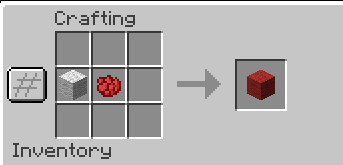
- Craft any wool color from any other wool color using 1 wool + 1 dye → 1 wool
- Recipes are shapeless, lossless, and vanilla-friendly
- Works with all existing wool colors
- No commands, functions, or client mods required—fully server-side
Why Use It?
- Make wool recoloring fast and intuitive
- Avoid unnecessary sheep farming for different colors
- Adds a simple, vanilla-style feature inspired by Minecraft Bedrock Edition
Screenshot

Example of recoloring wool using a crafting table
Compatibility
- Minecraft Java Edition 1.20 → 1.21.11
- Compatible with most other datapacks unless they alter wool dyeing
Installation
- Download the
.zipfrom the Versions tab - Place it in your world or server’s
datapacksfolder - Run
/reloador restart the server - Recolor wool instantly in a crafting table
Mod Conversion Information
The mod was converted from a datapack using https://labs.hardel.io/en-us/converter
License
MIT License — free to use, modify, and redistribute with credit (LAGameStudios).
常见问题
Dyable Wools 支持哪些 Minecraft 版本?
Dyable Wools 支持 Minecraft Java 版 1.20–1.21.11,共 19 个版本,可用的加载器:Fabric / Forge / NeoForge / Quilt。下载时注意选择和你游戏版本一致的文件。
Dyable Wools 怎么安装?
新建世界时在「数据包」里把下载的 .zip 拖进去;已有的存档,把文件放进存档目录下的 datapacks 文件夹,进游戏输入 /reload 即可生效。服务器同样放在世界目录的 datapacks 里。
评论
登录后评论和评分