
截图

介绍
*** Thanks for checking out the Best-README-Template. If you have a suggestion
*** that would make this better, please fork the repo and create a pull request
*** or simply open an issue with the tag “enhancement”.
*** Don’t forget to give the project a star!
*** Thanks again! Now go create something AMAZING! 😀
–>
<!–
*** I’m using markdown “reference style” links for readability.
*** Reference links are enclosed in brackets [ ] instead of parentheses ( ).
*** See the bottom of this document for the declaration of the reference variables
*** for contributors-url, forks-url, etc. This is an optional, concise syntax you may use.
*** https://www.markdownguide.org/basic-syntax/#reference-style-links
–>
Red Discord Presence
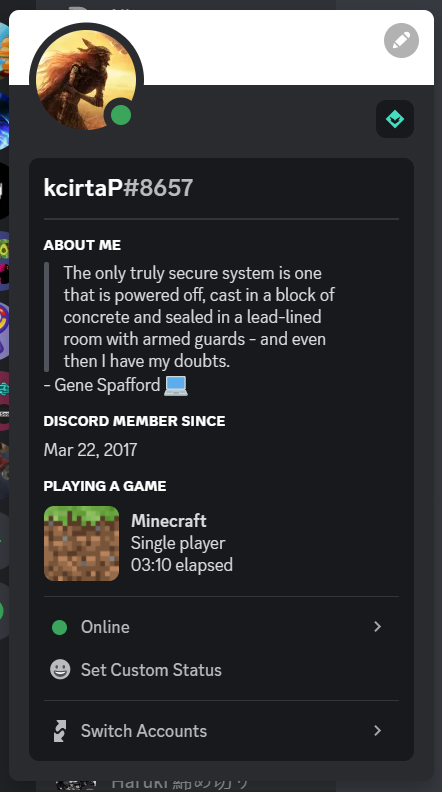
Show to your Discord friends your fancy Minecraft status!
·
Getting Started
Show to your Discord friends your fancy Minecraft status!

Usage
Simply install the mod like every other one, launch the game and here you go!
Make sure that your game status is visible on Discord.
Configuration
To edit the configuration edit config/red_discord_presence.json
(In order to save uou don’t have to restart the game, just enter and exit a world or a server)
Custom app name
Create a new application on Discord developer portal and edt clientId inside the configuration (See the paragraph above)
Custom image
Open Discord developer portal and select your application, go inside Rich Presence menu
and click on Art Assets, click Add Image and upload an image. Once you have done go back
to the configuration (See the paragraph above) and change singleplayerImage with the image that you chose
when you uploaded the iamge
Contributing
Contributions are what make the open source community such an amazing place to learn, inspire, and create. Any contributions you make are greatly appreciated.
If you have a suggestion that would make this better, please fork the repo and create a pull request. You can also simply open an issue with the tag “enhancement”.
Don’t forget to give the project a star! Thanks again!
- Fork the Project
- Create your Feature Branch (
git checkout -b feature/AmazingFeature) - Commit your Changes (
git commit -m 'Add some AmazingFeature') - Push to the Branch (
git push origin feature/AmazingFeature) - Open a Pull Request
License
Distributed under the GPLv3 License. See LICENSE for more information.
Acknowledgments
- CDAGaming for creating a nice fork of DiscordIPC
常见问题
Red Discord Presence 支持哪些 Minecraft 版本?
Red Discord Presence 支持 Minecraft Java 版 1.19.3–1.20.2,共 2 个版本,可用的加载器:Fabric。下载时注意选择和你游戏版本一致的文件。
Red Discord Presence 怎么安装?
先用 PCL2 或 HMCL 启动器安装对应版本的 Fabric,再把下载的 .jar 文件放进游戏目录的 mods 文件夹,重新启动游戏即可。开启了版本隔离的,mods 文件夹在 versions/版本名 下面。运行环境:仅客户端。

评论
登录后评论和评分