
Show My Coordinates
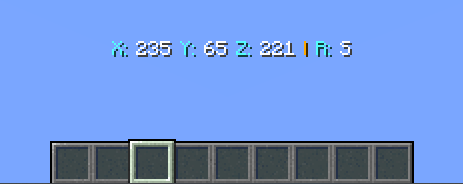
Do you want to see your Coordinates? Now you can! And it's fully customizable.
截图
介绍


📝About:
Do you want to see your Coordinates? Now you can! And it’s fully customizable.
⚙️Features:
- Fully customizable
- Customizable by players with triggers
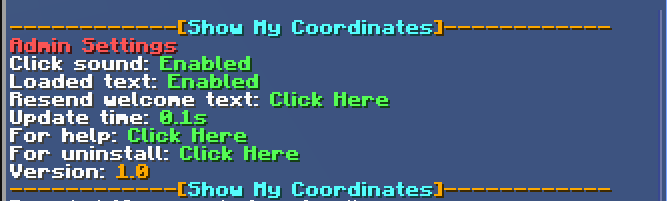
- Settings menu
- There are 2 language support.
– Automaticaly counts.
- 4 update time (0.1s, 0.3s, 0.5s, 1.0s)
- Players can send their coordinates to the chat
- Help menu
⌨️Commands:
- (ADMIN) /function antrolgaming:showmycoordinates/settings
- Here you can access the admin settings menu.
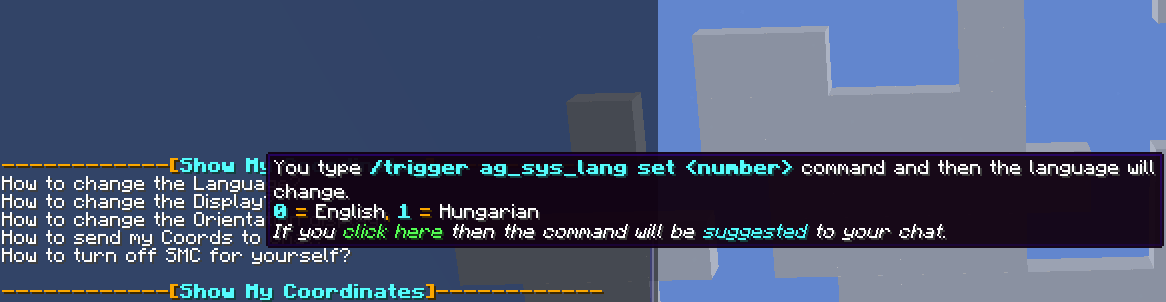
- (Player) /trigger ag_sys_lang set
- 0 = English, 1 = Hungarian
- With this you can change the language.
- (Player) /trigger ag_smc_display set
- 0 = Show Always, 1 = Only with Compass item
- With this you can change when do you want your coordinates to appear.
- (Player) /trigger ag_smc_orientation set
- 0 = Long, 1 = Short, 2 = Off
- With this you can change how do you wanna see the orientations.
- (Player) /trigger ag_smc_status set
- 0 = On, 1 = Off
- With this you can turn off the SMC for yourself.
- (Player) /trigger ag_smc_send
- With this you can send your current coordinates to the chat.
- (Player) /trigger ag_smc_help
- With this you can send yourselft the help menu to your chat.
💬Languages:
- English
- Hungarian
📜Our partner:

💡Ideas:
If you have an idea which makes the datapack better please write it on our discord server in the #💡idea-suggestions forum.
👾Bugs:
If you have found a bug then please write it on our discord server in the #🧰bug-reports forum
🔍Help:
How to change datapack settings:
Write this command: “/function antrolgaming:showmycoordinates/settings”
How to install (1.):
- Download the ZIP file
- Place in your save datapacks folder (.minecraft/saves//datapacks)
- (Not necessary) Unzip the ZIP file
- Restart the world which in the datapack was installed or write the command /reload
- (If don’t work 4.) Write this command: ” /datapack enable “file/AG, Show My Coordinates, v1.0” “
How to install (2.):
- When creating a new world click on the Data Packs button
- Drag the ZIP or the folder in the Available column.
- Click yes then hover you mouse over the datapack and click the arrow.
- Done
How to reach the minecraft folder:
- Search: %appdata% and go to “.minecraft” folder.
Path:
- C:\Users\\AppData\Roaming\.minecraft
How to uninstall:
- Write the command /function antrolgaming:showmycoordinates/settings then click the uninstall text and then you can remove the datapack from here: “.minecraft/saves//datapacks”
👫Social:


❤️Support Us:

常见问题
Show My Coordinates 支持哪些 Minecraft 版本?
Show My Coordinates 支持 Minecraft Java 版 1.19.4。下载时注意选择和你游戏版本一致的文件。
Show My Coordinates 怎么安装?
新建世界时在「数据包」里把下载的 .zip 拖进去;已有的存档,把文件放进存档目录下的 datapacks 文件夹,进游戏输入 /reload 即可生效。服务器同样放在世界目录的 datapacks 里。
AntrolGaming 的其他作品
查看全部 →
Day Counter
Day Counter 是一款高度可自定义的 Minecraft 模组,可追踪世界中的时间流逝,为游戏增添生机。它为你的游玩体验带来全新的成长进度与氛围层次。

Hud Texts
如果你想要带变量的 UI 文本,那么这个模组正适合你。

Show My Coordinates
想查看坐标吗?现在就能看到!而且完全可以自定义。

RPG Mob Levelling
通过全新的方式体验怪物,为你的世界提升难度。本模组加入了动态 RPG 风格的等级系统,让每次遭遇都更具挑战性、更有奖励,也更加独特。
评论
登录后评论和评分