
截图
介绍
BACAP Score
A companion datapack for BlazeandCave’s Advancements Pack that replaces simple advancement counts with a weighted progression score.
Not all advancements are created equal.
Completing “Stone Age” shouldn’t be worth the same as finishing “Explorer of Worlds”. BACAP Score assigns point values based on advancement difficulty, creating a leaderboard that better reflects actual progression.
Features
Weighted Advancement Scoring
Every completed advancement contributes to your BACAP Score:
- Tasks → 1 Point
- Goals → 2 Points
- Challenges → 5 Points
- Super Challenges → 20 Points
This rewards difficult, time-consuming, and prestigious advancements far more than basic milestones.
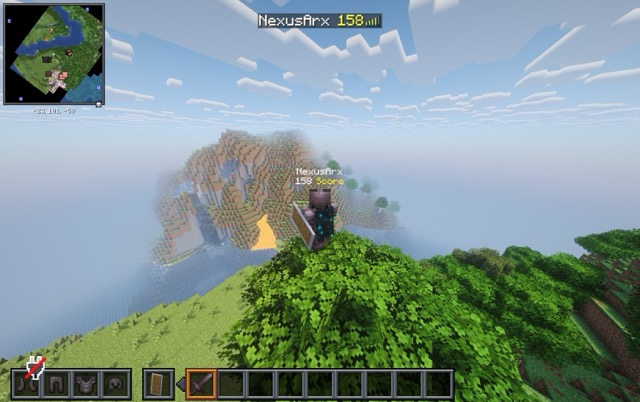
Live Score Tracking
Scores update automatically as players earn advancements.
Built-In Leaderboards
Your BACAP Score is displayed:
- In the Tab List
- Below player names
- Through the
bac_pointsscoreboard objective
Perfect for servers, competitions, and long-term BACAP worlds.
A Return of a Classic BACAP Feature
Long-time BACAP players may recognize this system.
Weighted advancement points originally appeared in alpha version of BlazeandCave’s Advancements Pack and were featured in early BACAP challenge content by creators such as MinuteTech and SB737.
BACAP Score revives that concept as a standalone datapack, bringing weighted progression back to modern versions of BACAP with live score tracking and built-in leaderboards.
Requirements
- BlazeandCave’s Advancements Pack
This datapack does not function without BACAP installed.
Installation
- Download the datapack.
- Place it in your world’s
datapacksfolder. - Run
/reloador restart the world.
That’s it. Your BACAP Score will begin tracking automatically.
常见问题
BACAP Score 支持哪些 Minecraft 版本?
BACAP Score 支持 Minecraft Java 版 26.1–26.2,共 4 个版本。下载时注意选择和你游戏版本一致的文件。
BACAP Score 怎么安装?
新建世界时在「数据包」里把下载的 .zip 拖进去;已有的存档,把文件放进存档目录下的 datapacks 文件夹,进游戏输入 /reload 即可生效。服务器同样放在世界目录的 datapacks 里。
评论
登录后评论和评分