
截图
介绍
Link Item
Quark has a shift-T command that can link an item to chat, but it cannot be used in JEI ingredient and bookmark overlay. This mod adds a new shortcut (configurable, default shift-/) that can be used in all those mentioned screens. The text is also clickable, which will open the inventory (so the JEI) and input the search term for you. You need to set resource id search to “REQUIRE_PREFIX” in order for the search to work.
open JEI command
/the-toolkits jei <search_term>This command is used in the implementation of the link-item function. You may find this useless.
print item nbt
This command print nbt of item to chat. You hold the item and run this command, that’s it. You need to be OP to use this OP command.
/the-toolkits nbt getprint player attributes
This command prints player attributes like speed. There are two types of attributes (syncable and dirty). I don’t know the difference between them, so I just print them all. This command can be useful, e.g. when you want to understand how apotheosis works, since in apotheosis many effects are implemented by injecting new attributes in the player. You need to be OP to use this command.
/the-toolkits attributes getrecipe dump
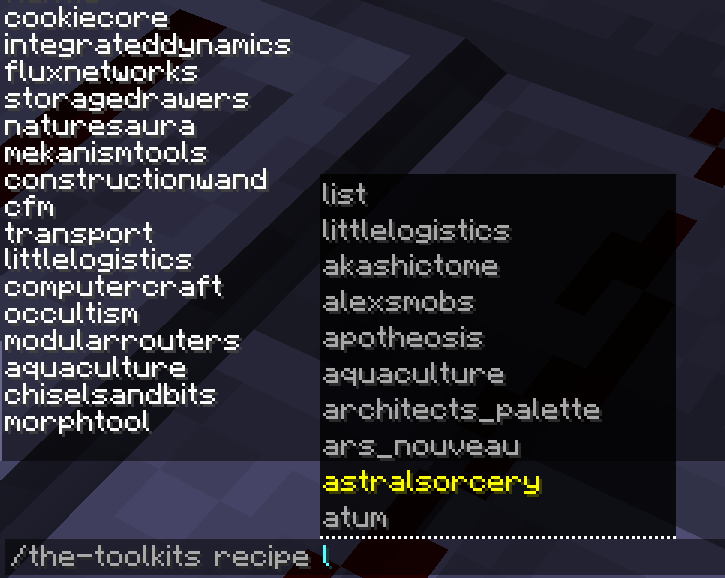
This is a newly added feature, currently only available in 1.16.5 and will be ported into higher version in the future. Recipes can be categorized by Serializer, whose name is a resource id, like “minecraft:crafting_shaped” or “create:mechanical_crafting”. The first part is “namespace”, the second is “path”. This command takes parameters based on this concept.
List all namespaces:
/the-toolkits recipe listList all paths under this namespace:
/the-toolkits recipe <ns> listList all recipes id under this ns:path:
/the-toolkits recipe <ns> <path> listRandomly print one recipe under this ns:path:
/the-toolkits recipe <ns> <path> randomDump recipes under this category (in the form of json), watch the output to see where the result is stored:
/the-toolkits recipe <ns> <path> dumpThis command may not work for all type of recipe and will/need to be improved
entity inspection command
Wonder what is lagging your world? After you use mods like spark to have an idea of what contributes the most of the lag, do you want to know the location of them? This command helps you dump every entity’s location of a given entity type (you can use classname, name or registry name). This will be useful if you are the OP of a server and want to inspect where exactly is causing the lag. (recommend to be used with spark or other profiler mods)
/the-toolkits entity summary classname/name/registry_name # have a summary of all the entities count/the-toolkits entity locations classname/name/registry_name name # dump the locations of themSimilar command exists for block_entity as well, replace entity with block_entity and let the suggestion guides you to dump locations of block entities.
常见问题
The Toolkits 支持哪些 Minecraft 版本?
The Toolkits 支持 Minecraft Java 版 1.16.5–1.19.2,共 4 个版本,可用的加载器:Forge。下载时注意选择和你游戏版本一致的文件。
The Toolkits 怎么安装?
先用 PCL2 或 HMCL 启动器安装对应版本的 Forge,再把下载的 .jar 文件放进游戏目录的 mods 文件夹,重新启动游戏即可。开启了版本隔离的,mods 文件夹在 versions/版本名 下面。运行环境:客户端和服务端都要装。
评论
登录后评论和评分