
截图



介绍
💰 Economy Craft
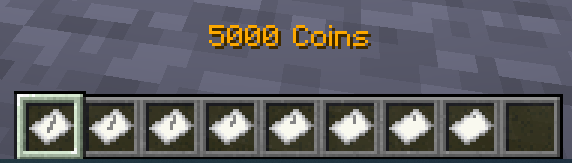
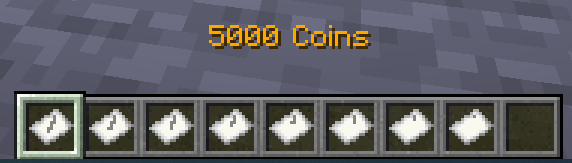
A Datapack that adds a complete money system to your Minecraft world!
With Economy Craft, you can transfer money between players using physical currency or your bank account.
Screenshots



Using
💸 Sending Money
To send money, just type:
/trigger ec.payand follow the instructions.
💵 Withdraw and Deposit
To withdraw money from your in-game bank account, use this command:
/trigger ec.withdraw set $amount$$amount$ can be any number — the datapack will give you your money.
For example, if you type /trigger ec.withdraw set 19302, you’ll get 3×5000, 4×2000, 3×100, and 2×1.
You can also do the opposite and deposit your cash into your bank account. Just type:
/trigger ec.depositFor Admins
If you’re an admin and want to install this datapack, simply place the zip archive into your world’s datapacks folder.
You can modify player balances directly using the scoreboard:
/scoreboard players set $player$ ec.money $amount$      # Sets a player's balance
/scoreboard players add @a ec.money $amount$            # Adds an amount of money to all players
/scoreboard objectives setdisplay sidebar ec.money      # Displays balances (visible to all players)
If you want to uninstall the datapack, run this command:
/function sc_economycraft:uninstallThen delete the datapack archive file.
⚙ Customization
The datapack is fully customizable. You can change textures for existing banknote denominations — or even add or remove denominations entirely.
🏷 Changing the Currency Name
You may also want to rename your currency — and you can easily do that.
Locate the file in your resource pack:
/assets/sc_economycraft/lang/en_us.json // And all languages you need"scec.money":"Money",
"scec.moneyformat":"%s Coins",
"item.scec.cash_1":"1 Coin",
"item.scec.cash_10":"10 Coins",
"item.scec.cash_50":"50 Coins",
"item.scec.cash_100":"100 Coins",
"item.scec.cash_200":"200 Coins",
"item.scec.cash_500":"500 Coins",
"item.scec.cash_1000":"1000 Coins",
"item.scec.cash_5000":"5000 Coins",🎨 Change Texture for present denominations
Simply replace the texture files in your resource pack.
They are located in:
/assets/sc_economycraft/textures/item/💵 Remove and add denominations
Removing or adding denominations requires a bit more setup.
Open the file:
/data/sc_economycraft/functions/settings.mcfunctionFind the following lines:
# Default banknote denominations
# All value must be unique and in ascending order
data modify storage sc_economycraft:banknotes values set value [{v:1}, {v:10}, {v:50}, {v:100}, {v:200}, {v:500}, {v:1000}, {v:5000}]
data modify storage sc_economycraft:banknotes length_minus_one set value 7

# Default timeout duration (in ticks)
scoreboard players set timeout_duration ec.SETTINGS 600
To add or remove denominations:
- Modify the list inside
values set value [...].
- Each entry has the format
{v:<denomination>}. - Example: to remove 5000 and add 2000, change it to
data modify storage sc_economycraft:banknotes values set value [{v:1}, {v:10}, {v:50}, {v:100}, {v:200}, {v:500}, {v:1000}, {v:2000}]- Update
length_minus_oneto match the number of denominations minus one.
- In the example above, there are 8 denominations → set it to 7.
data modify storage sc_economycraft:banknotes length_minus_one set value 7Tipp
If you add new denominations that don’t exist in the default setup,
you’ll also need to create corresponding files in your resource pack:
/assets/items/cash_$your_value$.json:
    {
        "model": {
            "type":"minecraft:model",
            "model": "sc_economycraft:item/cash_$your_value$"
        }
    }
/assets/models/cash_$your_value$.json
    {
        "parent": "minecraft:item/generated",
        "textures": {
            "layer0": "sc_economycraft:item/cash_$your_value$"
        }
}/assets/textures/cash_$your_value$.png(This is the actual texture image for your new banknote.)- And also you need to make localization for your new denominations (see here)
This Datapack Follows Conventions
You can read them here

常见问题
EconomyCraft 支持哪些 Minecraft 版本?
EconomyCraft 支持 Minecraft Java 版 1.21.9–1.21.10,共 2 个版本。下载时注意选择和你游戏版本一致的文件。
EconomyCraft 怎么安装?
新建世界时在「数据包」里把下载的 .zip 拖进去;已有的存档,把文件放进存档目录下的 datapacks 文件夹,进游戏输入 /reload 即可生效。服务器同样放在世界目录的 datapacks 里。
kirbodevv 的其他作品
查看全部 →
Auto login mod
This Minecraft mod lets you log into your server account with a simple shortcut. I created it because typing my password every time I joined a server on the Steam Deck was pretty inconvenient.

End Portal Calculator
This datapack allows you to find End Portal using just two throws of ender pearl.

Save From Void
This datapack prevents you from falling into the void.
评论
登录后评论和评分