
Revised Glass
Enhance your Minecraft experience with the Revised Glass data pack, which provides a simple and user-friendly way to recolor your existing colored glass.
截图
介绍
Summary
Enhance your Minecraft experience with the Revised Glass data pack, which provides a simple and user-friendly way to recolor your existing colored glass.
How To Craft
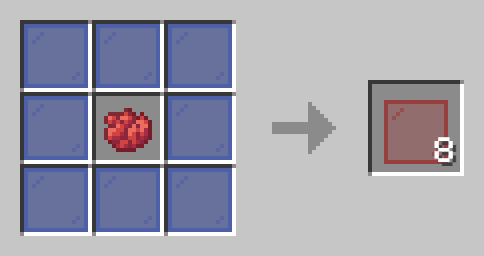
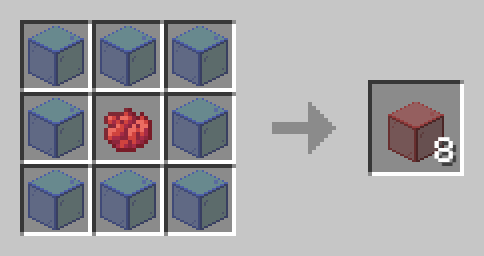
Simply open a crafting table and place your chosen dye color in the center slot. Then, surround the dye with eight pieces of colored glass. The crafting table will transform these materials into your newly recolored glass, allowing you to customize your glass blocks and panes with the desired color.
Installation
Installing the Revised Glass data pack on your server is straightforward. First, locate the data packs folder within your server files. Once found, simply drag the Revised Glass data pack, which should be in a .zip file format, into that folder. Afterward, restart your server, and you’re all set to enjoy the changes.
——————————————
Have any questions or concerns please contact sunny223#0 on Discord.
常见问题
Revised Glass 支持哪些 Minecraft 版本?
Revised Glass 支持 Minecraft Java 版 1.21,可用的加载器:Fabric / Forge。下载时注意选择和你游戏版本一致的文件。
Revised Glass 怎么安装?
新建世界时在「数据包」里把下载的 .zip 拖进去;已有的存档,把文件放进存档目录下的 datapacks 文件夹,进游戏输入 /reload 即可生效。服务器同样放在世界目录的 datapacks 里。

评论
登录后评论和评分