
Mineralized
Mineralized gives Minecraft a lot more minerals. Oh boy, there is truly a lot. There are also tools and armor for existing Minecraft minerals (quartz, copper, etc.).
截图

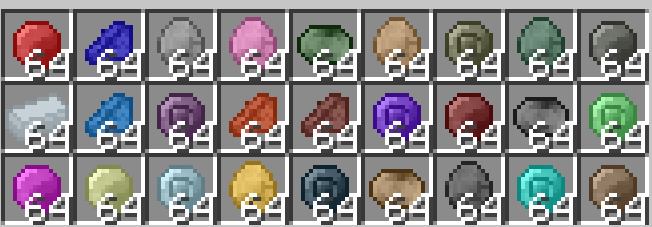
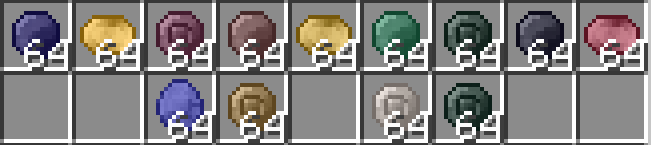


介绍
Introduction
Welcome to Mineralized! This mod adds a ton of new minerals, tools, weapons, armor, and blocks. Since this mod has so many gems, think of this mod as a sequel to another mod named “Ancient Gems”.
Please note that the quality of the textures are not the best, as I am not an artist when it comes to Minecraft textures. Most textures have been auto-generated with the power of MCreator. Yes, you heard me right, MCreator. This entire mod wouldn’t have existed without MCreator, which is the only tool I can use to make actual Minecraft mods. Thank you to the creator of MCreator, as my account wouldn’t have existed without you and your awesome project.
Regular Features
Normally, the following minerals by default are: coal, redstone, iron, gold, copper, emerald, diamond, netherite (ore is ancient debris), lapis lazuli, amethyst, and probably some ones I forgot. However, this mod is here to change that. It adds various new minerals, such as: ruby, gabbro, tin (0.1 version of tin ingot was just named tin, this was fixed in 0.1.2), chrysocolla, and many more!
There is also pumice, which is meant to be crafted. And, with pumice, you can craft volcanic glass. Unlike all other glass types, which doesn’t block light but also doesn’t emit them, and tinted glass blocks which block all light, volcanic glass sends a light level of 6 (according to my memory).
You may also get sunstone or moonstone. If you do get those precious gems, you can turn them both into blocks and make a portal out of them. If you do this, you will be able to go to different planets.
Travel to Different Planets
If you make a sunstone portal frame and light it with hot citrine, you can go to Venus. On the other hand, if you make a moonstone portal frame and light it with cold sapphire, you can go to Uranus.
Wiki
https://mineralized-minecraft-mod.fandom.com/wiki/Mineralized_Wiki
常见问题
Mineralized 支持哪些 Minecraft 版本?
Mineralized 支持 Minecraft Java 版 1.20.1–1.21.5,共 4 个版本,可用的加载器:Forge / NeoForge。下载时注意选择和你游戏版本一致的文件。
Mineralized 怎么安装?
先用 PCL2 或 HMCL 启动器安装对应版本的 Forge / NeoForge,再把下载的 .jar 文件放进游戏目录的 mods 文件夹,重新启动游戏即可。开启了版本隔离的,mods 文件夹在 versions/版本名 下面。运行环境:客户端和服务端都要装。
rcsonline 的其他作品
查看全部 →
MCreator Test Mod
A test Minecraft mod created with MCreator with test features mainly for testing my skill in using MCreator.

Giygascraft
A mod themed around EarthBound's final boss: Giygas. Go on a red and dark adventure in a new biome: the giygas biome.

Idiotic/Dumb Keybinds
This mod will add new keybinds to the game. Trust me, some were dumb, while others were unbelievably smart. - Note: This mod is only in beta. This means the mod has not yet been completed.

Tags Xtra
A mod that adds new tags. Top 25 favorite summaries.
评论
登录后评论和评分