
Player Shops
Earn in style with this user-friendly player shop datapack! Villagers will be your only competitors.
截图



介绍
KETKET’S PLAYER SHOPS – Sell in style!
Minecraft Quality of Life datapack based on vanilla. Working with 1.21.4- 1.19.4
For more information and updates about the project, visit the ketket.dev page.
UTILITIES
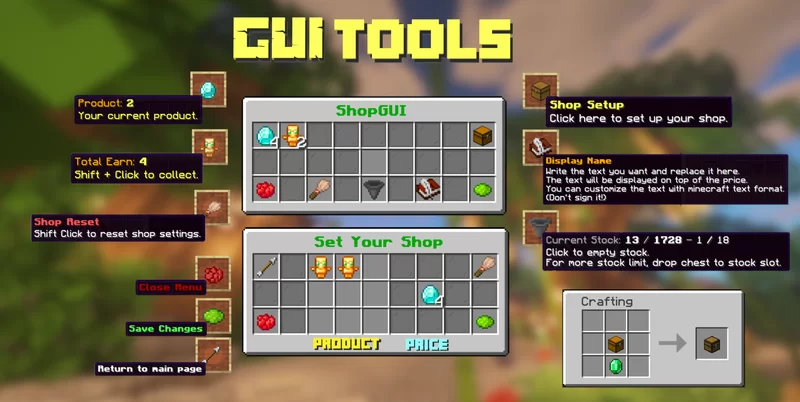
- With this datapack, you can easily create your own shops and can customize it to your own style.
- You can sell every item to players for every item you want.
- Without permission, players cant change anything to other player shops. (break,withdraw,store etc.)
- As an admin, you can create an infinitely stocked shop for players.
For tutorial videos CLİCK HERE
Check My Other Projects
- Silk/Fortune Switch – Instantly switch between Fortune and Silk Touch enchantments on your tools with a simple right-click.
- Display Cases – Interactive display cases that can store items, change appearance, and emit redstone signals when occupied.
- Better Cauldrons – Throw dirt or concrete powder into a water-filled cauldron to instantly create mud or concrete. Wash dyed blocks and items back to their clean form with an intuitive, vanilla-friendly system.
- Mannequins – Add fully customizable mannequins that can hold items, change poses, swap skins, and bring your world to life.
- UndyingRefill – Automatically replaces a used Totem of Undying by pulling another one from your inventory—or even from the first shulker box containing a totem. Never fumble your totems again.
- Graves – This datapack creates a grave when a player dies, safely storing their items. Retrieve your belongings without worrying about losing them!
- Quick Shulker Boxes – Quick Shulker Boxes lets you open Shulker Boxes while holding them, without needing to place them on the ground. Simply shift-right-click to access your shulker boxes.
- Stackraft – Compress farm items like sugarcane, gunpowder, and more to save space. Perfect for managing large farms and keeping your inventory organized. Also works with the new Auto Crafters.
- EasyCoords – Displays your coordinates, daytime, and direction on screen, simplifies location sharing, and shows death coordinates in chat.
- Better Hanging Signs – It will enable your hanging signs to hold items.
- FurnniCraft – Furnish your creations with a wide variety of unique furniture in the vanilla style, without the need for any resource packs.
EXTERNAL LINKS



🚯 Uninstall
- Run “
/function ketket_shops:uninstall“ command. - Disable datapack.
- If there is any PlayerShops material left, run “
/kill @e[type=ketket_shop]“ command.
常见问题
Player Shops 支持哪些 Minecraft 版本?
Player Shops 支持 Minecraft Java 版 1.19.4–26.3,共 22 个版本,可用的加载器:Fabric / Forge / NeoForge / Quilt。下载时注意选择和你游戏版本一致的文件。
Player Shops 怎么安装?
新建世界时在「数据包」里把下载的 .zip 拖进去;已有的存档,把文件放进存档目录下的 datapacks 文件夹,进游戏输入 /reload 即可生效。服务器同样放在世界目录的 datapacks 里。
efeketket 的其他作品
查看全部 →
Better Hanging Signs
It will enable your hanging signs to hold items. Better than just text, isn't it?

Graves
This datapack creates a grave when a player dies, safely storing their items. Retrieve your belongings without worrying about losing them!

Quick Shulker Boxes
Open Shulker Boxes while holding them, without needing to place them on the ground. Simply shift-right-click to access your shulker boxes.

Better Cauldrons
Throw dirt or concrete powder into a water-filled cauldron to instantly create mud or concrete. Wash dyed blocks and items back to their clean form with an intuitive, vanilla-friendly system.
评论
登录后评论和评分