
介绍
中文介绍正在准备中,下面暂时显示原文。
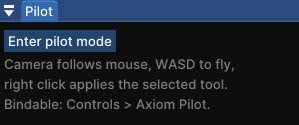
Pilot adds a toggleable first-person camera mode to the Axiom editor. Flip it on and the cursor is captured: the camera follows your mouse like vanilla Minecraft, WASD flies, and the crosshair becomes your cursor. No more holding a mouse button just to look around.
| Pilot off | Pilot on |
|—|—|
|  |
 |
While piloting
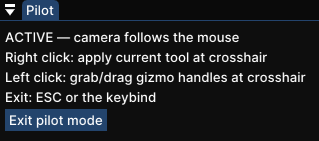
- 🎯 Right click applies your selected tool at the crosshair. Painting, sculpting and other brush tools work with full stroke preview
- 🕹️ Left click grabs and drags gizmo handles: path tool points, selection cuboid faces, and more
- ↩️ Undo/redo and Axiom keybinds keep working as usual
- 🚪 ESC or the keybind exits instantly
Axiom has this only as a hold (right click with no tool active). Pilot makes it a toggle, and your active tool stays usable the whole time.
Toggle it
- Bind “Toggle Pilot Mode” in vanilla Controls (category “Axiom Pilot”), or
- Use the small Pilot window inside the editor. It never steals your toolbar selection

Support
Bug reports and suggestions: https://discord.gg/XpPFSMVF9Y.
常见问题
Axiom Pilot 支持哪些 Minecraft 版本?
Axiom Pilot 支持 Minecraft Java 版 1.21.11,可用的加载器:Fabric。下载时注意选择和你游戏版本一致的文件。
Axiom Pilot 怎么安装?
先用 PCL2 或 HMCL 启动器安装对应版本的 Fabric,再把下载的 .jar 文件放进游戏目录的 mods 文件夹,重新启动游戏即可。开启了版本隔离的,mods 文件夹在 versions/版本名 下面。运行环境:仅客户端。

评论
登录后评论和评分