
截图


介绍
Auth




📖 Description
Login and Register Authorization
⚠️ Warning
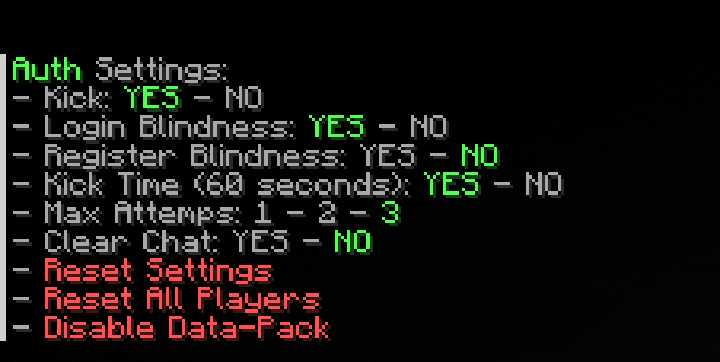
In vanilla we cannot use /kick, so I use many particles to kick (game crash) a malicious player, but you can disable it by disabling kick in /function auth:settings.
⌨️ Commands
Player
Register with:
/trigger register set <password>Login with:
/trigger login set <your password>Change password with (need to be logged):
/trigger change_password set <new password>Admin
Reset player:
/execute as <player> run function auth:auth/resetReset all player:
/function auth:auth/reset_all_playersShow/get player password:
/gamerule sendCommandFeedback true
/scoreboard players get <player> register
/gamerule sendCommandFeedback false
Disable:
/function auth:disableEnable:
/datapack enable "file/auth.zip"Settings
To see the settings menu use the command:
/function auth:settingsBypass
To give a authentication bypass to a player use the command:
/tag <player> add auth.bypassand to remove it, use:
/tag <player> remove auth.bypass🪪 License
👾 Bugs/Issues
Please report any problem/bug/issues in the Discord Server.
💌 Donate
🎁 Server Hosting
Creating your own server can be a very lengthy, tedious and costly process.
But with BisectHosting, you get your own server in just a couple of clicks! With their 24/7 support and fast-response time, no issues shall stand in your way!
Interested? Then we’ve got a deal for you!
https://bisecthosting.com/lullaby

常见问题
Auth 支持哪些 Minecraft 版本?
Auth 支持 Minecraft Java 版 1.19–26.3,共 23 个版本,可用的加载器:Fabric / Forge / NeoForge / Quilt。下载时注意选择和你游戏版本一致的文件。
Auth 怎么安装?
新建世界时在「数据包」里把下载的 .zip 拖进去;已有的存档,把文件放进存档目录下的 datapacks 文件夹,进游戏输入 /reload 即可生效。服务器同样放在世界目录的 datapacks 里。
lullaby 的其他作品
查看全部 →
Clumps
合并经验球并瞬间拾取经验球以减少卡顿!

Lucky Blocks
Lucky Blocks in Vanilla Minecraft! (no resourcepack!)

Graves
A fully customizable grave to save your loot upon death!

Chunky Offline
An add-on/extension of Chunky to generate chunks when no players are online.
评论
登录后评论和评分