截图
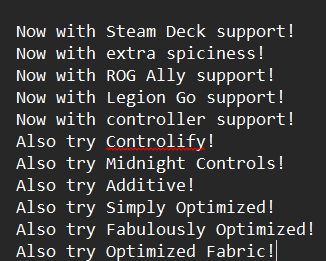
介绍
If you want something that looks and feels like Minecraft’s splashes, this is where you’ll get them! This has a growing amount of splashes while keeping the default ones!
How to install?
Prism Launcher
Click on an instance, press edit and go to resource packs, search up ‘More Splashes’ and it should show up
Modrinth app
Go to an instance, press the ‘Install content’ button, select resource packs, search up ‘More Splashes’ and it should show up
Vanilla Launcher
Windows
Press Windows key and the ‘R’ key, type ‘%appdata%\.minecraft\resourcepacks’ and download the resource pack. Place the resource pack in that folder once it finishes downloading
MacOS
Unknown (to macos users please make a pull request on the github for this)
Linux
Unknown (to linux users please make a pull request on the github for this)
常见问题
More Splashes 支持哪些 Minecraft 版本?
More Splashes 支持 Minecraft Java 版 1.20.1。下载时注意选择和你游戏版本一致的文件。
More Splashes 怎么安装?
把下载的 .zip 文件(不用解压)放进游戏目录的 resourcepacks 文件夹,进游戏后在「选项 → 资源包」里把它移到右边启用。
loaf0002 的其他作品
查看全部 →
Deckcraft Server (Controlify)
The performance your Steam Deck needed

Deckcraft Client (Controlify)
The modpacks your Steam Deck needed!

Deck Craft (Client Midnight)
The modpack your Steam Deck needed

Controlify ROG Ally Prompts
Replaces the Controlify Xbox One buttons with the ROG Ally ones
评论
登录后评论和评分