
Don’t Drop XP
Disables dropping your XP when you die. Perfect for players who want to drop items upon death but not lose their levels.
截图


介绍
Overview
Drop Drop XP is a datapack that eliminates the hassle of losing your experience when dying. Unlike the gamerule keepInventory, players will drop their items upon death without worrying about losing their levels. It may be annoying to lose your XP when you want to enchant something, so this datapack removes players dropping XP while still losing their items. This datapack also has the option to have XP penalties when players die.
Scoreboard to Point Binary Decomposition by Cloud Wolf.
Optional Features
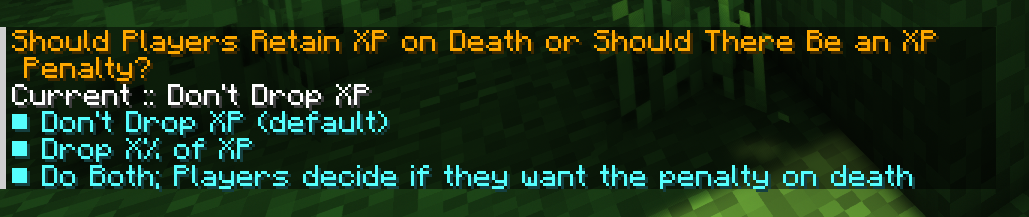
By default, the datapack’s goal is to prevent any levels from being lost on death. However, there are a couple of options to have a penalty be applied upon death. By using the command, /function dont_drop_xp:_change_xp_penalty_type, you can change the type of XP penalty that will be applied when players die. Operators can additionally customize the percent of XP lost with /function dont_drop_xp:_change_xp_percent_lost.
Penalty Type Options:
- Don’t Drop XP: Default option. Players will not lose any levels.
- Drop X% of XP: Players lose a percentage value of their XP ranging from 10% to 90%. Defaults to 60%.
- Do Both; Players Decide: A mixture of the two. Players will retain all XP by default. A new text message will appear and give players the option to take a penalty. This is to give more freedom to players to decide for fair or unfair deaths.
Installing and Uninstalling the Pack
This datapack can not be easier to install and uninstall.
Simply place the datapack file into the datapacks folder in your singleplayer or multiplayer world. Upon loading the world or by using the /reload command, the datapack will be installed.
To uninstall, use the command, /function #dont_drop_xp:uninstall. This will automatically remove all related objective scoreboards. You can then disable or delete the datapack from there.
常见问题
Don’t Drop XP 支持哪些 Minecraft 版本?
Don’t Drop XP 支持 Minecraft Java 版 1.18–1.19.4,共 8 个版本。下载时注意选择和你游戏版本一致的文件。
Don’t Drop XP 怎么安装?
新建世界时在「数据包」里把下载的 .zip 拖进去;已有的存档,把文件放进存档目录下的 datapacks 文件夹,进游戏输入 /reload 即可生效。服务器同样放在世界目录的 datapacks 里。
TimmyChips 的其他作品
查看全部 →
Pommel – Held Item Models
一款 Fabric 模组,让资源包作者可以像望远镜和三叉戟那样替换手持物品的模型。
Modefite – Item Definition Backport
为资源包移植了 1.21.4 中引入的物品模型定义系统

Modefite – Item Definition Backport
Backports the Items Model Definition system introduced in 1.21.4 for resource packs

Dynamic Rain Shader
Uses vanilla resource pack core shaders to tilt the rain, giving it a more dynamic look. No mods needed!
评论
登录后评论和评分