
截图


介绍
It’s finally here!
Entirely made in vanilla, this datapack adds ghosts that will haunt your world to the game! Equip yourself with sci-fi ghostbusting equipment replicated from the world of _Ghostbusters_ and chase them down! In all seriousness, this pack is my personnal love letter to the _Ghostbusters_ franchise. I tried my very best to bring the magic of hunting ghosts, just like _Ghostbusters_ did in it’s many movies and games, without breaking the core gameplay of Minecraft too much. This pack as a whole isn’t much, but it’s made by a fan for other fans. I hope you enjoy!
Features
- Ghosts that occasionally spawn around your world
- 5+ unique sci-fi gadgets to craft
- Exclusive creative items and commands for map making
- 10 advancements to obtain
- Multiplayer compatible
- A car cool car!! (beep beep)
- And more!
How to install/uninstall
Download “Ghostbusters (datapack)” and put the .zip file in the datapacks folder of the world you want to play in. Download “Ghostbusters (resourcepack)” and put the .zip file in your resourcepacks folder. Do not forget to enable the resourcepack in the settings and you’ll be ready to go! To uninstall, enter the command “/function ghostbusting:uninstall” and remove the datapack from the datapacks folder or your world.
Getting started
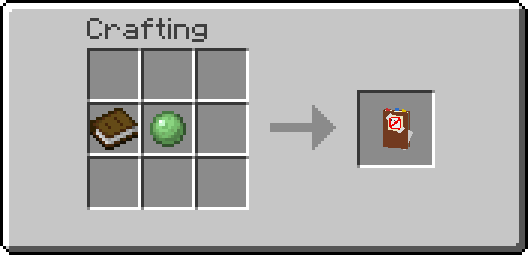
You can unlock the first advancement in the advancement tree of the pack by crafting the ghostbusters notebook. Right clicking with the book will also grant you the recipe for every item in the pack. Otherwise, the video provided above contains an extensive guide that goes over every single feature of the datapack!
FAQ
Q: Where is the resourcepack? I can’t see the models and textures.
A: The resourcepack is located here on modrinth. It’s a seperate download next to the download for the datapack. Click on “Versions” then click on the desired version and then click on “Required resourcepack”.
Q: Can I use this datapack in my modpack or adventure map?
A: Of course you can! Just make sure to give proper credit 🙂
Q: Could you downgrade the datapack to another version?
A: No, sorry 🙁
Q: Does this datapack work on servers?
A: Yos
Disclaimer regarding datapack conflicts
I am not held accountable for any conflicts with other datapacks you have installed. It may be better to use this datapack standalone to avoid any problems or if you aren’t sure of what you are doing.
License
This project is licensed under the Attribution-NonCommercial-ShareAlike 4.0 International (CC BY-NC-SA 4.0) license. You may use and modify the datapack as you please, as long as proper credit is given to the original author, do not use it for commercial purposes, and share any modifications under the same license.
常见问题
Ghostbusters 支持哪些 Minecraft 版本?
Ghostbusters 支持 Minecraft Java 版 1.21.3。下载时注意选择和你游戏版本一致的文件。
Ghostbusters 怎么安装?
新建世界时在「数据包」里把下载的 .zip 拖进去;已有的存档,把文件放进存档目录下的 datapacks 文件夹,进游戏输入 /reload 即可生效。服务器同样放在世界目录的 datapacks 里。
Stoddle 的其他作品
查看全部 →
F.L.U.D.D
Adds F.L.U.D.D the multifunction water pump to the game.
Stoddle’s Simple Mech Datapack
Datapack that adds customizable mechs to the game.

Vanilla-Like Aliens
A datapack that adds the Omnitrix from Ben 10 to the game.
评论
登录后评论和评分